
Safe lock help · Mesa Safe
Safe lock troubleshooting › Mesa Safe › MF series LCD keypad (MSL-MF2)
The Mesa MF series (MSL-MF2) is an oval electronic keypad with an LCD screen on Mesa MF Series U.L. Classified fire safes. It has two user codes and runs on 4 AA batteries. This guide covers how to open the safe, change the code, replace the batteries, and what the display messages mean.
Want the whole manual? Jump to the manufacturer download links.
Is this your lock?
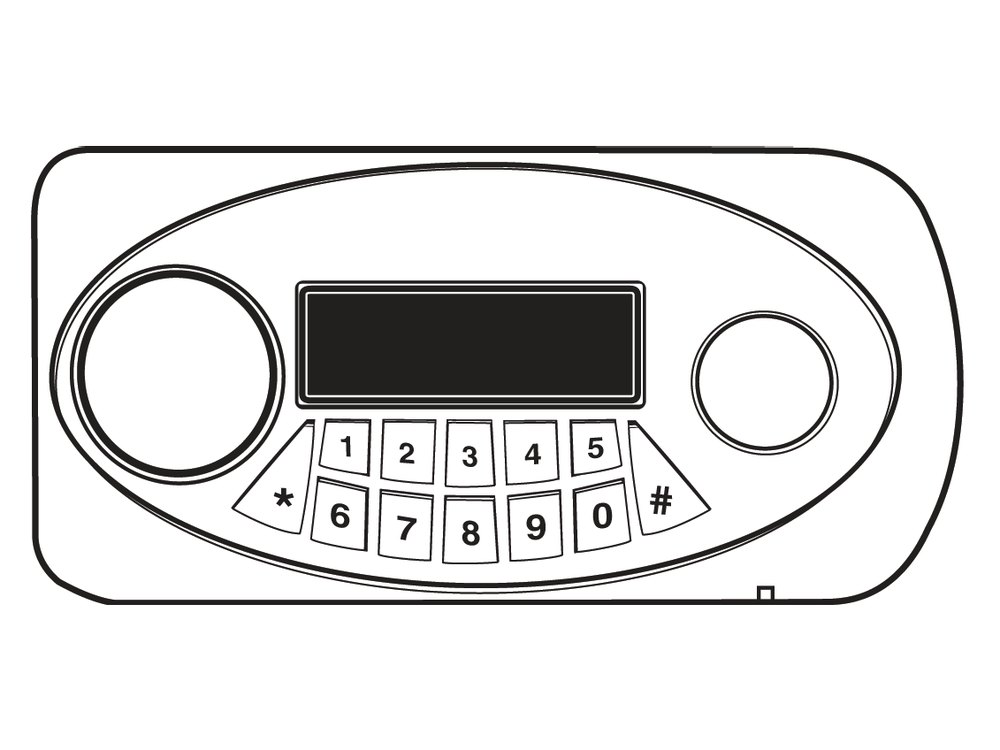
- An oval keypad on the safe door with an LCD screen at the top, a round area on each side, and number keys in two rows (1 to 5 and 6 to 0) with * and # keys.
- Mesa uses it on its MF Series U.L. Classified fire safes.
- It has two user codes and runs on 4 AA batteries. The safe also comes with an external power pack and two emergency keys.
- A keypad with a red numeric display is the MH hotel lock, and a smaller keypad with a one-line MATCH! display is the MFS: see those guides.
How to open it
- Press #. The display turns amber and shows – – – – – – – –.
- Enter a valid code, then #. You hear a click, the display turns blue, and it says OPEN.
- Turn the handle clockwise within 5 seconds to open the door.
- A wrong code makes the display say Error.
- If you press a wrong number by mistake, press * to delete it.
- To lock the safe, close the door and turn the handle back to the locked position. The safe’s detent holds the bolts in the unlocked position while the door is open. Push the detent rod in to release the bolts before you close the door.
How to change the battery
The keypad uses 4 AA batteries in a compartment on the inside of the door (we recommend Procell alkaline). Change them when: the battery level on the display shows only 1 bar, the display says Lo-BATTE after you enter your code, OPEN shows but the safe does not unlock, or the keypad shows no sign of life.
- If the batteries are too weak to unlock the safe, plug the external power pack (with 4 AA batteries in it) into the external power jack. This powers the lock so you can open the safe. Mesa’s manual also covers the emergency key.
- With the door open, find the battery compartment on the inside of the door. Mesa’s picture (page 4 of its manual) shows it in the lower part of the inside panel, under a small cover. Put in 4 new AA batteries.
- Test your code with the door open before you close the safe.
- Mesa’s manual says that if the batteries are dead or too low to unlock the safe, use the external power pack or the emergency key to open it, then change the batteries.
How to change your code
Always do this with the safe door OPEN.
Test the new code several times before you close the door. A code can be 1 to 8 digits long.
- Press #. The display turns amber and shows – – – – – – – –.
- Enter a valid code and #. You hear a click, the display turns blue and says OPEN.
- While the display is still blue, press *. It shows – – – – – – – – again.
- Enter your new code and press #. The display says INTO.
- Your new code is set. Test it several times with the door open.
- Pressed in order, a change looks like this: # old code # * new code #.
- To keep your code from showing on the screen, press #, then *, then your code and #. You need to do this every time you want it hidden.
What the display shows
| Display | What it means |
|---|---|
| – – – – – – – – (amber) | The keypad is ready for a code. |
| OPEN (blue) | The code was valid. You hear a click. Turn the handle within 5 seconds. |
| Error | The code was not valid. |
| Lo-BATTE | The batteries are low. Replace them. |
| INTO | A new code was stored. |
| PASS1 / PASS2 | In the open-door records, which user (User 1 or User 2) opened the safe. |
Wrong codes (alarm)
Entering 3 wrong codes triggers the Wrong Code Alarm. To switch it off right away, enter a valid code. If you do not, the alarm turns itself off 1 minute after the last wrong code. You can also set a Tamper Alarm (enter 0 and the display says BELL ON) that sounds if the safe is hit: a valid code turns it off. Mesa’s manual does not give a lockout time for this keypad.
If it still won’t open
The display shows OPEN but the handle will not turn
You only have about 5 seconds. Also check the batteries: OPEN with no unlock is a sign they are too weak.
The keypad shows nothing
Replace the batteries, or plug in the external power pack to open the safe and then change them.
The safe is locked and the batteries are dead
Plug the external power pack (with 4 AA batteries in it) into the external power jack and enter your code. Or use the emergency key: push a pin into the access hole on the bottom edge of the keypad to release the emergency key cover, take the cover off, put the key in and turn it counter-clockwise, then turn the handle. Do not force the cover back on (if it will not snap in, it is upside down). Never store the emergency keys inside the safe.
Download the full manufacturer instructions
This page is a quick-reference summary. For every feature and diagram, use the official manual for your model:
- Mesa MF Series Electronic Lock Instructions (PDF)Mesa Safe Company, 2015. Hosted by Mesa.
- Mesa MSL-MF2 lock pageMesa’s page for the MSL-MF2.
- Mesa Safe technical supportMesa’s lock list and support page.
Need a hand?
Still stuck? We can help.
Having a hard time getting into your safe? Our technicians are trained to open malfunctioning safes professionally, so your valuables can still be safely secured. Call us or stop by.
Steve’s Lock, Safe and Alarm · 3401 N. Sepulveda Blvd, Manhattan Beach, CA 90266
More lock guides
About this guide. This is an independent guide from Steve’s Lock, Safe and Alarm, a safe and lock dealer. Brand and model names belong to their owners and are used only to help you identify your lock. We are not affiliated with the manufacturers. These steps summarize the manufacturers’ own instructions; your lock may be a different version, so if anything here does not match what your lock does, follow your manual or call us. Always change codes with the safe door open, and test the new code several times before you close the door.
Steps last checked against the manufacturer documents on October 15, 2026.