
Safe lock help · AMSEC
Safe lock troubleshooting › AMSEC › IRC916E in-room safe (code or magnetic card)
The AMSEC IRC916E is an in-room (hotel) safe with an oval keypad and display. You pick your own code each time you lock it, or you can use a magnetic card. This guide covers how to lock and open it with a code or card, set the date and time, see the audit trail, replace the four AA batteries, and open it in an emergency with the battery box or the key.
- How to open
- Battery
- Set the date and time
- Messages
- Lockout
- How to open it in an emergency
- Troubleshooting
- Manuals
Want the whole manual? Jump to the manufacturer download links.
Is this your lock?
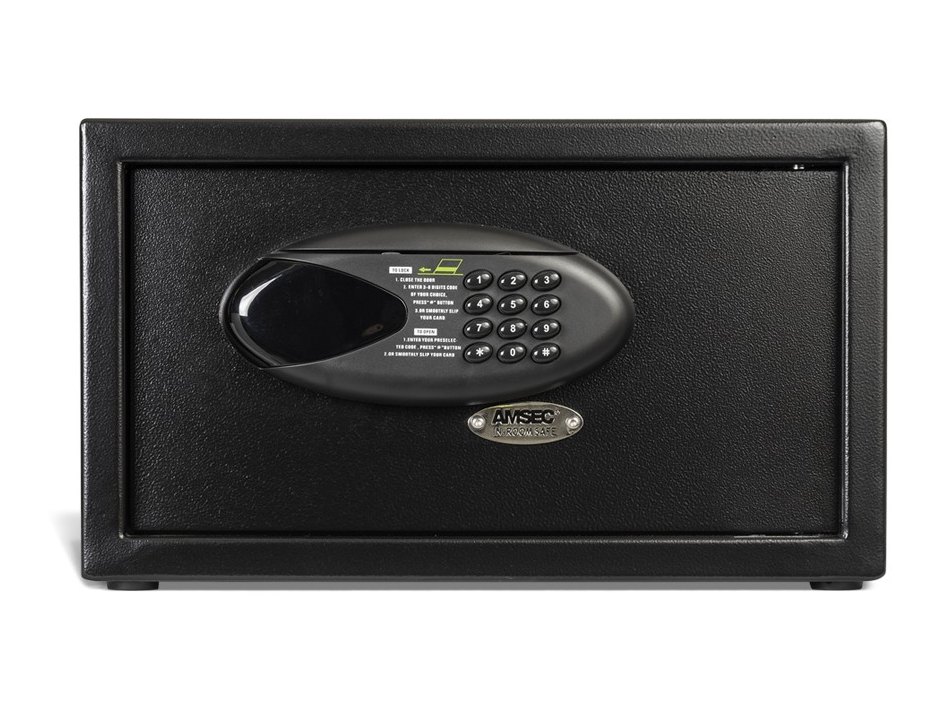
- A small black safe with an oval keypad and display on the door and an AMSEC logo plate just down and to the right of the lock.
- It can be locked and opened with a 4 to 6 digit code or a card with a magnetic strip (a bank card works). You choose one or the other.
- It runs on four AA batteries in a case on the back of the door.
- AMSEC’s sheet is part number 4305284, revised 08/10.
How to lock and open it
- To lock with a code: with the door closed and the handle in the unlocked position, enter a 4 to 6 digit number of your choice and press # (the LOCK button).
- The display shows -CLOSED- as the bolts extend. It then shows your number for 2 seconds as a reminder.
- To open: enter the same number. The display shows -OPEN- as the bolts retract, then -OPENED-.
With a magnetic card
- With the door closed and unlocked, put the card in the notch in the position shown on the safe and slide it from right to left, steadily and quickly.
- The display shows -CLOSED- and the door locks. If the card was not swiped right, it shows -AGAIN-: swipe again until it reads -CLOSED-.
- Swipe the same card again to open the safe.
- The code you lock with is the code you open with. Once the safe is open it resets itself, so you enter a new code every time you lock it.
- If you enter an invalid code or an invalid card, the display shows -ERROR-.
Battery
The safe is shipped without the batteries installed to prevent corrosion. It uses four AA alkaline batteries (we recommend Procell) in the battery case on the back of the door. When the batteries are low, the display reads -LO-BAT-.
- Open the safe (use the emergency battery box or the key below if the batteries are dead).
- Put four AA batteries in the battery case on the back side of the door.
- Close the door and test the safe with your code.
- First time: the sheet says to put the four AA batteries into the emergency battery box and use the box to open the safe the first time. Once open, take the batteries out of the box and put them into the case on the back of the door.
Date, time and audit trail
Set the date and time
- Press * * 1. The display reads -DATE-.
- When it reads -YE-, enter the two-digit year (for 2011, enter 11).
- When it reads -ON-, enter the two-digit month (06 for June).
- When it reads -DA-, enter the two-digit day.
- Enter the hour, minute and seconds the same way when the display reads -HO-, -IN- and -SE- (hour 1 to 24).
- The display reads -GOOD- if everything was set.
See the audit trail
- Press * * 2. The display reads -RECORD-.
- The first message shows the record number and how it was opened: for example 001-C is the first record, opened by magnetic card.
- Three seconds later it shows the year, month and date, and three seconds after that the hour, minute and seconds.
- In the audit trail, U means opened by password, C by magnetic card and B by the optional CEU (computerized electronic unit). The CEU steps and its starting codes are in AMSEC’s sheet; we are not printing them here.
Display messages
| What you see | What it means |
|---|---|
| -CLOSED- | The bolts are extending: the safe is locked. |
| -OPEN- then -OPENED- | The bolts are retracting: the safe is open. |
| -AGAIN- | The card was not swiped correctly. Swipe it again. |
| -ERROR- | An invalid code or card. |
| -LO-BAT- | The batteries are low. |
| -HOLD 05- | The 5-minute lock-out is on. |
Wrong codes
Three invalid codes in a row start a 5-minute lock-out and the display reads -HOLD 05-. Wait the five minutes and try again.
How to open it in an emergency
If the batteries are dead or you cannot open the safe, use one of these:
- Emergency battery box: put 4 AA batteries in the battery box and plug it into the USB port on the bottom of the keypad. Then enter your code or use your card.
- Emergency key: find the AMSEC logo plate just down and to the right of the lock. Use a screwdriver to take out its 2 screws and show the emergency lock, then use the emergency key to open the door.
- Keep the emergency keys in a safe place, but not in the safe.
If it still won’t open
The safe is locked and the keypad is dark
The batteries are probably dead. Plug the emergency battery box (4 AA) into the USB port on the bottom of the keypad, or open it with the emergency key under the AMSEC logo plate. Then change the batteries.
I forgot the code I locked it with
The code you locked it with is the code that opens it. Please do not keep guessing: three wrong codes lock it out for 5 minutes. Call us, or use the emergency key.
The card is not accepted
Slide it firmly, steadily and quickly from right to left, in the notch shown on the safe. If the display says -AGAIN-, swipe again. Use the same card you locked it with.
Download the full manufacturer instructions
This page is a quick-reference summary. For every feature and diagram, use the official manual for your model:
- AMSEC IRC916E Operating Instructions (PDF)Part 4305284, revised 08/10. Hosted by AMSEC.
- AMSEC knowledge base: IRC916 safe manualAMSEC support article for the same safe.
Need a hand?
Still stuck? We can help.
Having a hard time getting into your safe? Our technicians are trained to open malfunctioning safes professionally, so your valuables can still be safely secured. Call us or stop by.
Steve’s Lock, Safe and Alarm · 3401 N. Sepulveda Blvd, Manhattan Beach, CA 90266
More lock guides
About this guide. This is an independent guide from Steve’s Lock, Safe and Alarm, a safe and lock dealer. Brand and model names belong to their owners and are used only to help you identify your lock. We are not affiliated with the manufacturers. These steps summarize the manufacturers’ own instructions; your lock may be a different version, so if anything here does not match what your lock does, follow your manual or call us. Always change codes with the safe door open, and test the new code several times before you close the door.
Steps last checked against the manufacturer documents on October 19, 2026.