
Safe lock help · Mesa Safe
Safe lock troubleshooting › Mesa Safe › MAWS2113E wall safe keypad
The Mesa MAWS2113E is an electronic in-wall safe. Its keypad has three small lights, the numbers 1 to 9, and the keys A, 0 and B. This guide covers how to open the safe, set a new code, replace the batteries, use the override key, and what the lights mean.
Want the whole manual? Jump to the manufacturer download links.
Is this your lock?
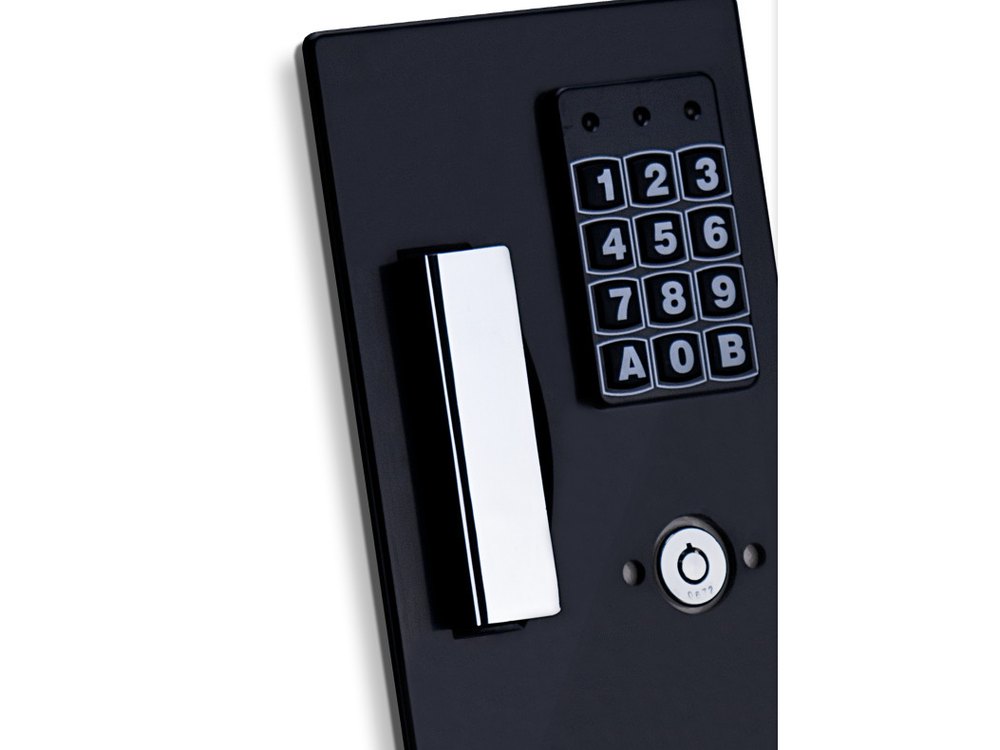
- A black keypad on an in-wall safe, with three small lights at the top, the numbers 1 to 9, then A, 0 and B on the bottom row.
- A plastic cap below the keypad covers the override key lock. The handle sits beside the keypad.
- It runs on 4 AA batteries in a compartment on the inside of the door. A small interior light has its own switch on the top edge of the inside of the door.
How to open it
- Enter your code, then press A. The green light comes on for about 5 seconds.
- Pull the handle to open the door while the green light is still on.
- A wrong code makes the keypad beep 6 times while the orange light is on.
- To lock the safe, close the door and push the handle back to the closed position. Make sure the safe is locked before you walk away.
How to change the battery
The keypad uses 4 AA alkaline batteries (we recommend Procell). Low battery: the red light comes on, or the safe does not unlock after you enter your code.
- With the door open, find the battery compartment on the inside of the door.
- Replace the batteries with 4 new AA alkaline batteries.
- Test the lock with the door open before you close and lock the safe.
- If the batteries die while the safe is locked, use the override key (see below).
- The interior light switch is on the top edge of the inside of the door. Turn it off before you close the door, or it drains the batteries.
How to set a new code
Always do this with the safe door OPEN.
Test the new code at least 3 times before you close the door, and keep a record of it. A code is 3 to 8 digits.
- Open the safe and find the red program button on the inside of the door.
- Press the red button and release it. The keypad beeps once and the orange light comes on for 10 to 15 seconds.
- Before the orange light goes out, enter your new code, then press B.
- A valid entry gives 4 beeps.
- If you make a mistake, wait for the orange light to go out and start again from step 1.
What the lights and beeps mean
| What you see or hear | What it means |
|---|---|
| Green light for about 5 seconds | The code was valid. Pull the handle now. |
| 6 beeps and the orange light | The code was not valid. |
| Orange light flashing every second, keypad not responding | The lock is in its lockout period (about 3 minutes). |
| Red light | The batteries are low. Replace them. |
| 1 beep and orange light for 10 to 15 seconds | Code change: the lock is waiting for the new code and B. |
| 4 beeps | Code change: the new code was saved. |
Wrong-code lockout
If a wrong code is entered 3 times in a row, the lock goes into a lockout of about 3 minutes. The keypad does not respond and the orange light flashes every second until the lockout is over.
If it still won’t open
The safe is locked and the batteries are dead, or the code is lost
Use the override key. Take off the plastic cap below the keypad, put the override key in, turn it counter-clockwise, and pull the handle to open the safe. Do not store the override keys inside the safe. Mesa advises you to test the keys when the safe is new.
The code is right but the safe does not open
Pull the handle while the green light is still on (about 5 seconds). A red light, or no unlock, means the batteries are low: replace them.
The batteries keep dying
Check that the interior light switch is off when the door is closed. Mesa’s manual says a light left on drains the batteries.
Download the full manufacturer instructions
This page is a quick-reference summary. For every feature and diagram, use the official manual for your model:
- Mesa MAWS-Series Electronic Lock Instructions (PDF)Mesa Safe Company. Hosted by Mesa. Also covers installing the wall safe.
- Mesa MAWS2113E product pageMesa’s page for the MAWS2113E.
- Mesa Safe technical supportMesa’s lock list and support page.
Need a hand?
Still stuck? We can help.
Having a hard time getting into your safe? Our technicians are trained to open malfunctioning safes professionally, so your valuables can still be safely secured. Call us or stop by.
Steve’s Lock, Safe and Alarm · 3401 N. Sepulveda Blvd, Manhattan Beach, CA 90266
More lock guides
About this guide. This is an independent guide from Steve’s Lock, Safe and Alarm, a safe and lock dealer. Brand and model names belong to their owners and are used only to help you identify your lock. We are not affiliated with the manufacturers. These steps summarize the manufacturers’ own instructions; your lock may be a different version, so if anything here does not match what your lock does, follow your manual or call us. Always change codes with the safe door open, and test the new code several times before you close the door.
Steps last checked against the manufacturer documents on October 15, 2026.