
Safe lock help · Securam
Safe lock troubleshooting › Securam › ProLogic (L01, L02, L22, L62, L66, E66, Smart B22)
The Securam ProLogic keypads (L01, L02, L22, L62, L66, E66 and the Smart B22) have a small screen with Menu/OK, arrow and Back keys. This guide covers how to open the lock, change a code in the System Menu, replace the 9-volt battery, and what the messages on the screen mean.
Want the whole manual? Jump to the manufacturer download links.
Is this your lock?
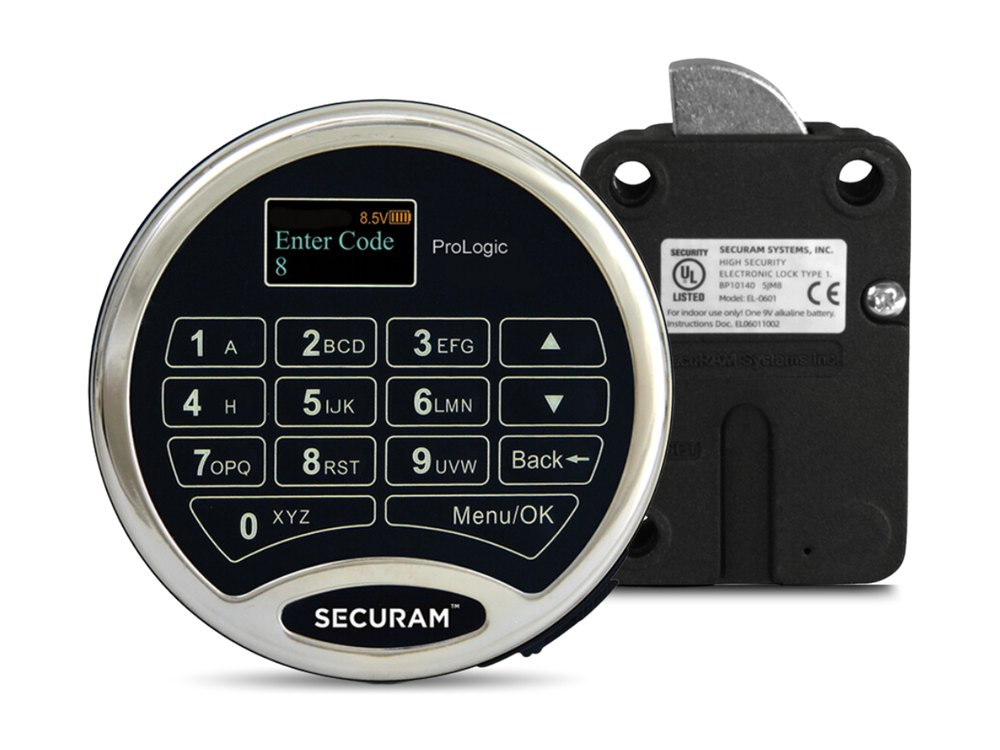
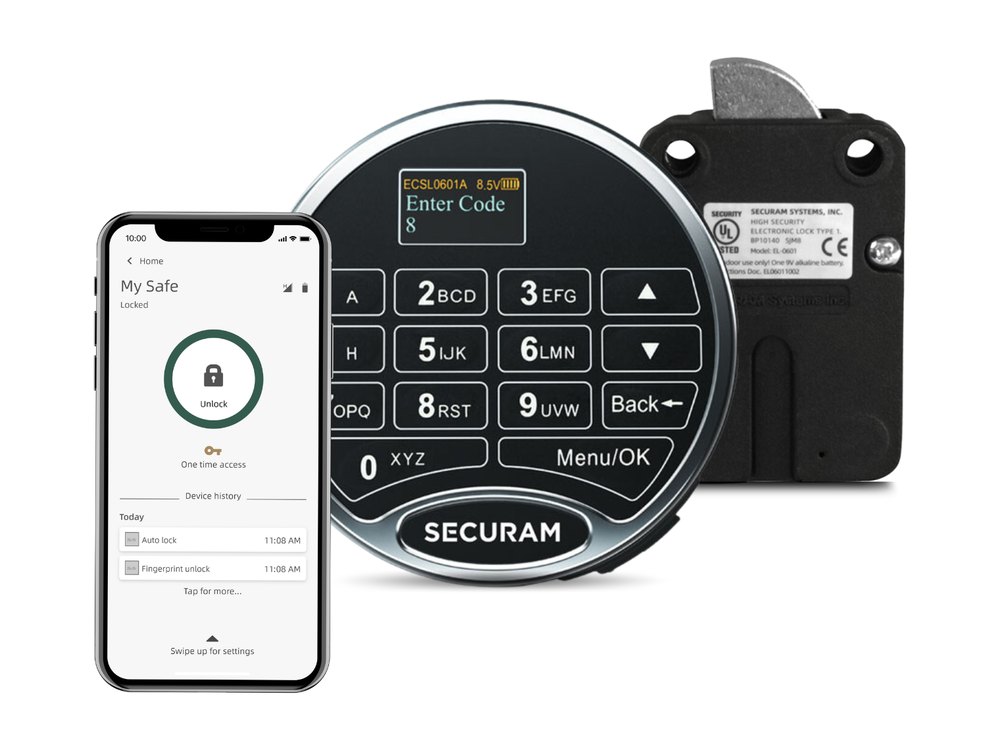
- A round Securam keypad with a small screen at the top, the word ProLogic on the face, and keys marked Menu/OK, up and down arrows and Back.
- It is powered by one 9-volt alkaline battery and talks to a Securam lock body (EL-0601 swing bolt, EL-0701 deadbolt or EL-0801 spring bolt) inside the door.
- The model is printed on the lock or shown on the screen when it wakes up. L22, L62, L66 and E66 are audit locks (they keep a record of who opened the lock and when).
- Securam lists two versions of the manual for these locks: one for locks sold before Aug 29, 2025 and one for locks sold after it. If your steps do not match this page, use the manual for your date from the download box below.
- A Securam keypad with a screen and a fingerprint reader is a ScanLogic. A keypad with no screen is a SafeLogic. See those guides.
How to open it
- Press any key to wake the keypad. The screen says Enter Code.
- Enter a valid code. The screen shows ID verified and the lock opens.
- The lock relocks automatically after 6 seconds (this time is fixed and cannot be changed). Turn the handle right away.
Smart B22 (phone-app model)
The B22 works a little differently from the others.
- Enter a valid code, then press Menu/OK.
- The screen shows a Verified message and the lock opens. It relocks after 6 seconds.
- On the B22 you can hide your code from someone watching: enter your 6-digit code with up to 3 extra digits before and/or after it (for example 34-123456-7), then press Menu/OK. If you enter fewer than 9 digits, always press Menu/OK to send the code.
- If a time delay is set, the lock does not open on the first code. The screen shows Time Delay Start. When the delay ends the keypad beeps twice and shows Time Window. Enter a valid code again during that window to open. Administrator codes (ID 00, 01 and 02) skip the delay.
- If dual control is set, enter one code, then the screen asks for the second user code.
- On a system with more than one lock, the screen asks you which lock number to open after your code.
How to change the battery
The keypad uses one 9-volt alkaline battery (we recommend Procell). Where the battery is depends on the keypad:
- Standard keypad: the battery is in the back of the keypad, with the terminals pointing down. Take the keypad off the door (it hangs on shoulder bolts), unsnap the old battery, snap on a new 9-volt alkaline, push it into its compartment, tuck the excess cable into the cavity, and re-hang the keypad. Do not pinch the cable.
- SureLock keypad: the battery is in a pull-out drawer at the 5 o’clock position on the bottom of the keypad. Pull the latch lever downward, pull the drawer out, put in a new 9-volt alkaline (it only fits when the + and – are the right way round), slide the drawer back and push the latch up until it snaps closed.
- With the safe door open, wake the keypad and enter a valid code to check that the lock opens.
- The screen always shows the battery voltage (a number such as 8.4V, with a battery icon) at the top. Watch it: when the number is dropping, replace the battery before the keypad stops working.
- After a battery change, the keypad runs a short test on power-up and shows the model, software version and Link with Lock OK.
How to change a code
Do this with the safe door OPEN.
Securam says to complete all programming with the door open, so you can reach the back of the lock if something goes wrong. Change all factory codes to unique codes and keep a record of them. Securam does not keep a record of your codes.
This changes the code that you enter in step 2. A new code is 6 digits unless the lock was set to 8-digit mode.
- Press the Menu/OK key. Use the down arrow to scroll to System Menu, then press Menu/OK.
- The screen asks for a valid code. Enter the code you want to change.
- Use the down arrow to scroll to Change Code and press Menu/OK. The screen shows Set Code of IDxx.
- Enter the new code.
- Enter the new code again (Repeat). The screen says Code Saved.
- Test the new code at least 3 times before you close the door.
Smart B22
- Press Menu/OK. At My Menu, press Menu/OK again.
- Enter a valid code and press Menu/OK.
- Scroll down to Change My Code and press Menu/OK.
- Enter the new 6-digit code, then enter it again. The code is saved.
- A Manager or the Super Code can also add and delete users and disable or enable a user from the System Menu. See the manual for those steps.
- Do not use birthdays, phone numbers or other personal dates as a code.
What the screen says
ProLogic keypads mostly use their screen instead of beeps.
| Screen message | What it means |
|---|---|
| Enter Code | The keypad is awake and ready for a code. |
| A voltage number (for example 8.4V) and a battery icon at the top | The battery level. It is always shown. A falling number means the battery is getting weak: replace it. |
| ID00 / ID03 Verified (and so on) | The code was accepted. The number is the user ID that was entered. The lock opens. |
| Link with Lock OK | The keypad and the lock body are talking to each other. |
| Fail to Link with Lock | The keypad cannot reach the lock body. Securam’s manual says to repeat its pairing (reset) procedure, which needs access to the back of the lock. Call us rather than trying it yourself. |
| Time Delay Start | A time delay is running. Wait for it to finish, then enter a valid code in the time window. |
| Time Window XX:00 | The delay is over. You have this much time to enter a valid code to open the lock. |
| Enter 2nd User Code | Dual control is on. A second user must enter a code. |
| Code Saved | A new code was stored. |
Wrong codes
If four incorrect codes are entered in a row, the ProLogic goes into a 5-minute penalty, the same as the SafeLogic Basic. Wait for the 5 minutes to finish before you try again, and do not keep guessing: call us if you are not sure of the code.
If it still won’t open
The screen is blank
Replace the 9-volt battery with a fresh alkaline one (see the battery section for your keypad type). If it is still blank, call us.
The keypad works but the voltage on the screen keeps dropping
The battery is wearing out. Replace it with a fresh alkaline 9-volt now, with the safe door open, instead of waiting for the keypad to die.
The screen says Fail to Link with Lock
The keypad cannot talk to the lock body. Securam’s manual says to repeat its pairing (reset) procedure, which needs access to the back of the lock. Call us if you are not sure.
It says the code is valid but I cannot open the door
The lock relocks 6 seconds after a valid code, so turn the handle right away. If the handle is hard to turn, pressure from the safe’s bolts on the lock bolt may be holding it: call us.
Download the full manufacturer instructions
This page is a quick-reference summary. For every feature and diagram, use the official manual for your model:
- ProLogic L02 Operation Instructions, after Aug 29, 2025 (PDF)Securam document EC-0601A-L02-250919. Hosted by Securam.
- ProLogic L22 Operation Instructions, after Aug 29, 2025 (PDF)Hosted by Securam.
- ProLogic L62 Operation Instructions, after Aug 29, 2025 (PDF)Hosted by Securam.
- ProLogic L66 Operation Instructions, after Aug 29, 2025 (PDF)Hosted by Securam.
- ProLogic E66 Operation Instructions, after Aug 29, 2025 (PDF)Hosted by Securam.
- ProLogic L02 to L66 Quick Start Guide, 2025 (PDF)Hosted by Securam.
- ProLogic Smart B22 Operation Instructions (PDF)Securam document EC-1701A-B22-190502. Hosted by Securam.
- ProLogic L01 Operation Instructions (support site)Hosted by Securam.
- ProLogic L22 Operation Instructions, before Aug 29, 2025 (support site)Hosted by Securam.
- ProLogic L62 Operation Instructions, before Aug 29, 2025 (support site)Hosted by Securam.
- ProLogic L66 Operation Instructions, before Aug 29, 2025 (support site)Hosted by Securam.
Need a hand?
Still stuck? We can help.
Having a hard time getting into your safe? Our technicians are trained to open malfunctioning safes professionally, so your valuables can still be safely secured. Call us or stop by.
Steve’s Lock, Safe and Alarm · 3401 N. Sepulveda Blvd, Manhattan Beach, CA 90266
More lock guides
About this guide. This is an independent guide from Steve’s Lock, Safe and Alarm, a safe and lock dealer. Brand and model names belong to their owners and are used only to help you identify your lock. We are not affiliated with the manufacturers. These steps summarize the manufacturers’ own instructions; your lock may be a different version, so if anything here does not match what your lock does, follow your manual or call us. Always change codes with the safe door open, and test the new code several times before you close the door.
Steps last checked against the manufacturer documents on October 14, 2026.