
Safe lock help · Mesa Safe
Safe lock troubleshooting › Mesa Safe › MH and MHRC hotel safe lock (red display, card swipe)
The Mesa MH101E and MHRC916E are hotel-room safe locks with a red number display. You open and lock the safe with your own 3 to 6 digit code or any magnetic-stripe card. This guide covers how to open and lock it, change the batteries, and what the display messages mean.
Want the whole manual? Jump to the manufacturer download links.
Is this your lock?
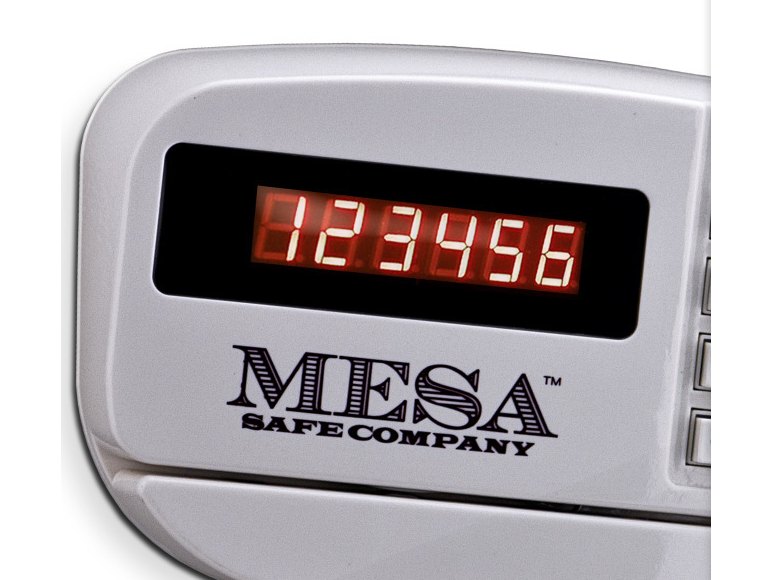
- A keypad with a red number display (the manual shows it reading 123456), a MESA name on the face, and a card swipe.
- The MH101E has a small round cap just below the right side of the keypad. The MHRC916E has an oval emblem there instead.
- The lock is set at the factory to hotel function: each guest picks a new code or card every time the safe is used.
- It runs on 4 AA batteries in a compartment on the inside of the door.
How to open and lock it
With a personal code (3 to 6 digits)
- To lock (safe open): enter your 3 to 6 digit code, then press #. The display says CLOSED and the safe is locked.
- To unlock: enter the same code. The display says OPENED and the safe unlocks.
- Once the safe is open it resets itself, so you can pick any new code the next time you lock it.
With a credit card (any card with a magnetic stripe)
- To lock (safe open): swipe the card firmly and evenly from right to left, magnetic stripe down. The display says CLOSED.
- To unlock: swipe the same card the same way. The display says OPENED.
- Press * to delete a digit on the display. If you press * before your code, dashes show instead of the numbers, as a privacy feature.
- If the card is swiped too fast, too slow, or the wrong way, the display says ERROR or AGAIN. Swipe it again. If you swipe a different card than the one you locked with, it says E-CARD.
- In the lock’s standard mode (set from the keypad, see Mesa’s manual), the first code or card you lock with is kept, and you only press # to lock afterwards.
How to change the battery
The lock uses 4 AA alkaline batteries (we recommend Procell). Change them when the display says LO BATT. To check the level, press # while the safe is locked: BATT H means the batteries are good, BATT L means they are low.
- With the door open, find the battery compartment cover on the inside of the door and pull the clip down to release it.
- Put in 4 new AA alkaline batteries. Follow the + and – marks in the compartment.
- Put the cover back on, and test the lock before you close the safe.
- Do not use rechargeable batteries, mix alkaline with other types, or mix old and new batteries.
What the display shows
| Display | What it means |
|---|---|
| OPENED | The code or card was right and the safe is unlocked. |
| CLOSED | The safe is locked. |
| E-Code | The code was wrong. |
| E-Card | A different card was used than the one that locked the safe. |
| ERROR / AGAIN | The card was swiped the wrong way, or too fast or too slow. Swipe it again. |
| E-BAR | The door is not closed properly or the bolts are not locking. The override keys are needed to unlock and re-lock the safe: then take the key out and try the code. |
| LO BATT | The batteries are low. Replace them. |
| HOLD## | The lock is in its 15-minute shutdown. The ## is the time left. |
| BATT H / BATT L | Battery check (press # while locked): high or low. |
Wrong codes (lockout)
If a wrong code or card is used 4 times in a row (with E-Code or E-Card each time), the lock shuts down for 15 minutes. If you press a key during that time, the display says HOLD##, where ## is the time left. Wait it out, then enter the right code. (A hotel can change the number of tries and the shutdown time in the lock settings.)
If it still won’t open
The display says E-Code or E-Card and I know the code is right
Mesa’s manual says that when E-Code, E-Card or ERROR show after the right code or card, the override code, override card or override keys are needed. A hotel manager normally has those. If you are the owner and do not have them, call us.
The display says E-BAR
The door is not closed properly or the bolts are not locking. Use the override keys to unlock and re-lock the safe, take the key out, and try your code again.
Using the override key
Find the small round cap (MH101E) or the oval emblem (MHRC916E) just below the right side of the keypad. On the MHRC916E, take the cover off with the Allen wrench that came with the safe; on the MH101E, pull the cap off with your fingertips. Put the override key in, turn it clockwise, and open the door. The key only works while the safe is locked. Never store the override keys inside the safe. Take the key out by turning it back.
Download the full manufacturer instructions
This page is a quick-reference summary. For every feature and diagram, use the official manual for your model:
- Mesa MH-Series Electronic Lock Instructions (PDF)Mesa Safe Company, 2015. Hosted by Mesa. Also covers the override code and card, lock settings, and date and time.
- Mesa MH / MHRC lock pageMesa’s page for the MH and MHRC.
- Mesa Safe technical supportMesa’s lock list and support page.
Need a hand?
Still stuck? We can help.
Having a hard time getting into your safe? Our technicians are trained to open malfunctioning safes professionally, so your valuables can still be safely secured. Call us or stop by.
Steve’s Lock, Safe and Alarm · 3401 N. Sepulveda Blvd, Manhattan Beach, CA 90266
More lock guides
About this guide. This is an independent guide from Steve’s Lock, Safe and Alarm, a safe and lock dealer. Brand and model names belong to their owners and are used only to help you identify your lock. We are not affiliated with the manufacturers. These steps summarize the manufacturers’ own instructions; your lock may be a different version, so if anything here does not match what your lock does, follow your manual or call us. Always change codes with the safe door open, and test the new code several times before you close the door.
Steps last checked against the manufacturer documents on October 15, 2026.