
Safe lock help · Bumil (Bumilsafe, Korea)
Safe lock troubleshooting › Bumil (Bumilsafe, Korea) › Bumil digital safe keypad (ZE, ESD, NE, DS and older models)
Bumil (Bumilsafe) is a Korean maker of fire-resistant digital safes that turn up in offices, shops and homes. The lock is a keypad with number keys and an ENT key, next to a handle and often a key cylinder, and it runs on four AA batteries. This guide covers how to open the safe, change the password (4 to 16 digits), where the batteries are on each model, and the lockout after wrong passwords. It follows Bumil’s own manuals, which are in Korean. Older Bumil keypads can work a little differently, and we point out where.
- How to open
- Battery
- Change the password
- Quick checks
- Lockout
- Sound level and the anti-prank function
- Older safes: the time delay (temporary stop)
- Troubleshooting
- Manuals
Want the whole manual? Jump to the manufacturer download links.
Is this your lock?
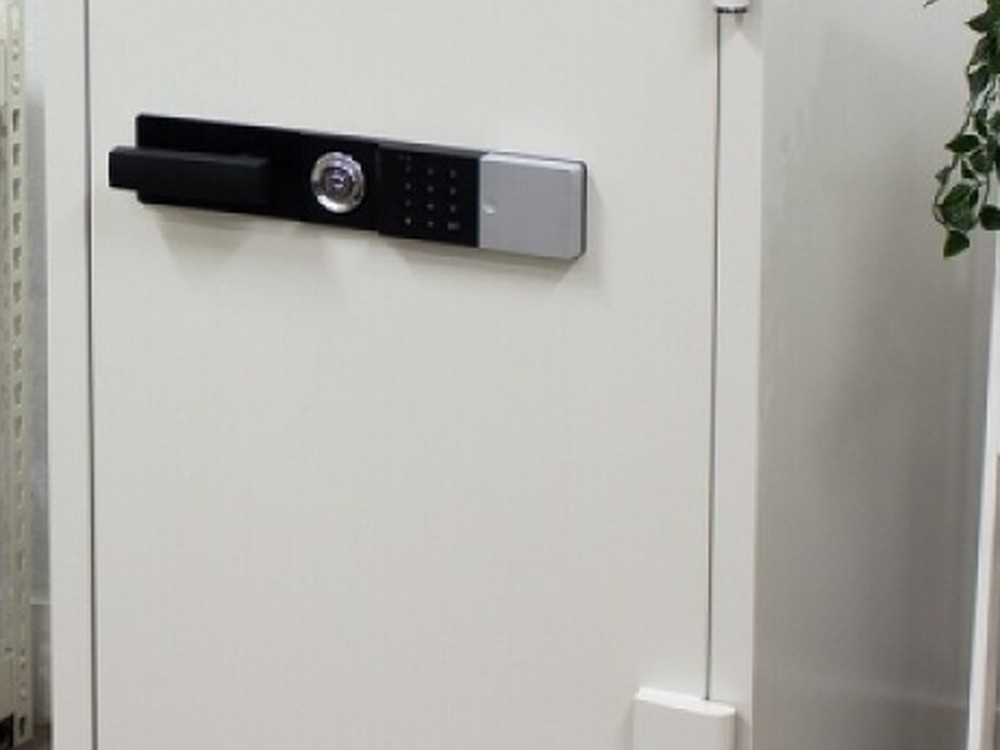
- A fire-resistant safe with a BUMILSAFE or Bumil logo and a lock assembly on the door: a handle, often a key cylinder in the middle, and a keypad with 1 to 9, 0, ENT and an M (or STORE) key.
- Four AA batteries run the keypad. A red LED blinks and a melody plays when they are low.
- Models in Bumil’s current manual: ZE, ESD, NE (and the file-safe version), and DS (DS23 to DS182). Small models have a handle and keypad, or a key and keypad. Large models have handle, key and keypad.
- The password is 4 to 16 digits long.
- Older Bumil digital safes with a key lock (insert the key first, then ENTER) are covered too, with the steps in Bumil’s older manual.
How to open it
Match the steps to your model. Small models with a handle:
- Press ENT, enter your password, and press ENT.
- A melody sounds when the password is right.
- Within 4 seconds, turn the handle to the right (clockwise) to open the door.
- To lock, close the door and turn the handle back to the left.
Small models with a key and keypad
- Put the key in the key hole.
- Press ENT, enter your password, and press ENT. A melody sounds.
- Within 4 seconds, turn the key to the right to open.
- To lock, close the door and turn the key back to the left.
Large models (handle, key and keypad)
- Put the key in the key hole and turn it one full turn clockwise.
- Press ENT, enter your password, and press ENT. A melody sounds.
- Within 4 seconds, lift the handle up to open the door.
- When you close the door it locks by itself. Turn the key one turn counterclockwise for the double lock.
Older Bumil digital safes (key and ENT)
- Put the key in the key hole and press ENT.
- When the green lamp lights, press ENT, enter your password, and press ENT. A melody sounds.
- Within 4 seconds, turn the key to the right and open the door with the handle.
- Dummy numbers: you can type extra random digits before and after your password, so no one can see the real one, as long as the total is no more than 48 digits. For example: ENT, 1234, your password, 1234, ENT.
- Locking: if the door will not lock, check that nothing inside is in the way, and that the door is closed all the way.
- When the batteries are weak, Bumil says the safe may not work even with the right password. Replace all four batteries.
How to change the battery
The safe uses four AA alkaline batteries (1.5 volt) (we recommend Procell). A red LED blinks and a melody plays when the batteries are low: replace them right away. Bumil says to replace all four at the same time, never to mix old and new, and that batteries last about 6 months if you open the safe once a day. The batteries that come in a new safe are for testing: replace them. On a new safe, take off the clear film that blocks the battery voltage before you use it.
ZE models
- Find the battery cover on the right side of the keypad.
- Press the cover gently and slide it to the right.
- Replace all four AA batteries with new ones.
ESD models
- Find the battery cover at the bottom of the keypad.
- Slide it to the left and take it off.
- Replace all four AA batteries with new ones.
NE and file-safe models
- Press the lower part of the keypad gently.
- While you hold it pressed, flip the keypad up to open the battery compartment.
- Replace all four AA batteries with new ones.
DS23 to DS50
- Hold the keypad and turn it counterclockwise.
- Pull the keypad down to take it off.
- Replace all four AA batteries with new ones.
DS70 to DS182
- Press the keypad gently and push it up.
- Pull the keypad down to take it off.
- Replace all four AA batteries with new ones.
- Do not use old and new batteries together. Bumil says that using weak batteries together with new ones can cause the lock to act up.
- Bumil’s manual does not give a way to open the safe when the batteries are completely dead. If the safe is locked and the keypad is dead, call us.
How to change the password
Do this with the safe door OPEN.
Bumil says to change the password you were given right after you buy the safe: the starting password stops working once you set a new one. Check the new password 2 or 3 times with the door open before you close it.
- Open the safe door.
- Press the inside switch (a small button on the inside of the door) once. You then have 10 seconds to start entering the new password. If you do nothing for 10 seconds, the change is cancelled and you start again.
- Enter the new password (4 to 16 digits), and press ENT.
- Test it: press ENT, enter the new password, press ENT, and listen for the confirmation melody. Do this 2 or 3 times.
- Older Bumil safes use the same idea: with the door open, press the button in the middle of the inside of the door once, enter the new password, and press ENT.
- Change the password every so often, and do not share it.
Troubleshooting
| What is happening | What to check |
|---|---|
| Red LED blinks and a melody plays | The batteries are low. Replace all four AA batteries. |
| Keys do nothing | Check that the batteries are in the right way (+ and -), that they are not used up or bad, that the keypad is not locked out for 3 minutes after 5 wrong passwords, and that the anti-prank function is not turned on (it makes the keypad quiet unless you press M or STORE first). |
| Right password, door will not open | The batteries probably do not have enough power. Replace all four with new ones (do not mix old and new). |
| Door will not lock | Check that the things inside are not in the way, and that the door is closed all the way. |
| Alarm sound is too loud | Change the sound level (see below). |
| New password will not register | After you press the inside switch, you have 10 seconds to start typing. The password must be 4 to 16 digits. |
| Some play in the door | This is normal. A fire-resistant door is made with a little play so that it opens and closes smoothly, and it does not affect how the safe works. |
Wrong passwords
On the current models, 5 wrong passwords in a row stop the safe from working for 3 minutes. On older Bumil digital safes, 3 wrong passwords in a row turn off the electronic opening for 5 minutes. After that the safe works normally again. Wait it out and enter the password slowly.
Sound level and the anti-prank function
Sound level (1 to 3, 3 is the loudest): press M (or STORE), 1, ENT, your password, ENT, 10, ENT, then 1, 2 or 3, and ENT.
Anti-prank function: this stops the safe from working when someone presses the keypad (a child, for example). To turn it on: press M (or STORE), 1, ENT, your password, ENT, 20, ENT, 1, ENT. To turn it off: do the same but finish with 0, ENT (that is, 20, ENT, 0, ENT). When it is on, the keys make no sound and do nothing unless you press M or STORE first.
Older safes: the time delay (temporary stop)
Bumil’s older manual describes a time delay, also called the temporary stop function. It stops the keypad and the opening for a number of minutes (05 to 99), and then the safe goes back to normal. While it is running, the LED blinks every 10 seconds.
To set it (from the front of the door): press STORE, your password, ENT, 83, ENT, the two-digit minutes (for example 15), ENT. To cancel it: press STORE, your password, ENT, 83, ENT, 00, ENT. If the safe will not open, a time delay may have been set.
If it still won’t open
The red LED is blinking and I hear a melody
That is the low battery warning. Replace all four AA batteries right away. If you keep using weak batteries, the safe may stop working even with the right password.
I typed the right password and nothing happens
Check the batteries first (replace all four), then check that the anti-prank function is not on (press M or STORE first), and that you are not in the 3-minute or 5-minute lockout.
The safe opened by itself and will not stay locked
Check that nothing inside is blocking the door, and that the door is closed all the way before you turn the handle or key.
The keypad is dead and the safe is locked
Bumil’s manual does not give an emergency power method. Call us and we will open the safe and put in new batteries.
I forgot the password
Please do not keep guessing: wrong passwords start a lockout. Call us.
Download the full manufacturer instructions
This page is a quick-reference summary. For every feature and diagram, use the official manual for your model:
- Bumil user manual, ZE / ESD / NE / DS models (Korean, 2025.04 edition)Bumilsafe’s download page for the combined manual. The manual is in Korean.
- Bumil digital safe manual, older models (Korean)Bumilsafe’s page for the older ESD / DS / EB / NE digital safe manual. In Korean.
- Bumilsafe download page (English site)The maker’s English download page. It only lists the OARC manual and a catalog.
Need a hand?
Still stuck? We can help.
Having a hard time getting into your safe? Our technicians are trained to open malfunctioning safes professionally, so your valuables can still be safely secured. Call us or stop by.
Steve’s Lock, Safe and Alarm · 3401 N. Sepulveda Blvd, Manhattan Beach, CA 90266
More lock guides
About this guide. This is an independent guide from Steve’s Lock, Safe and Alarm, a safe and lock dealer. Brand and model names belong to their owners and are used only to help you identify your lock. We are not affiliated with the manufacturers. These steps summarize the manufacturers’ own instructions; your lock may be a different version, so if anything here does not match what your lock does, follow your manual or call us. Always change codes with the safe door open, and test the new code several times before you close the door.
Steps last checked against the manufacturer documents on October 19, 2026.