
Safe lock help · Kaba Mas
Safe lock troubleshooting › Kaba Mas › X-09 (dial-powered)
The Kaba Mas X-09 is a high-security electronic lock that has no battery. You power it by spinning the dial, and a small display guides you. This guide covers how to power and open it, how to relock, how to change the combination, and what the display symbols mean.
Want the whole manual? Jump to the manufacturer download links.
Is this your lock?
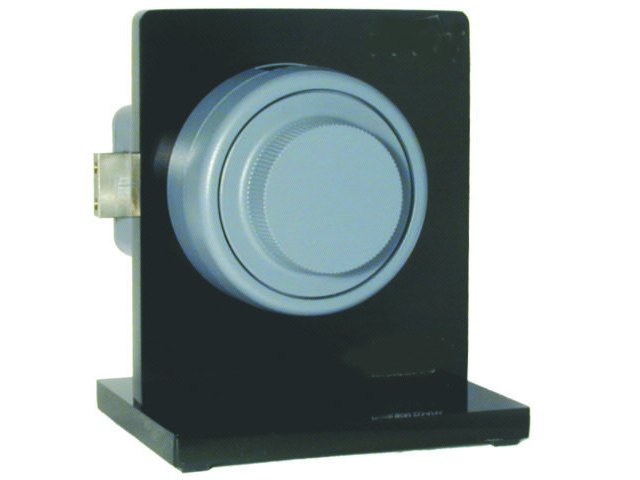
- The Kaba Mas X-07, X-08, X-09 and X-10 locks are sold mostly for government and contractor safes (the GSA program). Most commercial safes use the Auditcon, LA GARD or Axessor locks instead: see those guides.
- A dial with a small LCD display and no keypad. You turn the dial to generate power and dial the combination as numbers appear on the display.
- The display is hard to read from the side on purpose, so look straight at it.
- The combination is three numbers by default, such as 25-50-75.
- If yours says X-10, X-08 or X-07, use that lock’s own guide, because the dialing steps differ (the X-08 especially).
How to power it and open it
Dial with full wrist turns. Do not stop to re-grip the dial: pauses make the lock think it is being dialed by a robot. Dial left (counter-clockwise, CCW) and right (clockwise, CW) exactly as shown.
- Power the lock. Dial left until numbers appear on the display. It usually takes 5 to 10 turns of the dial. The lock is powered as soon as anything shows on the display.
- Keep dialing left to the first number of your combination. Stop on it and pause briefly.
- Dial right to the second number. Stop and pause briefly.
- Dial left to the third number. Stop and pause briefly.
- Dial right. When OP with a right arrow appears, keep dialing right to retract the bolt.
- Open the safe handle and the door.
- Left dials count up; right dials count down.
- If the dial stops moving for more than 40 seconds, the display goes blank and you must dial the whole combination again.
- If you pass your target number by 4 or more, keep dialing around until you reach it again. If you pass it by 3 or less, you can do the same, or reverse direction slowly: the display jumps back 4 numbers, then dial slowly in the original direction to the number.
- If the display goes blank before the bolt retracts, or a lightning bolt appears, dial the entire combination again.
No battery to change
There is no battery in an X-09. Spinning the dial generates the power, and the lock is powered when numbers appear on the display. If the display never lights up, keep dialing left with steady, full turns (5 to 10 turns). If it still does not respond, call us.
How to change the combination
You need the Change Key, the current combination, and the safe door open.
The Change Key is a separate key that came with the lock. If you do not have it, or you do not know the current combination, do not experiment: call us. Test the new combination several times before you close the door.
These steps set a single three-number combination (Single Combination Mode). The lock also has Dual and Supervisor/Subordinate modes: see the manual below for those. If you make any mistake or do not finish, the lock keeps the old combination.
- Open the lock with the current combination and retract the bolt. Release the container locking bolts if needed, and open the safe. Remove the dust cover plate to reach the change key holes on the back of the lock.
- Insert the Change Key into the change key holes. Hold your thumb on the key’s retractor while you insert it so the pins go into the lock.
- Dial left until the Change Key symbol appears in the upper right of the display. The lock never opens while that symbol is showing.
- Dial your current combination as if you were opening the lock.
- Dial right until SL (Select Mode) appears.
- Dial left to 01 (Single Combination Mode). Stop on it and pause. Do not use the "back up" dialing method here.
- Dial right until EC (Enter Combination) appears.
- Dial your new combination: left to the first number, right to the second, left to the third.
- Dial right briskly. The new combination is shown twice, then PO (Pull Out Change Key) appears. If the numbers shown are wrong, pull the key out while the display is still flashing. When EC appears, insert the key again and dial the combination you want.
- Pull out the Change Key. The key symbol disappears and CC (Confirm Combination) appears.
- Dial the new combination once more to confirm it.
- Dial right until OP appears and keep going to retract the bolt. The new combination is set.
- Test the new combination several times before closing the door.
What the display shows
The X-09 uses a display instead of beeps.
| Display | What it means |
|---|---|
| Blank | The lock is powered down. Dial left to power it. |
| OP with a right arrow | Open right: keep dialing right to retract the bolt. |
| Lightning bolt (upper left) | Incorrect combination, or you dialed the combination in under 10 seconds. Dial the correct combination again. |
| Lightning bolt with a number | Incorrect combination dialed that many times. Shown only after 3 or more wrong attempts in a row. |
| Key symbol | The Change Key is inserted and the lock is in change mode. |
| SL | Select mode of operation (during a combination change). |
| EC | Enter a combination (during a change). |
| PO | Pull out the Change Key. |
| CC | Confirm the combination (during a change). |
| C1 / C2 | Enter the first or second combination (dual or supervisor modes). |
| UL / LU | Unlocked / Lock Up (supervisor/subordinate mode). |
Wrong-combination lockout
After ten wrong combinations in a row, the X-09 locks out for 3 minutes, and each further wrong attempt starts another lockout. At fifteen in a row the lockout is 4 minutes. The lockout only counts down while the lock is powered, so turn the dial about every 30 seconds to keep it powered until the time is up. A successful opening resets the count.
How to close and relock
- Close the safe door.
- Turn the dial left at least one complete turn to extend the bolt.
- Turn the dial right at least one complete turn to make sure it is locked.
- After the lock is locked and the bolt is extended, the dial should turn freely in both directions without catching or binding.
If it still won’t open
The display stays blank
Dial left with full, steady turns for 5 to 10 turns. The lock is powered once anything appears on the display.
I see a lightning bolt
That means a wrong combination, or one dialed too fast. Dial the whole combination again, with full smooth turns and a short pause on each number.
It will not open after several tries
Do not keep trying: wrong attempts add up toward a lockout. Call us.
Download the full manufacturer instructions
This page is a quick-reference summary. For every feature and diagram, use the official manual for your model:
- Kaba Mas X-09 Operating Instructions (PDF)Kaba Mas document 520.021, Rev. D, 9/08. Hosted by Kaba Mas.
- Kaba Mas (dormakaba) websiteManufacturer website, with manuals for X-series locks.
Need a hand?
Still stuck? We can help.
Having a hard time getting into your safe? Our technicians are trained to open malfunctioning safes professionally, so your valuables can still be safely secured. Call us or stop by.
Steve’s Lock, Safe and Alarm · 3401 N. Sepulveda Blvd, Manhattan Beach, CA 90266
More lock guides
About this guide. This is an independent guide from Steve’s Lock, Safe and Alarm, a safe and lock dealer. Brand and model names belong to their owners and are used only to help you identify your lock. We are not affiliated with the manufacturers. These steps summarize the manufacturers’ own instructions; your lock may be a different version, so if anything here does not match what your lock does, follow your manual or call us. Always change codes with the safe door open, and test the new code several times before you close the door.
Steps last checked against the manufacturer documents on October 14, 2026.