
Safe lock help · Sargent & Greenleaf (S&G)
Safe lock troubleshooting › Sargent & Greenleaf (S&G) › 2740 and 2740B (GSA electromechanical lock)
The S&G 2740 and 2740B are GSA-approved electromechanical safe locks (federal spec FF-L-2740). They look like a mechanical dial lock, but a battery-powered computer inside checks the combination and beeps to tell you what is happening. There is no screen. This guide covers how to dial it open, relock, change the combination, the batteries, and what the beeps mean.
Want the whole manual? Jump to the manufacturer download links.
Is this your lock?
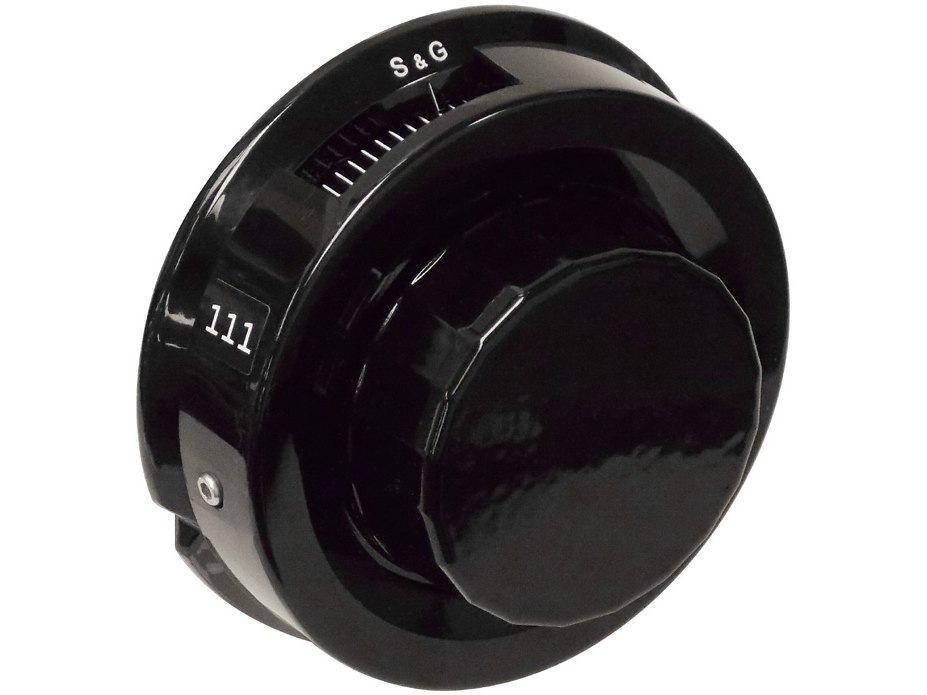
- A black dial with the S&G name and a ring of numbers, and a mark at the top of the dial ring (the opening index at 12 o’clock). No screen and no keypad.
- It is sold for GSA security containers and safes. S&G’s own page calls the 2740B an electromechanical lock approved under federal spec FF-L-2740B.
- The 2740B is the current model. The original 2740 works the same way and uses the same change key. (The original 2740 manual also describes a setup module that only an S&G certified technician uses.)
- The lock is battery powered: a CR123A main battery and a CR2450 backup battery, inside the lock case on the inside of the door.
- The combination has three numbers from 0 to 99. The lock can run in single user mode (one combination) or dual user mode (two combinations).
How to dial it open
The 2740B reads the number under the opening index (the mark at the top of the dial ring, at 12 o’clock). You do not have to count revolutions. If you overshoot a number, do not back up to it: keep turning the same way, one more turn if needed, and stop precisely on it. If two numbers are within 2 of each other (for example 26-24-3), turn a full revolution before dialing to the next number.
Single user mode (one combination)
- Turn the dial left (counter-clockwise) at least two full turns, then stop precisely on the first number.
- Turn the dial right (clockwise) and stop on the second number.
- Turn the dial left and stop on the third number.
- Turn the dial right. If the combination was right, the dial comes to a positive stop before you have turned more than two revolutions. The lock is open.
Dual user mode (two combinations)
- Both combinations must be entered within two minutes. Either can go first. Dial the first combination as in single user mode, but after the third number turn the dial right about ten numbers. The lock gives four quick beeps.
- Dial the second combination (left to the first number, right to the second, left to the third).
- Turn the dial right. If both combinations were dialed right, the dial comes to a positive stop within two revolutions.
- One long beep (a “brap”) means one of the combinations was not dialed precisely: start over at step 1.
- If you stop dialing for more than ten seconds, the lock resets and you start the combination again.
- 10 beeps when you open means both batteries are low: see the battery section.
- To relock: close the container, turn the handle to the fully locked position, then turn the dial left (counter-clockwise) at least a half turn.
How to change the battery
The lock uses two batteries: a CR123A lithium camera-type battery (main) and a CR2450 coin cell (backup). Both must be changed at the same time. S&G says this is preferably done by a technician trained on the lock. Low battery: when you dial the lock open, it gives 10 quick beeps, repeated every 20 seconds for one minute.
- With the safe or container open, lock the container open (extend the locking bolts), and turn the dial left to extend the lock bolt if it is not already out.
- Remove the two cover screws and lift the lock cover off. Do not let any metal tool touch the underside of the cover.
- Take the CR123A battery out of the cover first. Push the CR2450 coin cell partly out of its holder (the back end of a change key works) and pull it out. Dispose of both batteries properly.
- Wait one minute before putting in the new batteries.
- Slide the new coin cell in first, positive side up. Within one minute, put in the new CR123A battery. Never force a battery.
- You hear a beep once both are in. About 10 seconds later the lock does a battery check and gives one more beep if it passed. Wait for that beep before you put the cover back. If you hear the 10-beep signal, take both batteries out for a minute and start again at step 4.
- Put the cover back with both screws (the longer screw goes in the hole closest to the change key socket).
- With the door open, dial the combination and open the lock at least three times before you close the container.
- To check the batteries without opening the cover: with no change key in the lock, turn the dial right a few turns. After one long beep per turn you hear a single short beep and then a series of short beeps. Four short beeps after the first one means the batteries are good. Two means about half capacity: plan to replace both.
- If you keep ignoring the low-battery signal (about 100 openings), the lock goes into Lock Open Latch and cannot be locked until a technician resets it with an S&G 444 Device and the batteries are replaced.
- Lock bodies and covers are matched. Never swap a cover from another lock.
How to change the combination
You need the change key, the current combination, and the safe door open.
Never close the container with the change key in the lock. Check the new combination at least three times with the door open before you close it. If you do not have the change key or the current combination, do not experiment: call us.
The change key plugs into the lock cover one way only: the arrow on the connector lines up with the arrow on the lock case. You have two minutes to finish, and the lock resets if you stop dialing for ten seconds. Between combination entries the lock gives quick beeps as you turn the dial right: stop turning when you hear three beeps.
- Open the lock with the existing combination.
- With the container open, extend the lock bolt fully.
- Plug the change key into the socket in the lock cover. The lock gives one beep.
- Dial the OLD combination: left at least two turns to the first number, right to the second, left to the third, then turn right until you hear three quick beeps.
- Dial the NEW combination: left at least two turns to the first number, right to the second, left to the third, then right until three quick beeps.
- Dial the NEW combination again to confirm it: left at least two turns to the first number, right to the second, left to the third, then turn right. Five quick beeps mean the change worked. In single user mode, keep turning right to retract the bolt. In dual user mode, just stop.
- Take the change key out of the lock.
- Check the new combination at least three times with the door open.
- If you start a change and decide not to finish, wait two minutes: the change times out with one long beep.
- In dual user mode, each user changes their own combination, and the other person does not need to be there.
- Changing between single and dual user mode, and the lost-combination procedure, are in S&G’s manual (linked below). Call us if you need them.
- If the door closes with the change key still in a single-user lock, S&G says you go through the whole combination change again, using the last successfully set combination as the “OLD” combination.
What the beeps mean
The 2740B has two kinds of beeps: a short beep and a long beep (ten times as long) that S&G calls a brap.
| What you hear | What it means |
|---|---|
| 1 beep | The change key was inserted and recognized. |
| 3 beeps between steps | The lock accepted that entry in a programming sequence. |
| 4 beeps | The first combination was accepted in dual user mode. |
| 5 beeps | A combination change, mode change, or dial calibration finished successfully. |
| 10 beeps when you open | Low battery. Replace both batteries. It repeats every 20 seconds for a minute. |
| 3 beeps, pause, 3 beeps, pause, 3 beeps (whenever the dial turns) | The lock has never been calibrated and needs its dial calibrated to zero. |
| 1 brap (one long beep) | An error in a programming or dialing sequence. |
| 2 braps when you turn the dial | The lock is in its 10-minute penalty time. |
| 1 beep, pause, 4 beeps | Battery check: batteries are OK. |
| 1 beep, pause, 2 beeps | Battery check: marginal. Replace both batteries. |
Wrong combinations (penalty)
If ten wrong combinations in a row are dialed, the lock shuts down for ten minutes. Turning the dial during that time gives two braps. It does not matter how much time passes between wrong tries, and a correct combination before the tenth wrong try resets the counter. There is no way around the ten minutes: wait it out.
If it still won’t open
The lock beeps three times, pauses, and beeps again whenever I turn the dial
That is an uncalibrated lock. With no change key in the lock, turn the dial right a few turns (a long beep each turn, then a short beep and a series of short beeps). Then turn right precisely to zero, left a full turn precisely to zero, and right precisely to zero again, and keep going left and right to zero until you hear five quick beeps. Dial very precisely: if you pass zero even slightly, keep turning until it comes around to the index again. It takes under a minute.
It takes several tries to dial it open
Recalibrate the dial to zero (see above), and dial slowly and precisely to the opening index. The 2740B has no forbidden zone and reads each number exactly, so a number that is one off will not open.
It beeps 10 times when I open it
Both batteries are low. Replace them as soon as you can (see the battery section). If the warning is ignored for about 100 openings, the lock will latch open and cannot be locked.
I cannot lock the container
If the low-battery warning was ignored, the lock may be in Lock Open Latch. It needs a technician (and new batteries). Call us.
Download the full manufacturer instructions
This page is a quick-reference summary. For every feature and diagram, use the official manual for your model:
- S&G 2740B Electromechanical Safe Lock operating instructions (PDF, doc 630-848)Sargent & Greenleaf, revised 6/26/2014. Hosted by MBA USA, the GSA lock distributor.
- S&G 2740 operating instructions (PDF, doc 630-746)The original 2740, revised 6/11/2010. Hosted by MBA USA.
- S&G 2740B product pageManufacturer page, with operating and installation documents.
- MBA USA government (GSA) security downloadsManuals for the X-07, X-08, X-09, X-10 and S&G 2740.
Need a hand?
Still stuck? We can help.
Having a hard time getting into your safe? Our technicians are trained to open malfunctioning safes professionally, so your valuables can still be safely secured. Call us or stop by.
Steve’s Lock, Safe and Alarm · 3401 N. Sepulveda Blvd, Manhattan Beach, CA 90266
More lock guides
About this guide. This is an independent guide from Steve’s Lock, Safe and Alarm, a safe and lock dealer. Brand and model names belong to their owners and are used only to help you identify your lock. We are not affiliated with the manufacturers. These steps summarize the manufacturers’ own instructions; your lock may be a different version, so if anything here does not match what your lock does, follow your manual or call us. Always change codes with the safe door open, and test the new code several times before you close the door.
Steps last checked against the manufacturer documents on October 15, 2026.