
Safe lock help · LA GARD (dormakaba)
Safe lock troubleshooting › LA GARD (dormakaba) › SmartGard electronic lock (1997 programming and manager sheets)
The LA GARD SmartGard is an older electronic safe lock (La Gard Inc. paperwork from 1997) with a keypad and an LCD that shows prompts and a flashing cursor. It has a programmer, a manager (user 0) and users 1 to 9, with options for time delay, time lock, dual combination and a silent hold-up alarm. This guide covers changing a combination, what the manager can do, the audit trail, and the battery. LA GARD’s sheets for it are a programming sheet and a manager sheet, so some of this is manager-level.
- How to open
- Battery
- Change a combination
- Audit codes
- Lockout
- What the manager can do
- Time delay, time lock and duress
- Troubleshooting
- Manuals
Want the whole manual? Jump to the manufacturer download links.
Is this your lock?
- A keypad with an LCD marked SmartGard (LA GARD’s logo is a block “LG”), with arrow keys that scroll the menus and a flashing cursor in the upper right corner of the display when a value is changed.
- The lock has a programmer (sets up features, cannot open the lock) and a manager (user #0) who adds, disables, re-enables and deletes users 1 to 9. User #9 is the override user when time delay override is on.
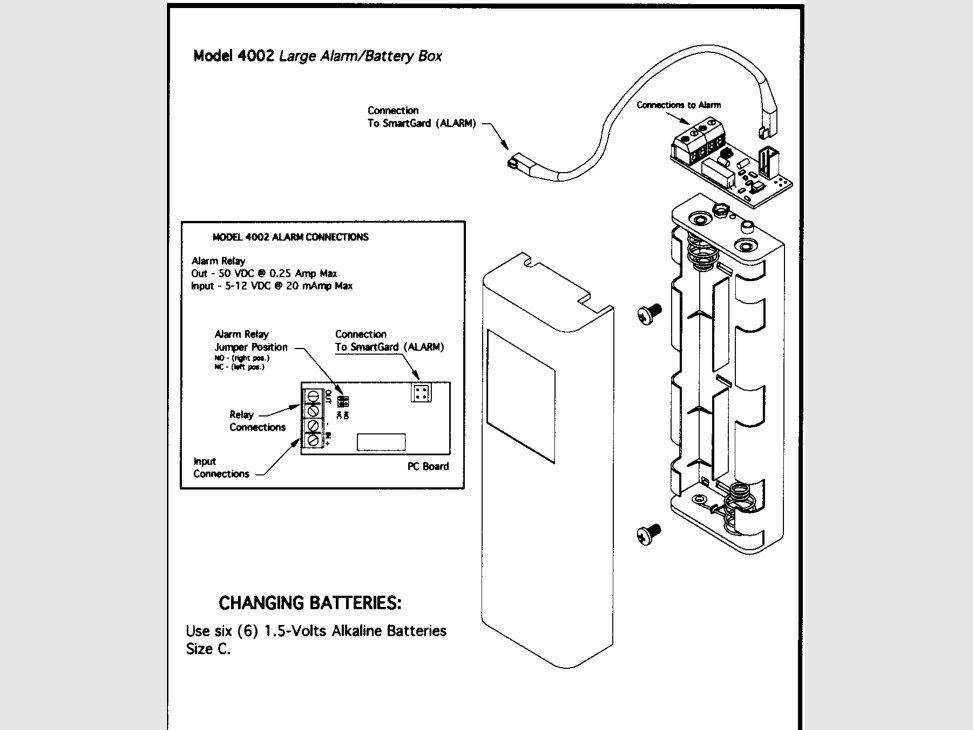
- It runs on six 1.5-volt C alkaline batteries in the model 4002 large alarm/battery box.
- LA GARD’s name for the combination is the “combination”. The sheets are © 1997 La Gard Inc., a MASCO company.
How the lock is used
- Users enter their own combination on the keypad to open the lock. LA GARD’s two sheets for this lock are the programming and manager instructions, so they do not give a separate “how to open” page.
- If dual combination is turned on, two combinations are needed to open.
- If a time delay is on, a valid combination starts the delay period and the lock then opens during the open period (1 to 99 minutes each).
- The program combination only sets up features. It does not open the lock, and a manager must be added before the lock can be used.
- Which features are turned on depends on how your lock was set up. If something does not match this page, call us.
Battery
The SmartGard’s power comes from the model 4002 large alarm/battery box. LA GARD’s sheet says: use six (6) 1.5-volt alkaline batteries, size C (we recommend Procell). The audit trail logs “BATTERY LOW” (event 42).
- Open the alarm/battery box (the drawing shows a cover held by two screws).
- Put in six new C alkaline batteries, matching the polarity marks.
- Close the box and test the lock several times with the door open.
- The box also connects the alarm (relay out 50 volts DC at 0.25 amp maximum; input 5 to 12 volts DC). That wiring is a service job.
How to change a combination
Do this with the door OPEN.
If the new combination is not confirmed, the old one is kept. The factory program combination is printed on LA GARD’s sheet and we are not printing it here.
A user or manager changes their own combination
- Enter six zeros (0-0-0-0-0-0).
- Enter your valid OLD combination.
- Enter your NEW combination and press the accept key.
- When the LCD shows “CONFIRM”, enter the new combination again. If it is valid the LCD shows “ACCEPTED.” If not, it shows “CONFIRM INVALID” and the confirm screen comes back.
The programmer changes the program combination
- Press the Program key and then eight zeros (0-0-0-0-0-0-0-0).
- Enter the valid OLD program combination, then the NEW one, and press the accept key.
- When the LCD shows “CONFIRM,” enter the new combination again. “ACCEPTED” means it worked.
Audit trail event codes
| Code | What it records |
|---|---|
| 00 and 01 | Combination entry and lock opened. |
| 02 | Silent alarm (hold-up). |
| 03 and 04 | Wrong try and time penalty. |
| 10, 11 and 12 | Time delay, time lock and remote lock. |
| 20 | Time change. |
| 21, 22, 23 and 24 | User added, deleted, disabled and enabled. |
| 30 | Immediate lock. |
| 40 and 41 | Door closed and door opened. |
| 42 | Battery low. |
Wrong tries
The SmartGard logs a WRONG TRY (event 03) and a TIME PENALTY (event 04). LA GARD’s two sheets do not give the number of tries or the length of the penalty, so we are not guessing. If the lock will not take your combination, call us.
What the manager can do
To use the manager functions, the manager enters the Manager key and then their combination. The manager can add, disable, re-enable and delete users 1 to 9, run the audit trail and change the time for daylight savings.
- Use the arrow key to scroll through the menu options.
- When you change a value, a flashing cursor appears in the upper right corner of the LCD. Press the accept key to keep the change.
- Press the exit key at any time to leave the menu.
- The audit trail stores 500 events, shown on the LCD or printed on an optional printer, with the unit’s serial number and software version.
Time delay, time lock and duress
Time delay: “Delay” and “Open” periods of 1 to 99 minutes. It can only be turned off in the open period.
Time delay override: user #9 overrides the delay period. The manager installs it in the open period.
Time lock: a standard week with auto lock, plus special event lock periods up to seven days. Immediate lock: the manager (or any user, if the option is set) can lock the time lock right away: press the lock key and your combination, then press and hold the accept key until the LCD shows TIME LOCK ACTIVATED.
Hold-up (silent signal alarm): with the optional alarm box, enter a combination whose last number is one higher or one lower to send a duress signal.
If it still won’t open
The lock does nothing
Check the six C batteries in the alarm/battery box. If the box is out of reach, call us.
I forgot my combination
LA GARD’s manager sheet says the manager can add, disable, re-enable and delete users 1 to 9, so ask your manager to set you up again. If it is the manager’s combination, the programmer can add or delete the manager. Call us if you need help.
The program combination did not open the lock
It is not supposed to. The program combination only sets up features. Use a user or manager combination to open.
Download the full manufacturer instructions
This page is a quick-reference summary. For every feature and diagram, use the official manual for your model:
- LA GARD SmartGard programming and manager instructions (PDF, 1997)A La Gard Inc. document. Copy hosted by MBA USA (scanned pages).
- dormakaba: LA GARD electronic safe locksdormakaba’s page for the LA GARD line, including legacy products.
Need a hand?
Still stuck? We can help.
Having a hard time getting into your safe? Our technicians are trained to open malfunctioning safes professionally, so your valuables can still be safely secured. Call us or stop by.
Steve’s Lock, Safe and Alarm · 3401 N. Sepulveda Blvd, Manhattan Beach, CA 90266
More lock guides
About this guide. This is an independent guide from Steve’s Lock, Safe and Alarm, a safe and lock dealer. Brand and model names belong to their owners and are used only to help you identify your lock. We are not affiliated with the manufacturers. These steps summarize the manufacturers’ own instructions; your lock may be a different version, so if anything here does not match what your lock does, follow your manual or call us. Always change codes with the safe door open, and test the new code several times before you close the door.
Steps last checked against the manufacturer documents on October 19, 2026.