
Safe lock help · Mesa Safe
Safe lock troubleshooting › Mesa Safe › MSL-500 and MSL-500-P keypad (depository safes)
The Mesa MSL-500 and MSL-500-P are the round electronic keypads on Mesa MFL depository safes. They have a Master code and five user codes, with an optional time delay and dual-user mode. This guide covers how to open the safe, change codes, open in time delay, replace the 9-volt battery, and what the lights and beeps mean.
Want the whole manual? Jump to the manufacturer download links.
Is this your lock?
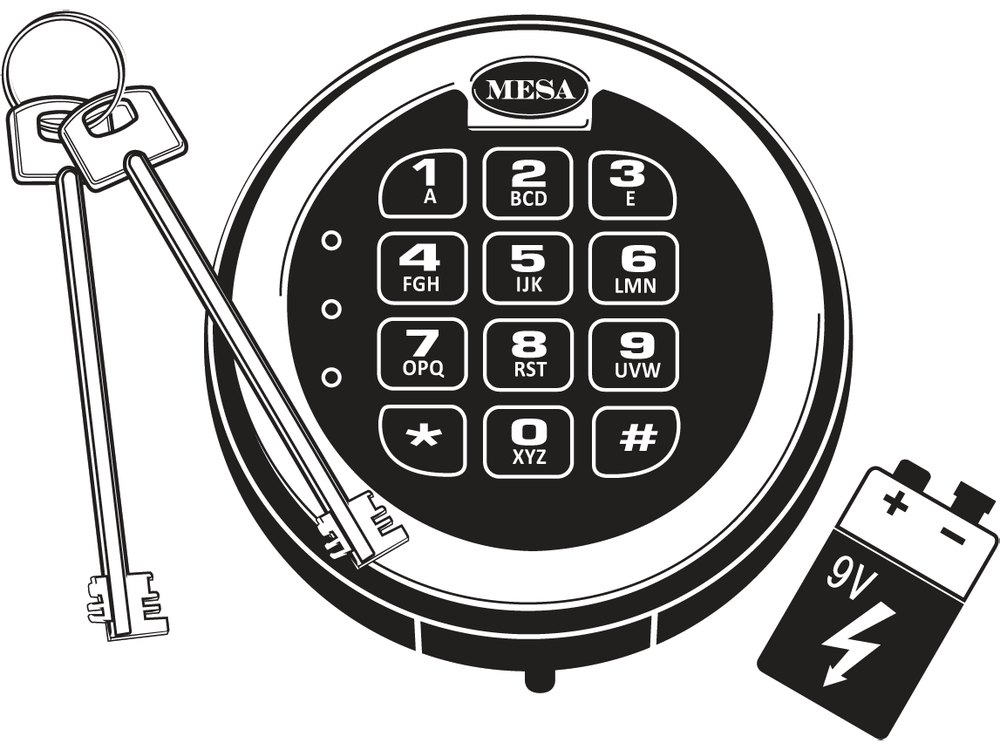
- A round keypad on the safe door with the MESA name at the top, number keys with letters, * and # keys, and three small lights at the left (green, red and orange).
- Mesa puts it on its MFL depository safes. It looks like the MSL-50, but it has six codes (a Master plus Users 1 to 5), time delay and dual-user mode. If your keypad has only two codes, see the MSL-50 guide.
- It runs on one 9-volt battery in a compartment on the bottom edge of the keypad.
- Mesa has a sheet that tells the MSL-50 and MSL-500 apart: it is linked in the download box below.
How to open it
Single-user mode (the normal setting)
- Enter your code, then press #. The green light stays on for about 5 seconds.
- Turn the handle clockwise before the green light goes out.
Dual-user mode (two codes needed)
- Enter the 1st code, then #. The lock gives 2 beeps.
- Enter the 2nd code, then #. The green light stays on for about 5 seconds.
- Turn the handle clockwise before the green light goes out.
With a time delay
- Enter any valid code other than the Master code. The time delay starts. While it runs, the keypad does not accept codes, and any key you press shows the orange light for 3 seconds.
- For the last 30 seconds the lock beeps continuously and the green light flashes.
- When the beeping stops, the lock unlocks for 5 seconds. Turn the handle to open the safe.
- A wrong code gives a red light and 5 beeps.
- The Master code overrides the time delay.
- To lock the safe, close the door and turn the handle back to the locked position.
How to change the battery
The keypad uses one 9-volt battery (we recommend Procell alkaline). Low battery: when you enter your code, the green and red lights come on for about 5 seconds with 10 beeps (the safe probably will not unlock), or the green light comes on for about 1 second and the safe will not unlock.
- Find the battery cover on the bottom edge of the keypad and pull its tab to remove the cover.
- Carefully remove the old 9-volt battery. Hold on to the battery connector so you do not pull the wires out of the housing.
- Connect the new battery and put it in, without forcing it.
- The lock keeps all codes and settings when the battery is changed. Test your code with the door open.
How to change a code
Always do this with the safe door OPEN.
Test the new code several times before you close the door. Codes are 3 to 8 digits long. Keep notes on which code belongs to which user.
Change the Master code
- Enter ** (2 beeps), then 888# (2 beeps).
- Enter the current Master code and # (2 beeps).
- Enter the new Master code and # (2 beeps).
- Enter the new Master code again and #. The green light stays on for 3 seconds.
- 5 beeps means it failed and the old code is still valid. Repeat the steps.
Change a user code (User 1 to 5)
- Enter ** (2 beeps), then 444# (2 beeps).
- Enter the current user code and # (2 beeps).
- Enter the user number (1 to 5) that goes with that code, then # (2 beeps).
- Enter the new user code and # (2 beeps).
- Enter the new user code again and #. The green light stays on for 3 seconds.
- 5 beeps means it failed and the old code is still valid. Repeat the steps.
- The Master code is needed to activate or delete users, to switch between single and dual-user mode, and to set the time delay (0 to 59 minutes). Those steps are in Mesa’s manual: see the download box below.
What the lights and beeps mean
| What you see or hear | What it means |
|---|---|
| Green light for about 5 seconds, and a click | The code was valid. Turn the handle now. |
| Red light and 5 beeps | The code was not valid, or a programming step failed. |
| 2 beeps (in dual mode or during programming) | That entry was accepted. Enter the next step. |
| Orange light for about 2 or 3 seconds when you press a key | The keypad is in a wrong-code shutdown or a time delay. |
| Green and red lights with 10 beeps when you enter a code | The battery is low. Replace it. |
Wrong-code lockout
Mesa’s manual says that if 4 wrong codes are entered in a row, the keypad shuts down for 5 minutes and does not accept any code. (Mesa’s website says 3 wrong codes, so stop after two wrong tries to be safe.) If you press a key during the shutdown, the orange light shows for about 2 seconds and you hear a beep.
If it still won’t open
The keypad does not respond at all (no beeps)
Make sure the battery wires in the keypad housing are not pinched and are firmly connected. The lock may be in the 5-minute shutdown, so wait. Then replace the battery.
It beeps but will not unlock
Check that you get a signal with every key press, that the lock is not in time delay, and replace the battery. If it still will not open, call us.
The safe is locked and the keypad is dead
Mesa includes a concealed override key for this. Its steps are in Mesa’s manual (linked below). If you are not sure, do not take the keypad apart: call us.
Download the full manufacturer instructions
This page is a quick-reference summary. For every feature and diagram, use the official manual for your model:
- Mesa MSL-500-P Electronic Lock Instructions (PDF)Mesa Safe Company, 2015. Hosted by Mesa.
- How to tell an MSL-50 from an MSL-500 (PDF)Mesa’s identification sheet.
- Mesa MSL-500 lock pageMesa’s page for the MSL-500.
- Mesa Safe technical supportMesa’s lock list and support page.
Need a hand?
Still stuck? We can help.
Having a hard time getting into your safe? Our technicians are trained to open malfunctioning safes professionally, so your valuables can still be safely secured. Call us or stop by.
Steve’s Lock, Safe and Alarm · 3401 N. Sepulveda Blvd, Manhattan Beach, CA 90266
More lock guides
About this guide. This is an independent guide from Steve’s Lock, Safe and Alarm, a safe and lock dealer. Brand and model names belong to their owners and are used only to help you identify your lock. We are not affiliated with the manufacturers. These steps summarize the manufacturers’ own instructions; your lock may be a different version, so if anything here does not match what your lock does, follow your manual or call us. Always change codes with the safe door open, and test the new code several times before you close the door.
Steps last checked against the manufacturer documents on October 15, 2026.