
Safe lock help · Securam
Safe lock troubleshooting › Securam › SafeLogic Stealth (touch-activated backlit keypad)
The Securam SafeLogic Stealth is a black, touch-activated keypad for home and gun safes. The screen is dark until you swipe your palm across it, and then the backlit number keys appear. It has a Stealth Mode that turns the beeper off and a randomized number feature that moves the keys around so no one can see your code. It takes two codes (a manager and a user), each 6 digits. This guide covers how to open it, how to use Stealth Mode and randomized numbers, and what Securam says about the lockout and the battery.
Want the whole manual? Jump to the manufacturer download links.
Is this your lock?
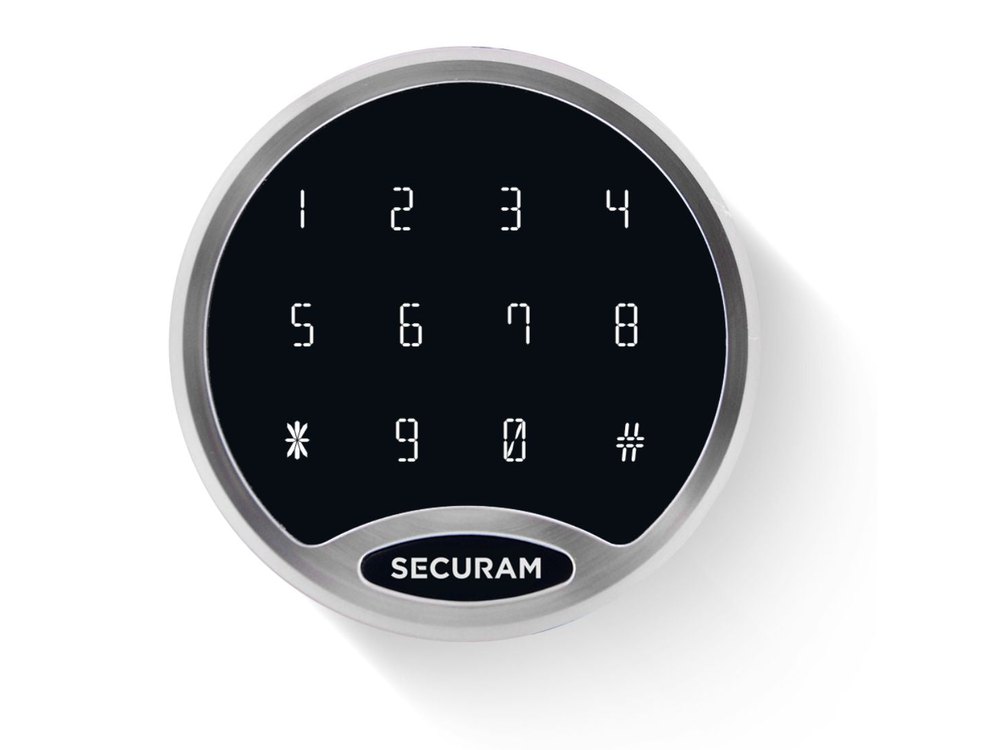
- A black, flat keypad with a chrome ring (Securam’s finish is chrome) that looks blank until you swipe your palm across it. The backlit LED numbers then light up.
- Securam sells it as the EC-2001A entry pad: EC-2001A-DT-CCH-EL for a standard lock body and EC-2001A-DT-CCH-DL for a direct drive lock body.
- It has a stainless steel housing with a CNC finish and a removable faceplate for easy battery access.
- MBA lists the lock sets as the SafeLogic Stealth Lock Package, Chrome Keypad. It works with Securam’s SwingBolt, DeadBolt, SpringBolt and StrikeBolt lock bodies, and with the D-Drive deadbolt if you lock the safe by hand.
- The SafeLogic Basic, BackLit and TopLit keypads are different: see their guides.
How to open it
- Swipe your palm across the screen to wake the display.
- Enter your 6-digit code.
- Turn the safe handle.
- Securam’s own words for it: “Enter your code and turn the safe handle.”
Wrong-code lockout
Securam says the lock locks out after 4 incorrect codes. Its product page does not say for how long. Wait a few minutes before you try again, and please do not keep guessing. Call us if it stays locked.
Stealth Mode (silent beeper)
Stealth Mode turns the beeper off so you can open the safe quietly.
- To turn it on, hold the * key. Securam lists Stealth Mode as an on/off beeper setting.
- With Stealth Mode on, enter your code in silence and open the safe.
Randomized numbers
If someone is watching, this feature moves the numbers around on the screen so your code is hard to see.
- Press * to switch it on.
If it still won’t open
The screen is dark
That is normal until you swipe your palm across it to wake it. If it will not wake, the battery may be dead: call us. Securam says the keypad has a removable faceplate and easy battery access, but its public page does not show the steps.
It does not beep
Stealth Mode may be on. Securam lists it as an on/off setting started by holding *. Try holding * again. If the beeper does not come back, call us.
The numbers are in a different order
The randomized numbers feature is on: it moves the keys around so no one can read your code. Look at the screen before you press each key. If it stays on and you do not want it, call us.
I want to change my code
Securam says the Stealth has two codes (manager and user) and that you can reset your access codes, but its public page does not list the steps and we could not find an operating guide. Call us and we will do it with you.
Download the full manufacturer instructions
This page is a quick-reference summary. For every feature and diagram, use the official manual for your model:
- Securam SafeLogic Stealth product pageSecuram’s page: touch activation, Stealth Mode, randomized numbers, 2 codes, 6 digits, lockout after 4 wrong codes, and the EC-2001A models. No operating guide is posted.
Need a hand?
Still stuck? We can help.
Having a hard time getting into your safe? Our technicians are trained to open malfunctioning safes professionally, so your valuables can still be safely secured. Call us or stop by.
Steve’s Lock, Safe and Alarm · 3401 N. Sepulveda Blvd, Manhattan Beach, CA 90266
More lock guides
About this guide. This is an independent guide from Steve’s Lock, Safe and Alarm, a safe and lock dealer. Brand and model names belong to their owners and are used only to help you identify your lock. We are not affiliated with the manufacturers. These steps summarize the manufacturers’ own instructions; your lock may be a different version, so if anything here does not match what your lock does, follow your manual or call us. Always change codes with the safe door open, and test the new code several times before you close the door.
Steps last checked against the manufacturer documents on October 20, 2026.