
Safe lock help · Securam
Safe lock troubleshooting › Securam › SafeLogic Xtreme (keypad + backup dial)
The Securam SafeLogic Xtreme has two ways in: an electronic keypad and a mechanical SpinDial combination lock. If the battery is dead or the electronics fail, you can still open the safe with the dial. This guide covers both, changing the electronic code, and the battery warning.
Want the whole manual? Jump to the manufacturer download links.
Is this your lock?
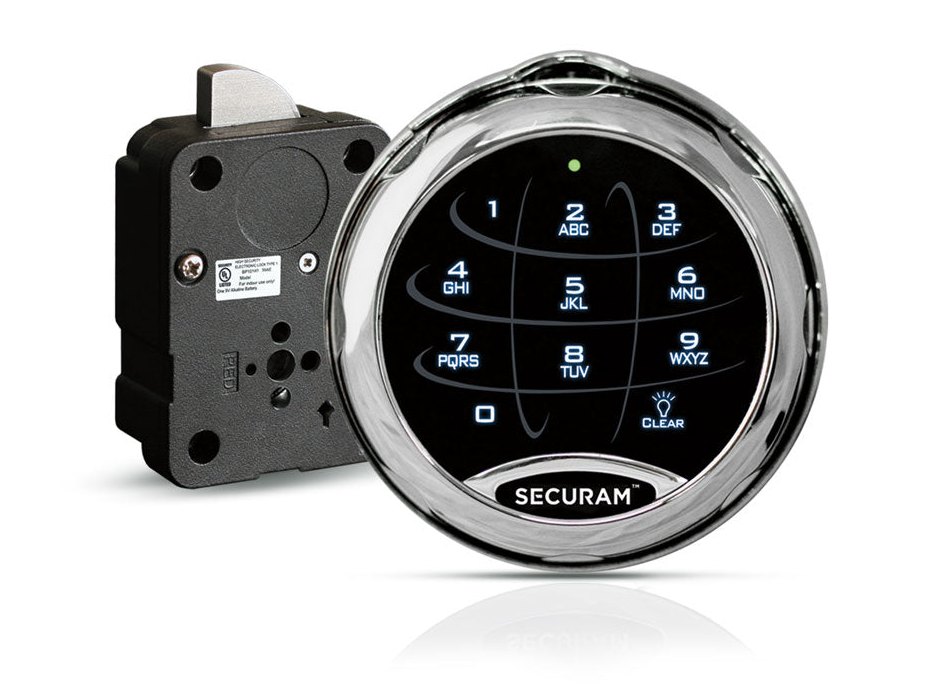
- A round Securam keypad mounted in a dial ring with a SpinDial release in the center. Lifting the release lets you turn the dial.
- It has two combinations: a 6-digit electronic code and a 3-number mechanical dial combination.
- It is powered by one 9-volt alkaline battery in the back of the keypad. The lock body (XL-1501) is inside the door.
- Securam calls it an electromechanical redundant lock, and its product page calls it EMP-proof.
How to open it with the electronic code
- Make sure the SpinDial release is pushed down (the dial is locked down at 00).
- Enter your 6-digit code.
- The lock opens, then relocks after 6 seconds. Turn the safe handle right away.
How to open it with the dial combination
Use this if the keypad is dead or the electronic code will not work. The numbers below stand for your own three-number combination.
- Pull up on the SpinDial release to turn off the electronics.
- Turn the dial 4 full turns to the left and stop on your first number at the dialing index (the small red arrow) the fourth time it passes.
- Turn right to your second number. Stop on it the third time it passes.
- Turn left to your third number. Stop on it the second time it passes.
- Turn the dial right until it comes to a stop (within one turn). The lock is open.
- Turn the safe handle.
- To relock with the dial combination: close the door and turn the safe handle, spin the dial at least 4 full turns to the left to spin off the combination, then push the SpinDial release back down to re-engage the electronics.
- When the release is lifted, a TopLight LED comes on for 2 minutes.
How to change the battery
The keypad uses one 9-volt alkaline battery in the back of the keypad (we recommend Procell). If you hear 8 rapid beeps after entering a code, the battery needs replacing. Securam’s guide shows how to take the keypad off the ring:
- With the safe door open, pull up on the SpinDial release to disengage the electronics.
- Rotate the keypad 180 degrees to get to the keypad screw at the 6 o’clock position.
- Loosen that screw, then pull the keypad away from the dial ring. (Magnets hold the keypad and ring together.)
- On the back of the keypad, put in a new 9-volt alkaline battery, following the + and – marks in the bottom of the battery compartment.
- Put the keypad back on the ring (the keypad face goes on upside down with the dial at 50), tighten the screw, then turn the dial back to 00 and push the SpinDial release down.
- Enter your code and check that it opens the lock, with the safe door still open.
- If you are not comfortable taking the keypad apart, call us. The dial combination still opens the safe while the battery is dead.
How to change the electronic code
Do this with the safe door OPEN.
Test the new code before you close the door. Securam’s guide says that if the lock does not open with the new code, you should repeat the change.
- Enter 000000. The lock beeps once: it is ready for programming.
- Enter your existing 6-digit code. It beeps once.
- Enter the new 6-digit code. It beeps once.
- Enter the new code again. It beeps once to show the change is complete.
- Enter the new code to test it. If the lock does not open, repeat the change.
- This changes the electronic code only. To change the mechanical dial combination, you need the Change Key that came with the lock and the steps in Securam’s guide (section 9.2). Do not try it without the key and the manual: call us.
What the beeps and lights mean
| What you hear / see | What it means |
|---|---|
| 8 rapid beeps after a code | The battery needs replacing. |
| 1 beep during a code change | That step was accepted. The last 1 beep means the change is complete. |
| 2 short beeps | Standby: no key was pressed for 10 seconds. |
| One beep every 5 seconds, keys do nothing | Penalty time after four wrong codes. Wait for it to finish. See below. |
Wrong codes
If four incorrect codes are entered in a row, the Xtreme goes into a 5-minute penalty time. During it, the keypad beeps once every 5 seconds. When the 5 minutes are over the beeping stops and you can enter your code. If you then enter two more wrong codes, another 5-minute penalty starts. Taking the battery out stops the beeping, but not the penalty: the countdown carries on when you put the battery back, so leave the battery in and let it beep through. If the electronic code will not work, the dial combination still opens the safe. Do not keep guessing: call us.
If it still won’t open
The keypad is dead
Use the mechanical dial combination to open the safe, then replace the 9-volt battery.
The keypad keeps beeping once every few seconds and will not take my code
It is in the 5-minute penalty after four wrong codes. Leave the battery in and let it finish, then enter your code. Pulling the battery does not skip the wait.
The dial will not turn
The dial only turns when the SpinDial release is pulled up. If the release is down, the electronics are engaged and the dial is locked.
The dial combination will not open it
Stop on each number precisely and count the passes the way the steps say. Do not force the dial. If you are not sure of the combination, call us.
Download the full manufacturer instructions
This page is a quick-reference summary. For every feature and diagram, use the official manual for your model:
- Securam SafeLogic Xtreme Installation and Operation Instructions, Dec 2024 (PDF)Securam document XU-EC1501A-X-241218. Hosted by Securam.
- Liberty Safe video: SafeLogic Xtreme troubleshooting and penalty time (YouTube)Liberty Safe, 2:38. Shows the 4-wrong-codes, 5-minute penalty and what the battery does.
- Securam SafeLogic Xtreme support articleHosted by Securam.
Need a hand?
Still stuck? We can help.
Having a hard time getting into your safe? Our technicians are trained to open malfunctioning safes professionally, so your valuables can still be safely secured. Call us or stop by.
Steve’s Lock, Safe and Alarm · 3401 N. Sepulveda Blvd, Manhattan Beach, CA 90266
More lock guides
About this guide. This is an independent guide from Steve’s Lock, Safe and Alarm, a safe and lock dealer. Brand and model names belong to their owners and are used only to help you identify your lock. We are not affiliated with the manufacturers. These steps summarize the manufacturers’ own instructions; your lock may be a different version, so if anything here does not match what your lock does, follow your manual or call us. Always change codes with the safe door open, and test the new code several times before you close the door.
Steps last checked against the manufacturer documents on October 14, 2026.