
Safe lock help · Sentry Safe
Safe lock troubleshooting › Sentry Safe › Older Sentry fire safe, keypad with a display and PROG/ENTER key
Some older SentrySafe fire safes (the CS, DS, KS, MS, OA, OS and DA series) have an advanced electronic lock: a round keypad with a small display and a PROG/ENTER key. It has a factory code, a manager code and up to six user codes. This guide covers how to open it, set the manager and user codes, replace the four AA batteries, and what the display icons mean. If your keypad has CLEAR and PROG keys and no display, see the older PROG-key guide.
Want the whole manual? Jump to the manufacturer download links.
Is this your lock?
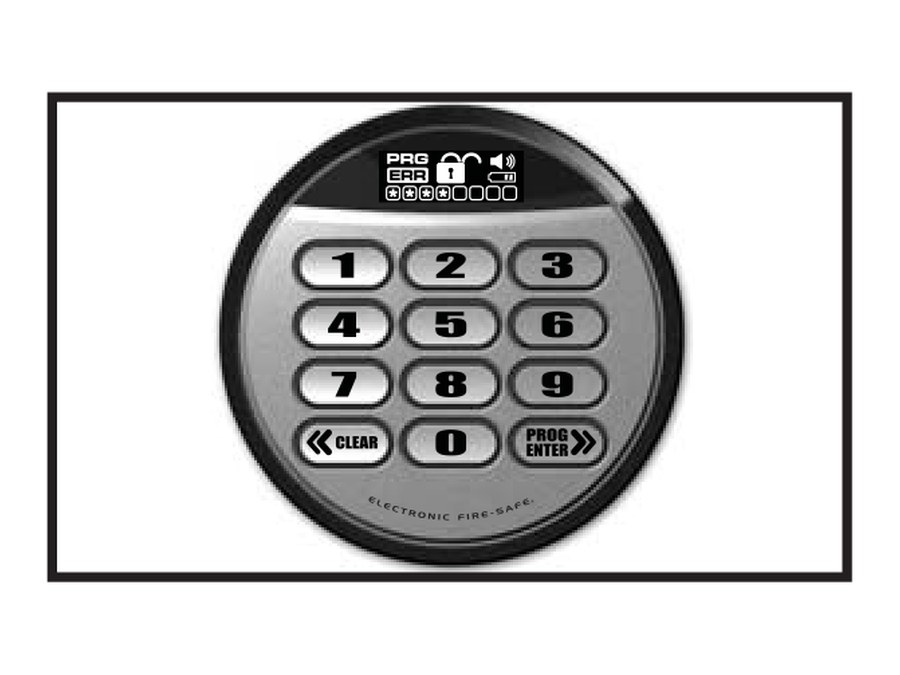
- A round keypad with a small display at the top and the numbers 1 to 9, 0, a «CLEAR key and a PROG/ENTER» key. “ELECTRONIC FIRE-SAFE” is printed around the ring.
- The display shows icons: PRG (programming), ERR (error), an open padlock (unlocked), a speaker (beeper), a battery, and a row of boxes for the codes.
- It runs on four AA batteries behind a lock case that you turn off.
- It uses the 5-digit factory code, one manager code and up to six user codes (4 to 8 digits each).
How to open it
- Enter the 5-digit factory code, a manager code or a user code, and press PROG/ENTER.
- The unlocked padlock icon appears. You have 4 seconds.
- Turn the handle down to open the door.
- If your safe has a key lock, turn the key to the right first so the lock cylinder pops out.
- Locking: close the door and put the handle back horizontal. If the safe has a key lock, press it in with your finger for more security. On a water-resistant door, press the front left corner before the handle will go back.
- First time: try your code several times with the door open before you close it.
How to change the battery
The lock uses four AA alkaline batteries (we recommend Procell). The battery icon lights when they need to be replaced. No codes are erased when the batteries are taken out. Sentry says to check the batteries first if the safe does not seem to work.
- Open the safe if you can.
- Take out the screw at the base of the lock case if there is one.
- Turn the electronic lock case to the right (clockwise), from 12 o’clock to 2 o’clock, and take it off.
- Put in four new AA alkaline batteries.
- Put the lock case back and turn it left, back to 12 o’clock.
- Open the safe with your code to test it, with the door open.
How to set the manager and user codes
Do this with the safe door OPEN.
Test the new code with the door open before you close it. An all-zero code is not accepted. Keep a record of the factory, manager and user codes in a safe place, but not in the safe.
- Press PROG/ENTER.
- Enter the 5-digit factory code and press PROG/ENTER.
- An empty box icon means no manager code is set. A boxed star icon means one is set.
- Enter a 4 to 8 digit manager code and press PROG/ENTER to save it.
Add a user code (up to six)
- Press PROG/ENTER two times, enter the manager code, and press PROG/ENTER.
- Use the << and >> keys to scroll between the boxes. An empty box is free. A boxed star is in use.
- Enter a 4 to 8 digit code in the box you chose and press PROG/ENTER.
Delete a user code
- Press PROG/ENTER two times, enter the manager code, and press PROG/ENTER.
- Scroll to the boxed star you want to remove.
- Enter 0000 and press PROG/ENTER.
Delete the manager code
- Press PROG/ENTER, enter the factory code, and press PROG/ENTER.
- The boxed star shows there is a code to delete.
- Enter 0000 and press PROG/ENTER.
- If you wait 5 seconds while programming, the lock times out and you start again.
- You can have one manager code and six user codes. The factory code cannot be deleted.
- Beeper: press 0 and then PROG/ENTER to turn the beeper on or off.
What the icons mean
| Icon | What it means |
|---|---|
| Unlocked padlock | The code was right. You have 4 seconds to open. |
| ERR (error) | The PROG key was pressed out of order, the code was wrong, 5 seconds went by between key presses, or a key was pressed during delay mode. |
| PRG (program) | You pressed PROG/ENTER, and it stays lit while you program a manager or user code. |
| Locked padlock (delay mode) | Three wrong codes in a row. The keypad is locked for 2 minutes. |
| Battery | The batteries need to be replaced. |
| Boxed star in a code box | That code is in use. An empty box is free. |
Wrong codes
Three wrong codes in a row start a 2-minute delay mode. The padlock icon stays lit. The lock cannot be used and any key you press gives the error signal. Wait the 2 minutes and then try again.
If it still won’t open
The display shows ERR
The code was wrong, you pressed PROG out of order, you waited more than 5 seconds between keys, or the lock is in delay mode. Press CLEAR (<<), and try again. If your own code will not work, try the factory code.
The battery icon is lit
Replace all four AA batteries (see above). Your codes are kept.
The keypad is dead
Check the batteries first. If the safe is locked and the batteries are dead, call us.
I lost the factory code
SentrySafe can look it up from your model and serial number on its Lost Key or Combo page.
Download the full manufacturer instructions
This page is a quick-reference summary. For every feature and diagram, use the official manual for your model:
- SentrySafe Fire-Safe owner’s manual (advanced electronic lock)Sentry’s manual for the CS, DS, KS, MS, OA, OS and DA fire safes. Linked from SentrySafe.com’s Product Manuals page.
- SentrySafe Product Manuals (find your model)Type in your model number to get your own manual.
- SentrySafe Lost Key or ComboOrder a replacement key or request your factory code.
Need a hand?
Still stuck? We can help.
Having a hard time getting into your safe? Our technicians are trained to open malfunctioning safes professionally, so your valuables can still be safely secured. Call us or stop by.
Steve’s Lock, Safe and Alarm · 3401 N. Sepulveda Blvd, Manhattan Beach, CA 90266
More lock guides
About this guide. This is an independent guide from Steve’s Lock, Safe and Alarm, a safe and lock dealer. Brand and model names belong to their owners and are used only to help you identify your lock. We are not affiliated with the manufacturers. These steps summarize the manufacturers’ own instructions; your lock may be a different version, so if anything here does not match what your lock does, follow your manual or call us. Always change codes with the safe door open, and test the new code several times before you close the door.
Steps last checked against the manufacturer documents on October 19, 2026.