
Safe lock help · Sargent & Greenleaf (S&G)
Safe lock troubleshooting › Sargent & Greenleaf (S&G) › Spartan round keypad (D-Drive and Swing Bolt)
The S&G Spartan is a round electronic keypad lock found on UL-listed safes. It has a master code and a second (user) code, each 6 characters long, and runs on one 9-volt battery. This guide covers how to open it in either of its two modes, change your code, check and replace the battery, and what the penalty means.
Want the whole manual? Jump to the manufacturer download links.
Is this your lock?
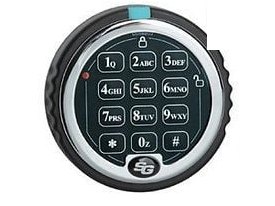
- A round keypad with a chrome ring, 12 keys (1 to 9, *, 0, #), a blue tab at the top, a small red light at the upper left, and the S&G logo at the bottom.
- Spartan locks come in D-Drive and Swing Bolt versions. Both use the same keypad and the same instructions. Hollon Safe uses them.
- Codes are 6 characters (digits and/or letters). The lock can work in STAR mode (you press # after the code) or BASIC mode (it opens after the 6th character, with 2 beeps).
- A very similar keypad is the S&G Titan, which has more users and a time-delay option. See the Titan guide if yours has those features.
How to open it
STAR mode (you press # after the code)
- Enter your 6-character code, then press #.
- The lock unlocks for about 6 seconds. Turn the handle within that time (on a D-Drive lock, turn the keypad to the right).
- If you do not open the safe, the lock locks itself again.
BASIC mode (no # needed)
- Enter your 6-character code. The lock gives 2 beeps and unlocks.
- The lock stays unlocked for about 6 seconds. Turn the handle within that time.
- If you do not open the safe, the lock locks itself again.
- Every key press makes the red light flash and the keypad beep (or click, if the beeper is off).
- If you make a mistake, press ** or wait 10 seconds and the lock clears. If you stop for more than 10 seconds between key presses, the lock resets and you start again.
How to change the battery
The lock uses one 9-volt alkaline battery (we recommend Procell), kept in the keypad. To check it: press 89*. One beep means the battery is weak, two beeps means it is good.
- If you can, leave the safe door open while you change the battery.
- Press the blue tab at the top of the keypad ring and release the keypad by turning it, as the Titan D-Drive battery video on Hollon’s site shows (linked below). The Spartan keypad looks the same, but the Spartan instruction sheet does not show these steps, so call us if yours does not release easily.
- Pull the old 9-volt battery off its connector and snap a new alkaline 9-volt battery on. Do not force the connector.
- Put the keypad back and turn it to lock it in place.
- Press a key: the red light flashes and the keypad beeps or clicks. If it does not, check that the battery is fresh and connected, then try again.
- Test your code several times with the door open.
- Hollon lists the Spartan battery at about 10,000 openings.
How to change your code (master or user)
Always do this with the safe door OPEN.
Check the new code at least 3 times before you close the door. Wait for each set of beeps to finish before you press the next key. The lock will not accept a user code that is the same as the master code. Do not use a birthday, street number or phone number.
STAR mode
- Press 22* (or 33*).
- Enter your current 6-character code and #. The lock gives 5 beeps.
- Enter your new code and #. The lock gives 3 beeps.
- Enter the new code again and #. The lock gives 3 beeps: the code is changed.
BASIC mode
- Press 000000. The lock gives 2 beeps.
- Enter your current 6-character code. 2 beeps.
- Enter your new code. 2 beeps.
- Enter the new code again. 2 beeps: the code is changed.
- A second (user) code, disabling or deleting it, the keypad beeper, and switching between STAR and BASIC mode all use the master code. Those steps are on S&G’s sheet: see the download box below.
- If your lock has a management reset code for a lost master code, the person who installed the lock or the safe maker has it. Call us.
What the beeps mean
| What you hear or see | What it means |
|---|---|
| Key press: red light flashes and a beep (or click) | The lock registered that key. |
| 2 beeps after the code (BASIC mode) | The code was right. The lock is unlocked for about 6 seconds. |
| Two long beeps when you press a key (STAR mode) | The lock is in its 3-minute penalty time. Do not press keys. |
| Red light blinks once every 10 seconds, no response to keys (BASIC mode) | The lock is in its 3-minute penalty time. Do not press keys. |
| Double beep after a user code (STAR mode) | That user code has been disabled. |
| Triple beep after a user code (BASIC mode) | That user code has been disabled or deleted. |
| 1 beep or 2 beeps after 89* | Battery check: 1 beep = weak battery, 2 beeps = good battery. |
Wrong codes (penalty)
If 5 or more wrong codes are entered in a row, the lock goes into a 3-minute penalty period and will not accept anything. Pressing a key during the penalty extends it by a few seconds, so do not press keys until the 3 minutes are up. In STAR mode, a key press gives two long beeps. In BASIC mode the keypad does not respond and the red light blinks once every 10 seconds. (Hollon’s product list says 3 wrong attempts, so stop after two to be safe.)
If it still won’t open
The keypad does not respond
Check for the penalty (the red light blinking every 10 seconds, or two long beeps). If not, replace the 9-volt battery.
I changed the code and it does not work
Repeat the change with the door open and wait for all the beeps in each step. If the lock gives a long error beep, start over.
I do not know if my lock is in STAR or BASIC mode
If you press # after your code and the lock opens, it is in STAR mode. If it opens by itself with 2 beeps after the 6th character, it is in BASIC mode. If you are not sure, wait for the penalty to end and call us.
Download the full manufacturer instructions
This page is a quick-reference summary. For every feature and diagram, use the official manual for your model:
- S&G Spartan Series Operating Instructions, STAR and BASIC modes (PDF, doc 630-869)Sargent & Greenleaf, revised 6/14/2013. Hosted by Hollon Safe.
- S&G Spartan installation instructions (PDF)Hosted by Hollon Safe.
- Battery replacement video, Titan D-Drive keypad (MP4)Hosted by Hollon Safe. Shows the same style of keypad.
- Hollon Safe electronic locks pageHollon’s list of locks, with the Spartan and Titan.
Need a hand?
Still stuck? We can help.
Having a hard time getting into your safe? Our technicians are trained to open malfunctioning safes professionally, so your valuables can still be safely secured. Call us or stop by.
Steve’s Lock, Safe and Alarm · 3401 N. Sepulveda Blvd, Manhattan Beach, CA 90266
More lock guides
About this guide. This is an independent guide from Steve’s Lock, Safe and Alarm, a safe and lock dealer. Brand and model names belong to their owners and are used only to help you identify your lock. We are not affiliated with the manufacturers. These steps summarize the manufacturers’ own instructions; your lock may be a different version, so if anything here does not match what your lock does, follow your manual or call us. Always change codes with the safe door open, and test the new code several times before you close the door.
Steps last checked against the manufacturer documents on October 15, 2026.