
Safe lock help · AMSEC
Safe lock troubleshooting › AMSEC › ESL5 / ESL5LP
The AMSEC ESL5 (round keypad) and ESL5LP (long keypad with a built-in handle) are electronic safe locks with a 6-digit combination. This guide covers how to open the safe, change the 9-volt battery, change the combination, turn the beeper off, and what the tones, lights and lockout mean.
- How to open
- Battery
- Change the code
- Beeps & lights
- Lockout
- Quiet mode
- Replacement keypad
- Troubleshooting
- Manuals
Want the whole manual? Jump to the manufacturer download links.
Is this your lock?
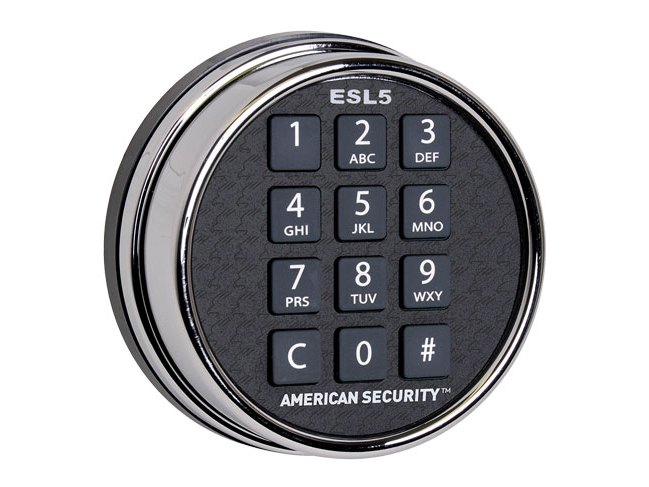
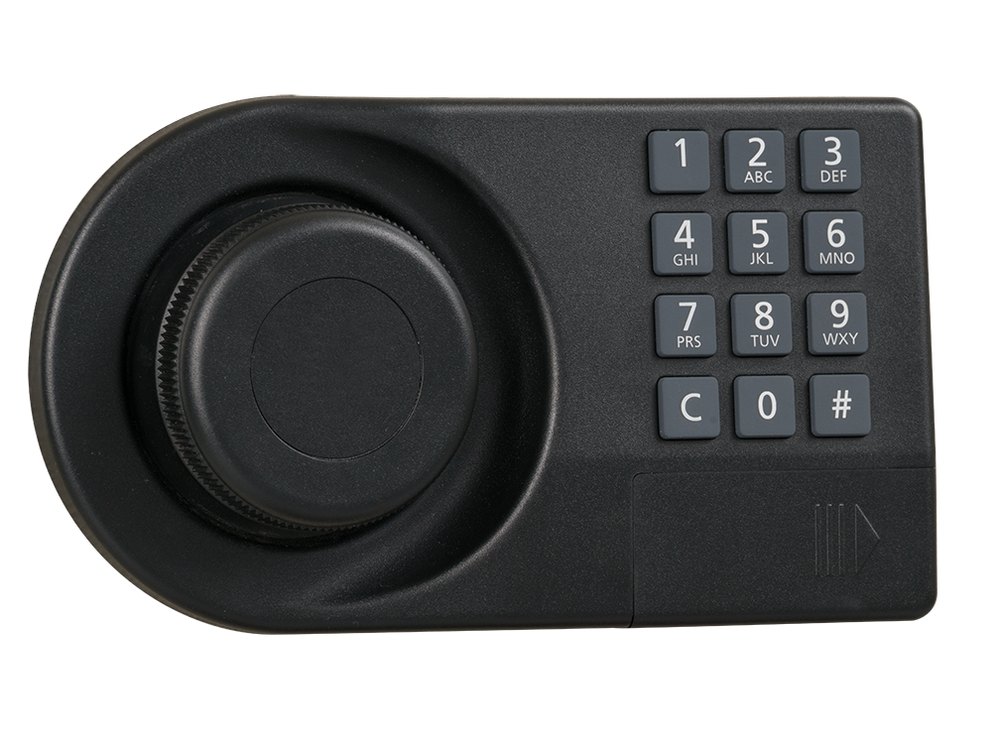
- An electronic keypad on the safe door with backlit keys, a C (clear) key and a # (enter) key. Pressing C turns the key backlights on.
- It uses a fixed 6-digit combination and one 9-volt battery inside the keypad.
- Two styles: the round ESL5 keypad twists off the door to reach the battery. The ESL5LP is a long keypad with an integrated handle and a small battery door at its bottom-right corner.
How to open it
- Make sure the safe handle is centered in the locked position, so the lock can open freely.
- Press C. The keypad backlights come on.
- Press the six digits of your combination, one at a time.
- Press #.
- If the combination is correct, the lock opens for 3 seconds. Turn the handle to the unlocked position and pull the door open during that time.
- Pressed a wrong key? Press C to clear the entry and start over.
- If you press no key for 10 seconds, the keypad goes back to rest and you have to begin again.
- Use only your fingers, and do not press hard or strike the buttons. Pens, keys and other sharp objects damage the keypad and are not covered by the warranty.
- If you press more than six digits, the lock uses the first five and the last one you press. This lets you hide your code from onlookers.
How to change the battery
The ESL5 uses one 9-volt alkaline battery. AMSEC says a typical battery lasts about a year, recommends fresh name-brand alkaline batteries once a year, and calls a weak or dead battery the number one cause of opening problems. Because the lock’s solenoid needs a quick burst of power, a battery that tests fine can still be too weak to open it. We recommend Procell.
Round ESL5 (twist-off keypad)
- Grip the keypad and rotate it about 1/8 turn counter-clockwise to release it from the base.
- Carefully pull the keypad away from the base. Do not let it hang from the cable that connects it to the lock inside the safe.
- Lift the 9-volt battery out of its pocket.
- Carefully remove the battery clip from the end of the battery. Do not pull the wires or disconnect the clip from the circuit board.
- Snap the new 9-volt battery onto the clip. Make sure it is tight, with no loose contact.
- Press the battery back into its pocket, routing the wires so they are not pinched under the battery.
- Put the keypad back on the base, starting at the top (around the 11 o’clock position). Press down so the three tabs go into their slots, then rotate clockwise until it is level. It snaps into place.
ESL5LP (long keypad with integrated handle)
- Slide the battery door at the bottom-right corner of the keypad to the right to expose the battery.
- Lift out the old battery.
- Place the new battery in the cavity. The larger (minus) battery terminal goes on top. Make sure both battery contact tabs are clean and touching the battery terminals.
- Put the door back over the battery and slide it to the left until it seats.
- Do the change with the safe door open and test your combination afterward.
- AMSEC’s support site describes the low-battery signs this way: the keypad flashes slowly and takes no input when the battery is low, and does not respond at all when it is dead. Another AMSEC page says some ESL5 locks give a 3-second warble and flashing lights after a normal opening when the battery is nearly out, but also says the ESL5 has no low-battery indication. Do not rely on a warning: change the battery every year.
How to change the code
Do this with the safe door OPEN.
Changing the combination with the door closed risks locking yourself out. Do not close the door until the new combination has worked several times.
The ESL5 uses a fixed 6-digit combination. You enter the old combination once and the new one twice.
- Press C. The keypad backlights turn on.
- Press #. You hear a short warbling tone and the red light flashes.
- Key in your old 6-digit combination.
- Press #. A short good-combination tone means it was accepted.
- Key in your new 6-digit combination.
- Press #. Another short good tone.
- Key in the new combination again.
- Press #. If it matches the first entry, a long good-combination tone means the new combination is recorded.
- Test the new combination several times before you close and lock the safe.
- Press C at any point to clear a mistake. If you pause for 10 seconds, the lock returns to rest and keeps the old combination.
- A wrong old combination, a new code that is not 6 digits, or two entries that do not match all give 4 short beeps and stop the change. Your old combination stays.
- Change the factory combination as soon as the safe is installed.
What the beeps and lights mean
A warble is a high-low-high-low run of tones.
| What you hear / see | What it means |
|---|---|
| 1 beep and the backlights flash off | Normal: each key press was accepted. Also signals the end of a lockout. |
| 2 beeps | The lock is open after a correct code. |
| 4 beeps (backlights flash 4 times) | An incorrect code was entered. After four wrong codes the lock starts a 15-minute lockout. |
| 6 beeps | The lock is in penalty lockout and will not accept input. Wait for it to end. |
| Short warble (about 2.5 seconds) | An entry was accepted during a combination change. |
| Long warble (about 10 seconds) | The combination change is complete. |
| Backlights flash once every 5 seconds | Penalty lockout is in progress. |
| Rapid flashing and 8 chirps after a key press | You pressed a key during penalty lockout. |
Wrong-code lockout
After 4 incorrect combinations the lock goes into a 15-minute penalty lockout. The backlights flash once every 5 seconds and the keypad accepts nothing. Removing power does not reset the lockout, so pulling the battery will not help. Wait for it to end.
Turn the beeper off (Stealth Mode)
The ESL5 and ESL5LP can be set so the beeper stays silent during normal opening. The beeper still sounds during combination changes and programming.
- Turn ON (silent): press C# (short warble), then 80# (short warble), then 1# (long warble).
- Turn OFF (beeping): press C# (short warble), then 80# (short warble), then 0# (long warble).
Replacing the keypad? Check the serial number
ESL5 keypads are not interchangeable between versions. AMSEC warns that plugging the wrong keypad into an ESL5 can damage the lock. The right replacement depends on the serial number (printed on the inside of the keypad housing) and the finish.
- Do not guess. AMSEC publishes a replacement-keypad chart by serial number and finish: see the compatibility link in the manuals list below.
- Or call us with the serial number and finish.
If it still won’t open
The keypad responds but the safe will not open
Check, in this order:
- Is it a penalty lockout? Wait 15 minutes.
- Move the safe handle to the center of its locked range and try again. Pressure from the boltwork on the lock bolt keeps it from retracting. If your handle turns clockwise to open, turn it fully counter-clockwise first, and the reverse if it turns counter-clockwise to open.
- Replace the battery with a fresh alkaline 9-volt, and check that its clip is snapped on tight.
Nothing happens, or I hear only a faint click
That usually means a weak battery. Replace it. If you changed it and there is still no response, press C first, then check that the keypad cable is firmly seated in its socket and that the battery contacts are tight.
The keypad only responds to C, or to C and one number
Rotate the keypad counter-clockwise and lift it off the base. Unplug the lock cable and plug it back in firmly. If that does not fix it, call us.
It opens only for a while after each new battery
That points to bolt binding in the boltwork: a fresh battery overpowers it for a short time. This needs a service visit. Call us.
Download the full manufacturer instructions
This page is a quick-reference summary. For every feature and diagram, use the official manual for your model:
- AMSEC support: ESL 5 lock articles (battery, combination, beeps, lockout)American Security (AMSEC) knowledge base. Each article has a Download PDF button.
- AMSEC support: ESL5 replacement keypad chart (by serial number and finish)American Security (AMSEC) knowledge base.
- AMSEC ESL5 Operating Instructions (PDF)Part No. 4305296, Rev A, April 20, 2011. Hosted by AMSEC.
- AMSEC ESL5LP Operating Instructions (PDF)Part No. 4305314, Rev A, June 20, 2014. Copy hosted by a dealer.
Need a hand?
Still stuck? We can help.
Having a hard time getting into your safe? Our technicians are trained to open malfunctioning safes professionally, so your valuables can still be safely secured. Call us or stop by.
Steve’s Lock, Safe and Alarm · 3401 N. Sepulveda Blvd, Manhattan Beach, CA 90266
More lock guides
About this guide. This is an independent guide from Steve’s Lock, Safe and Alarm, a safe and lock dealer. Brand and model names belong to their owners and are used only to help you identify your lock. We are not affiliated with the manufacturers. These steps summarize the manufacturers’ own instructions; your lock may be a different version, so if anything here does not match what your lock does, follow your manual or call us. Always change codes with the safe door open, and test the new code several times before you close the door.
Steps last checked against the manufacturer documents on October 14, 2026.