
Safe lock help · AMSEC
Safe lock troubleshooting › AMSEC › Simplex push-button lock (PS1210HD, PS1210EZ, HAS410)
The Simplex lock is a mechanical push-button lock with five round buttons and a black knob on a silver strip. It has no batteries and no electronics. AMSEC’s quick reference covers the PS1210HD, PS1210EZ and HAS410 safes. This guide covers how to open and lock it, and how to change your combination.
Want the whole manual? Jump to the manufacturer download links.
Is this your lock?
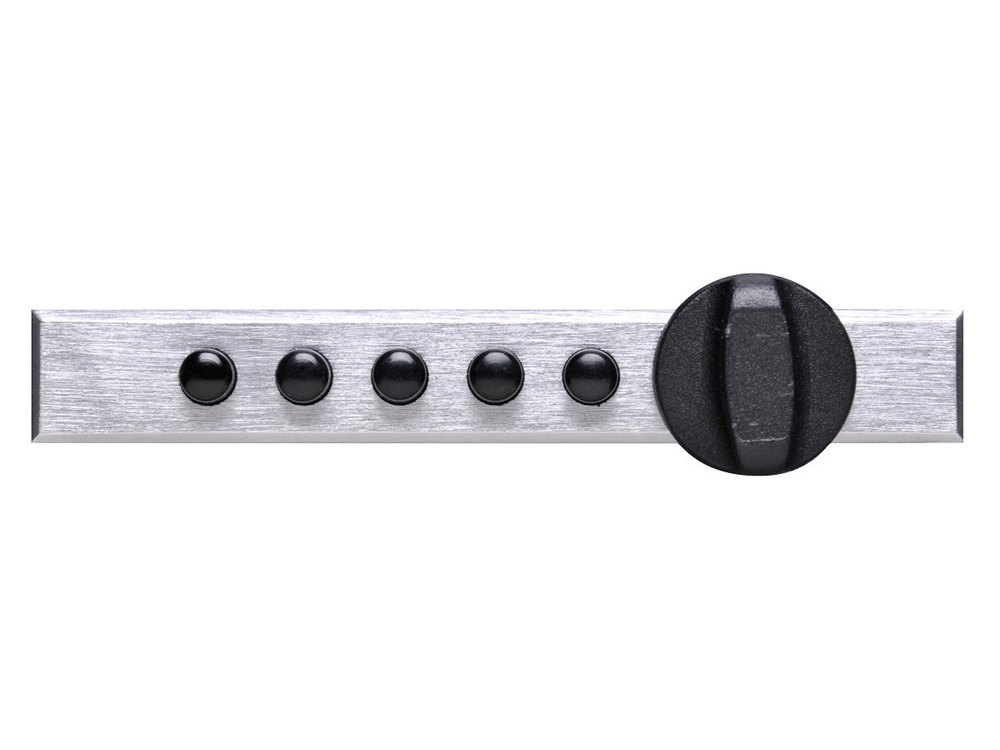
- A brushed silver strip with five black push buttons in a row and a black turn knob.
- AMSEC’s quick reference (revised 6/15) lists the models PS1210HD, PS1210EZ and HAS410.
- You can use one, all five, or any number of buttons, in any order, and two or more buttons can be pushed at one time as part of the combination. A button can be used only once in a combination.
How to open it
- Turn the knob LEFT (counter-clockwise) to activate all the buttons. Make a habit of doing this before you push the combination: it clears any wrong attempt.
- Push the proper buttons in your combination’s order.
- Turn the knob RIGHT (clockwise) to open.
To lock
- Turn the knob LEFT (counter-clockwise) until it stops.
- The lock comes set with a starting combination, shown in AMSEC’s sheet. We are not printing it here.
How to change your combination
Test the new combination with the lid open.
Test it several times with the lid open to make sure it is set. Write your new combination down and keep it in a safe place, not in the safe.
- Open the door or drawer and relock your lock.
- Press the correct buttons in the proper order for your EXISTING combination.
- On the inside of the safe, pull back the protective foam. There is a combination change button on the inside of the door. Push it until you hear a click. (On the HAS410, the change button is also on the inside of the door, as shown in AMSEC’s sheet.)
- Turn the knob LEFT (counter-clockwise) to clear out the existing combination.
- Press the buttons firmly and deliberately in the sequence you want for your new combination.
- Turn the knob RIGHT (clockwise) to set the new combination into the mechanism.
- Turn the knob full LEFT to lock the lock. Your new combination is installed.
- Simple two- and three-button combinations are easy to remember and still give top security, AMSEC says.
If it still won’t open
The buttons will not go down, or the knob will not turn
Turn the knob left (counter-clockwise) all the way first. That clears any earlier attempt and reactivates the buttons. Then push your combination and turn the knob right.
I forgot the combination
Please do not keep forcing it. Call us.
I changed it and it does not work
Repeat the change steps with the lid open. You must press your existing combination first, then push the change button inside the door until it clicks, then turn the knob left, press the new buttons, and turn the knob right.
Download the full manufacturer instructions
This page is a quick-reference summary. For every feature and diagram, use the official manual for your model:
- AMSEC Simplex Lock Quick Reference (PDF)Part 4305339, revised 6/15. Hosted by AMSEC.
Need a hand?
Still stuck? We can help.
Having a hard time getting into your safe? Our technicians are trained to open malfunctioning safes professionally, so your valuables can still be safely secured. Call us or stop by.
Steve’s Lock, Safe and Alarm · 3401 N. Sepulveda Blvd, Manhattan Beach, CA 90266
More lock guides
About this guide. This is an independent guide from Steve’s Lock, Safe and Alarm, a safe and lock dealer. Brand and model names belong to their owners and are used only to help you identify your lock. We are not affiliated with the manufacturers. These steps summarize the manufacturers’ own instructions; your lock may be a different version, so if anything here does not match what your lock does, follow your manual or call us. Always change codes with the safe door open, and test the new code several times before you close the door.
Steps last checked against the manufacturer documents on October 19, 2026.