
Safe lock help · dormakaba (Kaba Mas)
Safe lock troubleshooting › dormakaba (Kaba Mas) › Cencon ATM security lock (Gen 2)
The Cencon is a managed ATM and cash-in-transit safe lock from dormakaba (Kaba Mas). It has a dial that powers it, a small keypad, a 3-character display, and a key reader for the user key (a Dallas-type key) that your company issues. A dispatcher at the PC system controls who can open the lock and gives each call its combination. This guide covers how to power and open it, what the prompts mean, and what the error codes and lockout mean.
Want the whole manual? Jump to the manufacturer download links.
Is this your lock?
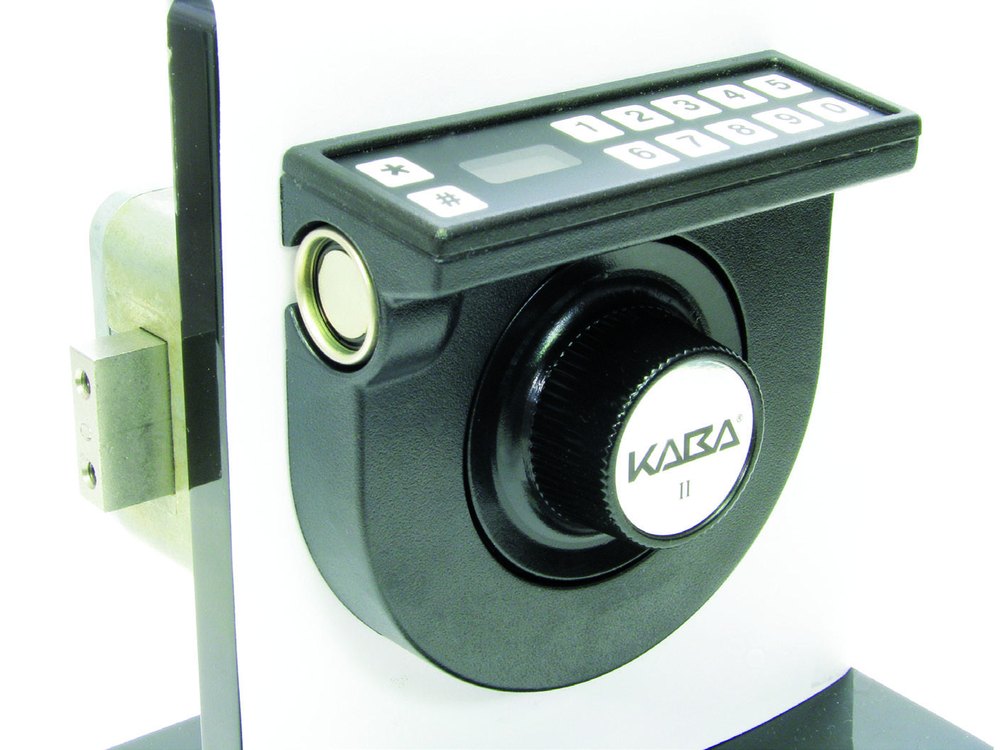
- A dial (with the Kaba or dormakaba name) in a dark housing, with a small keypad of two rows of numbers plus * and # keys and a 3-character display on top. It is mounted on the door of an ATM or cash safe.
- A small round key reader sits on the side of the keypad housing. The key you present is a user key: blue for FLM, yellow for Route, green for Bank mode.
- It comes as swing bolt and deadbolt versions, with a shunted or non-shunted lock back.
- The newer CenconX has no dial and no keys: it uses one-time codes from a phone app. See the CenconX guide.
- A lock that is not set up for a company works in shelved mode, with a combination only. A lock set up in a mode needs the key and the combination for every opening.
How to power and open it (bank mode, single user)
These are the steps for a lock in bank mode with one user. The combination for the call comes from your dispatcher. FLM and Route modes use the same steps with the blue or yellow key.
- Power up the lock. Turn the dial left (counter-clockwise) until EC (Enter Combination) shows on the display.
- Enter the combination on the keypad. The numbers show on the display as you press them. There is no backspace: if you press a wrong number, hold the * key to clear it, power the lock again, and start over.
- IPI shows. Insert the GREEN bank key into the key reader.
- OPr (Open Right) shows. Turn the dial right (clockwise) all the way to retract the bolt. The lock is open.
- To close: shut the door and turn the dial left to extend the bolt. IPI shows again.
- Insert the GREEN bank key again. EOP (End of Operation) shows. Some operations also end with a Close Seal number, which you report to the dispatcher.
- The display shows up to 3 characters at a time, so some prompts flash in pieces.
- A wrong combination shows a lightning bolt. Press * to clear it and enter the combination again. If you do not have the right combination, call the dispatcher for it.
- If the lock is idle it powers down after 40 seconds.
- FLM, Route and Bank are the modes your company sets up. A lock can have more than one mode active, and each mode has its own key color.
Power
You power the Cencon by turning the dial left. dormakaba’s notes also mention a battery: BEC is a “change battery” notice that can show at the EC prompt, and the lock must stay powered for the whole lockout time if there is a battery problem. The Cencon notes we have do not describe how to change that battery, so if you see BEC, call us.
Error codes when you try to open it
These are the numbers the lock shows when the key or the call has a problem:
| Code | What it means |
|---|---|
| 02 | Failed attempts. See the lockout (LCO) section below. |
| 03 | Key and mode do not match: the wrong type of key was used for the mode the lock is in. |
| 04 or ALS | Silent alarm reset (a hold-up or duress alarm). |
| 05 | Dual combination error: the same combination and key were used for the second entry as for the first. |
| 06 | Wrong key type. Check you are using the right key for the function. It can also be a bad key contact. |
| 07 | Data read error: the key data cannot be read. |
| 08 | Initialization error: the information in the key is corrupt. |
| 09 | The user key is not authorized to open this lock. |
| 0C | Time window mismatch: error in the time data on the key. |
| 0D | User out of time window: the key is being used outside the access time set for the lock. |
| 0F | Audit buffer: the lock could not write the audit record. |
| Lightning bolt only | Wrong combination, or the call was dispatched for a different lock or user, or the audit count at the lock and at the PC do not match. |
Lockout (LCO)
After 5 wrong combinations, the lock goes into lockout and shows LCO. Let the lock power down and wait at least 5 minutes without powering it (dormakaba’s support article says at least 4.5), then enter a valid combination and present the right key. If there is a problem with the battery when a lockout happens, the lock has to stay powered for the whole timeout; the display then alternates -DL and LCO.
What the display prompts mean
The Cencon display uses short codes:
- EC: Enter Combination. Dial the lock left to get here after extending the bolt.
- IPI: Insert the user key (Personal Identifier) into the key reader.
- OPr: Open Right. Turn the dial right to retract the bolt.
- EOP: End of Operation (or process).
- Lightning bolt: an error, usually a wrong combination.
- LCO: Lockout. Too many wrong combinations (5).
- rLO: Remote Lock Out. Keypad entry is blocked by a signal from the remote disable input.
- DLY: a 5-minute delay because of audit restrictions.
- CEC: at power up, the clock was reset and a clock set key is needed.
- BEC: change battery notification at the EC prompt.
- IFL / 2FL: single or dual FLM mode is active. IRO / 2RO: single or dual Route mode. IBA / 2BA: single or dual Bank mode. (These show after the # 70 command.)
- OPd / CLd / nCC: the door contact shows the door open, closed, or not connected.
- Pressing # at the EC prompt starts a menu command (for example # 70 shows the active modes and # 74 shows the door contact state). Most are for your service company.
If it still won’t open
I do not have the combination for this call
Call your dispatcher. They give the combination for the lock and the call. We cannot open or reset a managed Cencon lock for you without your company’s authorization.
The lock shows a lightning bolt every time
Press * to clear it and enter the combination again, carefully. If it still fails, check with the dispatcher that the call is for this lock and your user key.
The lock shows LCO
It is in lockout after 5 wrong tries. Let it power down and wait at least 5 minutes, then try again with the right combination and key.
The lock is stuck on DL
dormakaba has a separate support article for a lock stuck on DL. It is a service matter: call us.
Download the full manufacturer instructions
This page is a quick-reference summary. For every feature and diagram, use the official manual for your model:
- dormakaba: Cencon ATM Security Lock menu command listDisplay prompts and # commands. dormakaba support site.
- dormakaba: Cencon ATM Security Lock, error codes when attempting to open the lockError codes and the LCO lockout. dormakaba support site.
- dormakaba: how to open/close the lock (bank, single mode)The open and close sequence. dormakaba support site.
- Cencon ATM Security Deadbolt Lock installation instructions (PDF)Document 2003.048, Rev. K, 01/13. Includes the LCD terminology and menu commands. dormakaba support site.
- dormakaba Cencon support articlesAll Cencon articles, including FLM, Route and Bank mode setup.
Need a hand?
Still stuck? We can help.
Having a hard time getting into your safe? Our technicians are trained to open malfunctioning safes professionally, so your valuables can still be safely secured. Call us or stop by.
Steve’s Lock, Safe and Alarm · 3401 N. Sepulveda Blvd, Manhattan Beach, CA 90266
More lock guides
About this guide. This is an independent guide from Steve’s Lock, Safe and Alarm, a safe and lock dealer. Brand and model names belong to their owners and are used only to help you identify your lock. We are not affiliated with the manufacturers. These steps summarize the manufacturers’ own instructions; your lock may be a different version, so if anything here does not match what your lock does, follow your manual or call us. Always change codes with the safe door open, and test the new code several times before you close the door.
Steps last checked against the manufacturer documents on October 15, 2026.