
Safe lock help · Kaba / dormakaba
Safe lock troubleshooting › Kaba / dormakaba › Axessor (LCD input unit)
The dormakaba Axessor (also sold under the Kaba name) is an electronic safe lock with a small LCD input unit and a red ENTER key. It is a high-security lock used on commercial safes and vault doors. This guide covers how to open it, replace the 3 AA batteries, change a code, and what the messages on the screen mean.
Want the whole manual? Jump to the manufacturer download links.
Is this your lock?
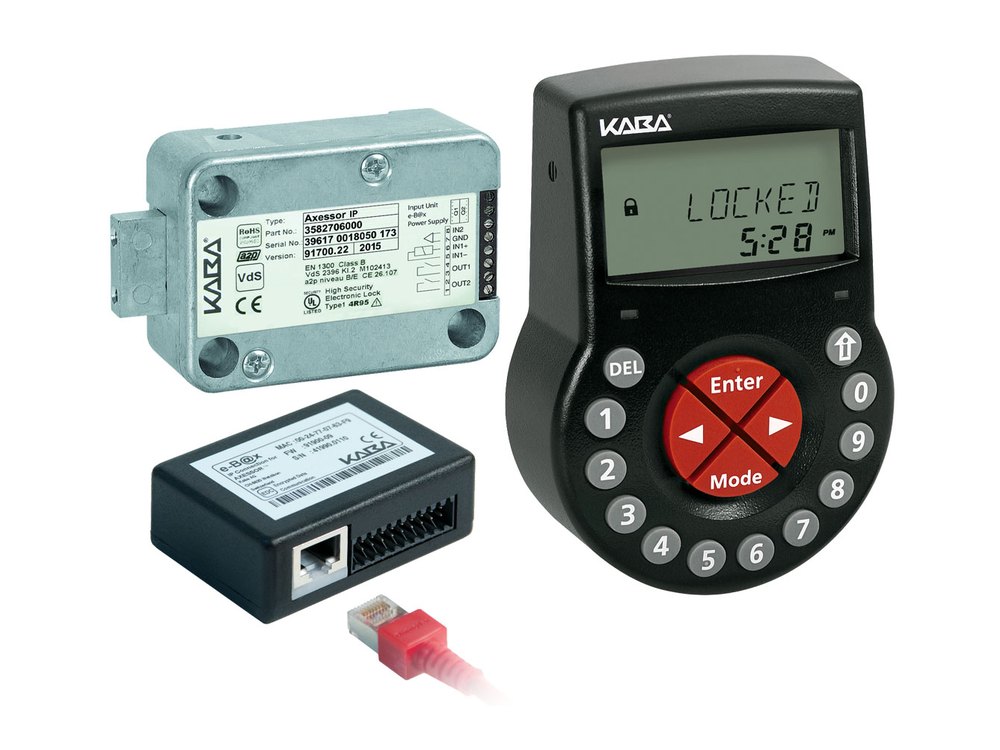
- A black input unit with an LCD screen, number keys, a large red ENTER key with arrow keys around it, and keys marked DEL, MODE and INFO/ESC. The Kaba or dormakaba name is on the front.
- It is powered by 3 AA batteries (alkaline or lithium) in a drawer in the bottom of the input unit.
- Codes are 8 digits: a two-digit user number plus a 6-digit code, for example user 11 uses a code that starts with 11. The Master code starts with 00, a Manager code starts with 1 0, 2 0, 3 0 or 4 0, and so on.
- The Axessor can run one lock or several locks from one input unit, and can use time delays, time locks and a dual (two-code) mode.
- This guide follows the Axessor series V28 and later quick reference guide and operating manual.
How to open and close it
- Wake the input unit. The screen shows LOCKED and the time.
- If the system has more than one lock, use the LEFT and RIGHT keys to choose the lock first.
- Enter a valid code with the number keys and press ENTER.
- The screen shows OPEN. Open the bolt work or the safe door during the “bolt open time”. The factory setting for that time is 6 seconds.
- To close the lock, press DEL (delete / close the lock).
- If you do not open the bolt work in time, the lock closes by itself again.
- If the Dual mode is on, a second valid code is needed: the screen asks for it after the first.
- A duress code is your code with 1 added or taken away from the last digit (only if the Duress function is on) and it signals a duress alarm.
How to change the battery
The input unit uses 3 AA batteries: alkaline or lithium, not rechargeable (we recommend Procell alkaline). Change them as soon as the “battery low” symbol appears, and at the latest when the screen says CHANGE BATT. The batteries must stay in the compartment even if you also have an external power supply.
- Take out the screw in the battery compartment on the bottom of the input unit.
- Carefully pull the battery compartment out until it stops.
- Replace the 3 old batteries with 3 new ones of the same type.
- When the batteries go in, the unit runs a test routine and gives a beep.
- Close the battery compartment and put the screw back in.
- Wait for the message BAT-CMP OPEN to appear.
- Clear that message by entering the Master code, any Manager code, or a User code that is allowed to reset the battery message. The lock opens and closes again after the open time.
- If nothing happens, close the lock with the door open, then enter one of those codes again.
- Set the time and date again if they were lost.
- The BAT-CMP message always appears when the battery compartment is opened, and it also warns that the input unit was opened.
- If the lock is without power, the internal clock stops. All other settings are kept in memory.
- Only put batteries in one input unit of a lock system.
How to change a code
The lock must be open.
The Axessor only lets you into programming mode while the lock is open. Do not shut the door until you have tested the new code. If you do not have the code needed for a menu, or the prompts do not match these steps, stop and call us.
- Open the lock.
- Press MODE.
- Enter your code and press ENTER. The main menu appears. What you see depends on the code you entered.
- If the menu shows CODE, use the LEFT and RIGHT keys to select it and press ENTER.
- If you are changing a code other than your own, use LEFT and RIGHT and ENTER to choose the code (for example User code 11).
- When the screen asks whether to change the code, select YES with LEFT or RIGHT and press ENTER.
- Enter the new code with the number keys and press ENTER.
- When the screen says CONFIRM, enter the same code again and press ENTER.
- Press INFO/ESC to leave programming mode, then test the new code before you close the door.
- If you do not press a key for 1 minute, the input unit leaves programming mode and any change you have not confirmed with ENTER is lost.
- Press INFO/ESC at any time to go back a level. Press INFO/ESC from LOCKED or OPEN to see the battery level, the opening counter and other information.
What the screen says
| Screen message | What it means |
|---|---|
| LOCKED | The lock is closed. The current time is shown. You can open it by entering a valid code. |
| OPEN | The lock is open. You can open the bolt work or door during the “bolt open time”. |
| BAT-CMP / BAT-CMP OPEN | The battery compartment was opened. Clear it with a Master code, a Manager code, or a code that is allowed to reset the battery message. |
| CHANGE BATT or battery symbol | Replace the 3 AA batteries. |
| DENIED | That code has been denied by a higher-level code, or a time delay (such as a non-return time delay) is refusing to open the lock. |
| IMM-TL / weekly or holiday time lock | The lock is in a time-locked period and cannot be opened. The current time is shown. |
| WAIT (time delay) | A time delay is counting down after a valid code. A beep sounds every 60 seconds. |
| CONF | The time delay has ended. Enter a valid code within the time shown to open. |
| Second-code prompt | Dual mode is on: a second valid code is needed. |
| RMT-DIS | Remote disabling is on: the lock cannot be opened while it is on. |
Wrong-code lockout
After 4 incorrect codes in a row, the Axessor starts a 5-minute penalty. You cannot enter a code, and you cannot cancel it. The time left is shown on the screen.
If it still won’t open
The screen is blank
Press a key to wake it. If it stays blank, replace the 3 AA batteries. If it is still blank, call us.
The screen says BAT-CMP after I changed the batteries
That is normal. Clear it with the Master code, a Manager code or a user code that can reset the battery message. If you do not have one of those, call us.
It says DENIED
That code has been blocked by a higher-level code, or a time delay is still running. Wait, or ask whoever manages the lock. Do not keep guessing: four wrong codes start a 5-minute penalty.
Download the full manufacturer instructions
This page is a quick-reference summary. For every feature and diagram, use the official manual for your model:
- Axessor series Quick Reference Guide, V28 and up (PDF)dormakaba, 2020-09. On dormakaba’s Axessor Operational Manuals page.
- Axessor IP Operating Manual (EN)dormakaba, V28, 08/2019. Same page.
- dormakaba safe locksManufacturer product pages for the Axessor series.
Need a hand?
Still stuck? We can help.
Having a hard time getting into your safe? Our technicians are trained to open malfunctioning safes professionally, so your valuables can still be safely secured. Call us or stop by.
Steve’s Lock, Safe and Alarm · 3401 N. Sepulveda Blvd, Manhattan Beach, CA 90266
More lock guides
About this guide. This is an independent guide from Steve’s Lock, Safe and Alarm, a safe and lock dealer. Brand and model names belong to their owners and are used only to help you identify your lock. We are not affiliated with the manufacturers. These steps summarize the manufacturers’ own instructions; your lock may be a different version, so if anything here does not match what your lock does, follow your manual or call us. Always change codes with the safe door open, and test the new code several times before you close the door.
Steps last checked against the manufacturer documents on October 14, 2026.