
Safe lock help · dormakaba
Safe lock troubleshooting › dormakaba › CenconX keyless ATM lock
The dormakaba CenconX is a keyless ATM and cash-in-transit safe lock. It has a round keypad with a small display and no dial and no keys. Your company’s dispatcher and the dormakaba Safe Locks phone app give each call a one-time code, and the lock talks to the phone over Bluetooth. This guide covers how to tell it apart, how it opens, the batteries, and what to do when the keypad does not respond.
Want the whole manual? Jump to the manufacturer download links.
Is this your lock?
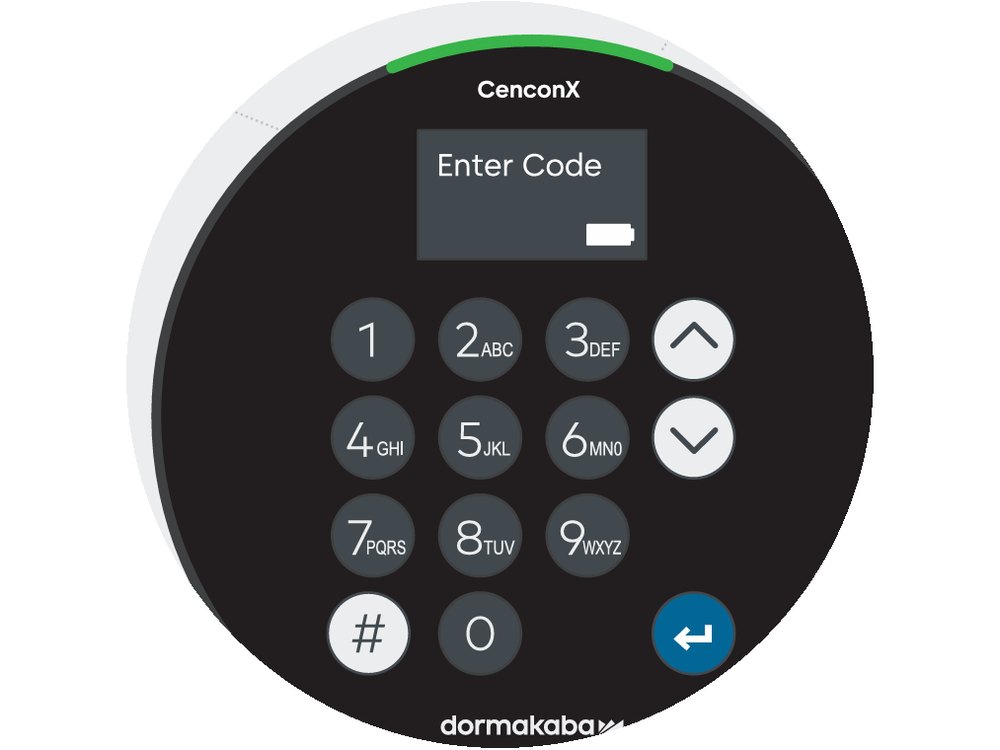
- A round black keypad with the CenconX name at the top, a small display showing Enter Code, keys 1 to 9 and 0, up and down arrow keys, a # (Pound/Back) key and a blue Return/Enter key. A light bar around the top edge is the indicator light, and there is a battery door at the lower right.
- It comes as a serviceable keypad or a tamper-evident keypad, with a swing bolt or dead bolt lock body.
- The lock has no dial and no key reader. The older Cencon (with a dial and keys) has its own guide.
- It is managed through Apexx Series software (the same system as the Axessor Apexx) and the dormakaba Safe Locks phone app.
How it opens
The CenconX is a managed lock: your company’s software administrator sets up the users and the dispatcher sends the codes. You cannot set up or reset it from the keypad alone.
- Open the dormakaba Safe Locks app on your phone and sign in with your credentials. The app is how you get the one-time code (OTC) for your call.
- Wake the keypad. The display shows Enter Code.
- Enter the code from the app and press Return/Enter.
- The lock unlocks. Open the door and do your work.
- Close the door and lock the lock. The app records the close seal and sends the audit data for the opening.
- Optional settings your company may use include dual mode (two people), geofencing (the phone must be at the site), invisible codes, and a photo of the closed door.
- The one-time codes can be cancelled by the dispatcher in near real time.
- If you are not sure how your company set it up, ask your dispatcher or software administrator. dormakaba’s steps are in the Apexx software help and user guide.
Battery
The CenconX is powered by two 9-volt batteries (we recommend Procell alkaline) or by AC power. The battery door is on the lower right of the keypad.
- Open the battery door on the keypad.
- Put in two new 9-volt alkaline batteries.
- Close the battery door.
- If the keypad does not respond right away, wait 30 to 45 seconds for it to pair with the lock body.
- If you are not sure how to open the battery door on a tamper-evident keypad, do not force it: call us.
The keypad keys
| Key | What it does |
|---|---|
| 1 to 9 and 0 | Enter the one-time code or credential code. |
| Up and down arrows | Move through the menu on the display. |
| # (Pound/Back) | Goes back or clears the entry. |
| Return/Enter (blue) | Confirms what you entered. |
| Light bar around the top | The indicator light for the lock’s status. |
Wrong codes
The CenconX has a wrong-try penalty and time delay, time lock and holiday schedules, which your software administrator sets in the Apexx software. dormakaba’s notes we have do not give the number of tries or the penalty time, so stop after a wrong code or two and ask your dispatcher for a fresh code.
If it still won’t open
The keypad shows nothing or does not respond
Put in two new 9-volt batteries, or check the AC power. After power is restored, wait 30 to 45 seconds, because the keypad needs that long to pair with the lock body.
The code from the app does not work
Ask the dispatcher whether the code is still valid (codes can expire or be cancelled) and whether it is for this lock. If geofencing is on, the phone needs to be at the site.
I need to set up or reset the lock
That is done by the software administrator with the Apexx software and a visit to the lock. We cannot do it without your company’s authorization.
Download the full manufacturer instructions
This page is a quick-reference summary. For every feature and diagram, use the official manual for your model:
- CenconX Quick Start Guide (PDF)dormakaba document CX001.0524, 12/2024. Keypad layout, installation and commissioning. dormakaba support site.
- dormakaba: CenconX FeaturesPower (2 x 9V or AC), keypad display, one-time codes and options. dormakaba support site.
- dormakaba: CenconX Keyless ATM Safe Lock AdvantagesHow the app, one-time codes and close seals work. dormakaba support site.
- dormakaba CenconX support articlesAll CenconX articles.
Need a hand?
Still stuck? We can help.
Having a hard time getting into your safe? Our technicians are trained to open malfunctioning safes professionally, so your valuables can still be safely secured. Call us or stop by.
Steve’s Lock, Safe and Alarm · 3401 N. Sepulveda Blvd, Manhattan Beach, CA 90266
More lock guides
About this guide. This is an independent guide from Steve’s Lock, Safe and Alarm, a safe and lock dealer. Brand and model names belong to their owners and are used only to help you identify your lock. We are not affiliated with the manufacturers. These steps summarize the manufacturers’ own instructions; your lock may be a different version, so if anything here does not match what your lock does, follow your manual or call us. Always change codes with the safe door open, and test the new code several times before you close the door.
Steps last checked against the manufacturer documents on October 15, 2026.