
Safe lock help · LA GARD (dormakaba)
Safe lock troubleshooting › LA GARD (dormakaba) › LA GARD 3000 / 3035 / 3125 keypad
The LA GARD 3000, 3035 and 3125 are round electronic keypads with letters on the number keys that were sold with LA GARD Basic and ComboGard Pro locks. This guide covers how to open the lock, change the combination, replace the 9-volt battery, and what the double and triple signals mean.
Want the whole manual? Jump to the manufacturer download links.
Is this your lock?
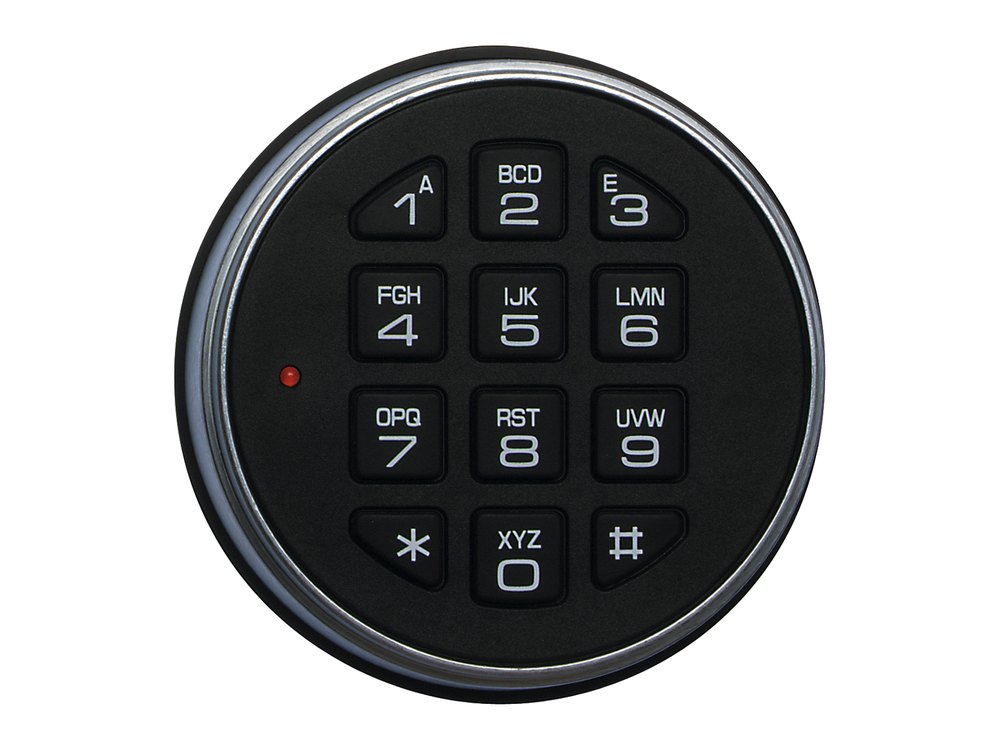
- A round keypad on the safe door with number keys that also show letters (1 A, 2 BCD, 3 E, and so on) and a small LED.
- 3000: the battery (two 9-volt batteries) is inside the keypad. 3035 and 3125: the battery is in a separate battery box mounted inside the door.
- The combination is six digits on the 3000 and 3035. ComboGard Pro locks used with the 3125 can use 6 to 9 digits.
- The lock behind the keypad is a LA GARD dead bolt (you turn the keypad) or swing bolt (you turn the safe handle) model.
- A LA GARD keypad with light-bulb keys (a backlight) is a different model: see the 5715 / 5750 guide. A LA GARD keypad with a dormakaba logo and a green Enter key is a 700 Series.
How to open it
- Enter your combination.
- The lock gives a double signal (two LED flashes and two beeps) to confirm the combination is valid.
- Within 4 seconds, turn the handle to the open position (swing bolt lock) or turn the keypad clockwise (dead bolt lock).
- Pull the door open.
- An invalid combination gives a triple signal (three LED flashes and three beeps).
- On the 3000, the instructions say to turn the handle. On the 3035 and 3125, turn the keypad for a dead bolt lock, or the handle for a swing bolt lock.
- On a 3125 set up with an eKEY, insert the eKEY when you enter the combination.
How to change the battery
Use alkaline batteries only, and change them at least once a year (we recommend Procell). Repeated LED flashing and beeping while the lock opens means the battery is low and needs replacing right away. The lock keeps its combination in permanent memory, even with the batteries out.
3000 (two 9-volt batteries in the keypad)
- Slide the keypad housing up and carefully pull it away from the mounting surface to expose the battery compartment.
- Remove the old 9-volt battery. Unsnap its connector from the two terminals on top of the battery. Hold on to the connector so you do not pull the wires out of the housing.
- Do the same for the second battery, then connect two new 9-volt alkaline batteries.
- Line the keypad up with the mounting screws and slide the housing down. Make sure no wires are trapped between the keypad and the safe door, because pinched cables can cause a short circuit.
3035 and 3125, small battery box (one 9-volt)
- Open the safe door and pull the front of the battery box cover away from the door to remove it.
- Unsnap the old battery from its connector. Hold on to the connector so you do not pull the wires out of the board.
- Snap on a new 9-volt alkaline battery and push the battery and its leads all the way into the compartment.
- Put the cover back on and test the lock several times before you close the door.
3035 and 3125, large battery box (six C cells)
- Open the safe door and pull the front of the battery box cover away from the door.
- Take out the six old C-cell alkaline batteries and put in six new ones.
- Put the cover back on and test the lock several times before you close the door.
- Dead battery on a 3035 or 3125: hold a new 9-volt battery on the two contact points on the front of the keypad (the large battery terminal to the large keypad contact, the small terminal to the small contact), and enter a valid combination. Keep the battery touching the contacts the whole time. Then change the batteries properly from inside the safe.
How to change the combination
Always do this with the safe door OPEN.
Test the new combination several times before you close the door. Do not use a birthday or other predictable number, and keep the combination secret.
3000 and 3035
- Press 0 six times.
- Enter your existing six-digit combination one time.
- Enter your new six-digit combination two times.
- A double signal means it worked. A triple signal means the old combination is still valid.
- If you make a mistake, wait 30 seconds and start again.
3125
- Enter your existing combination and hold down the last digit until the lock double signals twice and the LED stays on. (With an eKEY set up, enter the combination and then insert and hold the eKEY.)
- Press 0.
- Enter your new combination two times.
- A double signal means it worked. A triple signal means the old combination is still valid.
- If you make a mistake, wait 30 seconds and start again.
Beeps and lights
| What you hear / see | What it means |
|---|---|
| Double signal (2 LED flashes, 2 beeps) | The entry was valid and accepted. |
| Triple signal (3 LED flashes, 3 beeps) | The entry was invalid. If it happens during a combination change, the old combination is still valid. |
| Repeated LED flashing and beeping while opening | The battery is low. Replace it right away. |
| LED flashes red every 10 seconds | The lock is in the 5-minute wrong-try penalty. |
Wrong-code lockout
Entering four invalid combinations in a row starts a 5-minute delay. The LED flashes red every 10 seconds, and the keypad will not accept a combination (at most, a key press gives a triple signal). After the delay, two more invalid combinations start another 5 minutes.
If it still won’t open
It beeps and flashes over and over when I open it
That is the low battery warning. Replace the battery right away.
The keypad does nothing
The battery may be dead, or the lock may be in the 5-minute penalty. On a 3035 or 3125 you can hold a fresh 9-volt battery on the contacts on the front of the keypad (see the battery section) and enter your combination.
It beeped twice but the door will not open
You only have 4 seconds after the double signal to turn the handle (or the keypad on a dead bolt lock). Be ready to turn right away.
Download the full manufacturer instructions
This page is a quick-reference summary. For every feature and diagram, use the official manual for your model:
- LA GARD 3000 User Operating Instructions (PDF)dormakaba / Kaba Mas document 750.118. Open the LA GARD Basic page on dormakaba’s support site.
- LA GARD 3035 and 3125 User Operating Instructions (PDF)dormakaba / Kaba Mas documents 751.118 and 752.118. Same page.
- LA GARD ComboGard Pro 39E manuals (dormakaba support)The 3125 also works with ComboGard Pro locks. Hosted by dormakaba.
Need a hand?
Still stuck? We can help.
Having a hard time getting into your safe? Our technicians are trained to open malfunctioning safes professionally, so your valuables can still be safely secured. Call us or stop by.
Steve’s Lock, Safe and Alarm · 3401 N. Sepulveda Blvd, Manhattan Beach, CA 90266
More lock guides
About this guide. This is an independent guide from Steve’s Lock, Safe and Alarm, a safe and lock dealer. Brand and model names belong to their owners and are used only to help you identify your lock. We are not affiliated with the manufacturers. These steps summarize the manufacturers’ own instructions; your lock may be a different version, so if anything here does not match what your lock does, follow your manual or call us. Always change codes with the safe door open, and test the new code several times before you close the door.
Steps last checked against the manufacturer documents on October 14, 2026.