
Safe lock help · Lockmasters
Safe lock troubleshooting › Lockmasters › LKM10K lock series (handle, panic bar and Type VII lock down models)
The Lockmasters LKM10K is a government door lock that you see on secure rooms and GSA-type doors. It puts a combination lock (a Kaba Mas X-10 or an S&G 2740B) together with a lever handle, a key override and, on many doors, an electronic access control (badge and/or PIN). Inside the door is a push/pull handle or a panic bar, so leaving is always one motion. This guide covers how to open it from outside, how to leave, the key override, the Type VII lock down, and where the change key hole is.
- How to open
- How to leave
- Key override (power failure or access control failure)
- Type VII lock down
- Where the change key hole is
- If it will not open
- Manuals
Want the whole manual? Jump to the manufacturer download links.
Is this your lock?
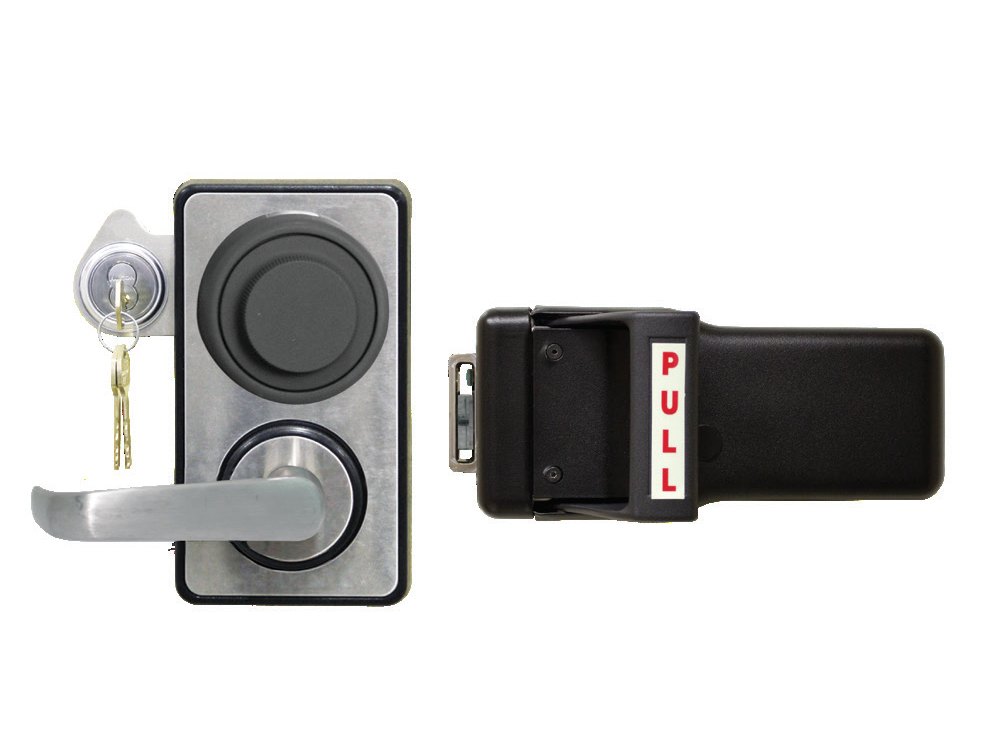
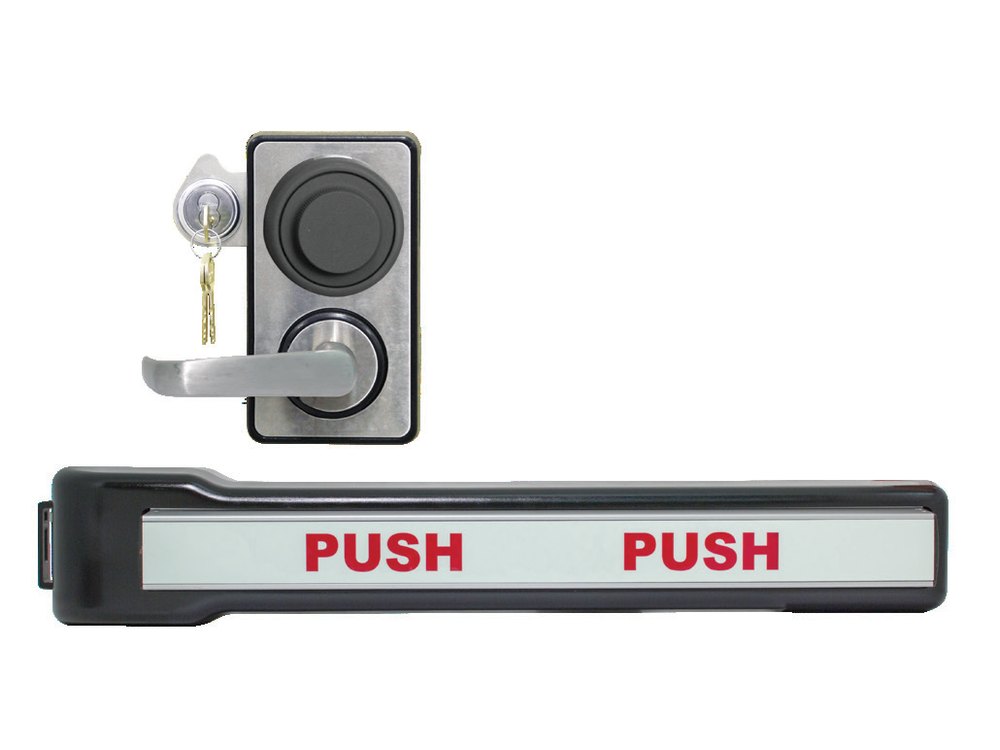
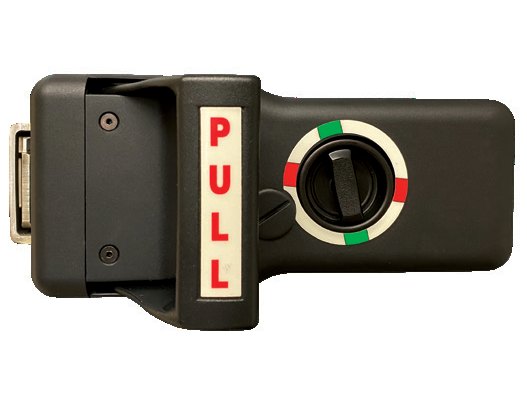
- Outside: a lever handle with a round dial above it, and a key cylinder (the key override) beside it. Some doors also have a badge reader or keypad, and a light indicator above the key cylinder on non-fire-rated doors.
- Inside: a black push/pull handle (handle models) or a panic bar (panic models) with a luminescent PUSH or PULL label.
- Lockmasters lists the handle models as Types I and II, the panic bar models as Types III and IV, the push/pull handle with lock down as Type VII, a panic bar as Type VIII, and exit-only handle and panic bar versions as Types IX and X. Some have an alarm.
- Each one comes with a Kaba Mas X-10 or an S&G 2740B combination lock and a #1, #2, #3 or #9 strike. ABR in a model name means automatic bolt retraction, and Lockmasters also sells ABR retrofit kits.
- The combination lock inside is a GSA-approved container lock. Its own dialing instructions are on the X-10 and S&G 2740 pages in this guide.
How to open it from outside
- Dial the combination on the X-10 (or 2740B) until the lock bolt retracts. The dial comes to a dead stop. (See the X-10 or 2740 guide for dialing.)
- Leave the combination lock in the open position. The lock bolt of the combination lock is inside the LKM10K. It is not the latch you can see from outside.
- With no electronic access control: the LKM10K stays locked until you put the key in the key override cylinder and turn it either way. Then turn the lever handle up or down to retract the deadbolt and open the door.
- With electronic access control: with the combination lock bolt retracted, present your badge and/or PIN. A green light above the key cylinder shows it is unlocked (if the light indicator is fitted). Then turn the lever up or down to open the door. On the panic models turn it to the stop.
- You can take the key out once the door is open. The lock relocks when the door closes and latches.
- The access control can be used as the daytime lock: the combination lock can stay retracted during operating hours.
- The light indicator only fits non-fire-rated doors. When it is lit you have a 5 to 7 second window to turn the lever.
- To secure the area after hours, the combination lock bolt must be spun off: that is, the combination lock must be locked again. After that, neither the access control nor the key override will open the door until someone dials the combination again.
How to leave
Single motion exit is always possible. Push or pull the handle on the back of the lock (or push the panic bar). A luminescent label shows which. It makes no difference whether the combination lock or the access control is locked or unlocked: leaving is never blocked.
Key override (power failure or access control failure)
If the power is out or the access control fails, the key override lets you in. The combination lock must be unlocked first.
- Dial the combination so the combination lock is open.
- Put the key in the key override cylinder and turn it either way.
- Turn the lever up or down to open the door. The key can come out once the door is open.
- If the lever is turned while the lock bolt is extended, or the access control was not used or timed out, the handle’s internal clutch keeps the lock from being damaged. You may need to return the handle to its home position.
Type VII lock down
The Type VII has a Lock Down on the inside base plate.
- Vertical (green, “disengaged”): entry is allowed. Use the access control as needed and turn the lever to open the door.
- Horizontal (red, “engaged”): entry is not allowed. Credentials or a PIN will not work, and the key override will not override the lock down. You can always get out.
- If the power is out and the lock down is in the vertical position, the door can be opened with the key override.
Where the change key hole is
The combination lock’s change key hole is reachable from the back of the LKM10K, so the combination can be changed without taking the lock off the door.
- Handle models: the change key hole is on the back cover. Remove the black plug to reach the change key receptacle, follow the combination lock maker’s instructions to change the combination, then put the plug back.
- Panic bar models: the hole is under the push label. Push down the black end cap on the push device and slide the label out a few inches to reach it.
- Change the combination with the door open and test it several times before you close the door. Our X-10 and 2740 guides cover the change key steps.
If it still won’t open
The lever turns but the door will not open
The combination lock may be locked, the access control may have timed out, or the key override was not turned. Dial the combination first, then badge in or turn the key, then turn the lever. The handle clutch can also leave the lever off its home position: return it to home and try again.
The badge reader or PIN does nothing
The access control only works after the combination lock bolt is retracted. Dial the combination first. If it still does nothing, use the key override and call us.
The key will not work
The combination lock must be unlocked first. On a Type VII, also check the Lock Down: horizontal (red) blocks the key override.
I cannot leave the room
Leaving should always work with one push or pull. If it does not, do not force it: tell your facility’s security office and call us at once.
I need to change the combination
Use the change key hole on the back of the lock (see above) and your X-10 or 2740 change key. Please call us if you are not sure.
Download the full manufacturer instructions
This page is a quick-reference summary. For every feature and diagram, use the official manual for your model:
- LKM10K Handle Operating Instructions (PDF, with Kaba Mas X-10 and Key Override, Feb 2018)Lockmasters document LKM10KHOPINST, linked from Lockmasters’ LKM10K page.
- LKM10K Panic Operating Instructions (PDF, with Kaba Mas X-10 and Key Override, Mar 2025)Lockmasters document LKM10KPOPINST.
- LKM10K Type VII Handle Lock Down Operating Instructions (PDF, Dec 2020)Lockmasters document LKM10KHDLOPINST.
- Lockmasters: LKM10K Lock Series (government hardware)Lockmasters’ model list: types, X-10 and 2740B versions, strikes, ABR retrofit kits and parts.
Need a hand?
Still stuck? We can help.
Having a hard time getting into your safe? Our technicians are trained to open malfunctioning safes professionally, so your valuables can still be safely secured. Call us or stop by.
Steve’s Lock, Safe and Alarm · 3401 N. Sepulveda Blvd, Manhattan Beach, CA 90266
More lock guides
About this guide. This is an independent guide from Steve’s Lock, Safe and Alarm, a safe and lock dealer. Brand and model names belong to their owners and are used only to help you identify your lock. We are not affiliated with the manufacturers. These steps summarize the manufacturers’ own instructions; your lock may be a different version, so if anything here does not match what your lock does, follow your manual or call us. Always change codes with the safe door open, and test the new code several times before you close the door.
Steps last checked against the manufacturer documents on October 20, 2026.