
Safe lock help · Protex
Safe lock troubleshooting › Protex › DigiPaz-309 and DigiPaz-307 keypad
Many Protex safes have the DigiPaz keypad: a flat, touch-sensitive keypad with the numbers, a * key and a # key and a blue light. Protex has a DigiPaz-309 manual (two 9-volt batteries, 6-digit code) and a shorter DigiPaz-307 manual with the same open and change steps. This guide covers how to open the safe, change the 6-digit code, replace the batteries, use the power override wire when they are dead, and what the 15-minute lockout means.
Want the whole manual? Jump to the manufacturer download links.
Is this your lock?
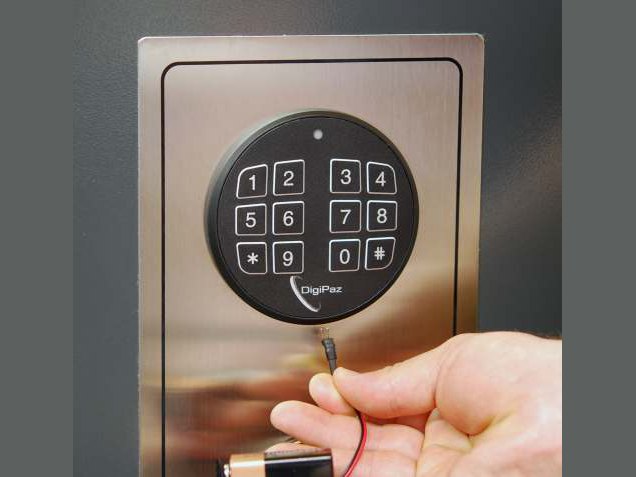
- A flat touch keypad on the safe door with the number keys, a * key and a # key. The blue LED on the keypad stays on when a code is accepted.
- The manuals say the DigiPaz keypad is very sensitive to touch (no need to press hard), is 100% waterproof, can be cleaned with stainless steel cleaner, and is maintenance free.
- Your code is 6 digits. The 309 runs on two 9-volt alkaline batteries in a battery box in the back of the door.
- Protex’s manuals are titled DigiPaz-309 (V 6.9) and DigiPaz-307.
How to open it
- Press *.
- Enter your 6-digit code.
- Press #. The blue LED stays on when the code is accepted.
- You now have 3 seconds to turn the handle (or knob) and open the safe. If you wait too long the safe relocks itself and you must enter the code again.
- If the LED flashes rapidly and you hear a fast wobbly beep, the code was wrong. Try again.
- Use the * key to clear and start over if you make a mistake in the middle.
- Always press # after the 6th (last) digit.
- The 309 manual says to check your code at least 3 times with the door open before you close the safe.
How to change the battery
The DigiPaz-309 uses two 9-volt alkaline batteries. Protex says to use high quality alkaline batteries (we recommend Procell) and never old or leaking ones. The lock has a low battery warning: if you open the door and hear continuous beeps and the LED flashes, the batteries are running low. The safe keeps its code for up to 6 months without power, so you do not need to reprogram the code after changing batteries.
- Find the battery box in the back of the door.
- Take out the Phillips head screw and remove the cover.
- Remove the two batteries and put in new alkaline 9-volt batteries.
- The keypad beeps once when the new batteries go in.
- Replace the cover and check your code to make sure the safe works.
If the batteries are dead: power override wire
- Plug a 9-volt battery into the power override wire connector.
- Find the connector under the keypad and plug the wire in snugly, so that the two prongs go into the two tiny holes. Plug it in with the red wire to the right.
- While the battery is plugged in, enter your 6-digit code as usual and open the safe.
- Then replace the batteries inside the safe as above.
- The override wire is only for an emergency. Unplug it after you replace the internal batteries.
- Never lock the override wire inside the safe.
- Optional LED interior light (309): it comes on for 30 seconds after the safe is opened. You can switch it on and off by pressing # during those 30 seconds. It uses the same batteries as the keypad, and the blue LED on the keypad stays on while the light is on. It is best to switch it off after closing the door with one press of #.
How to change the code
Do this with the door OPEN.
Protex says to leave the door open and test your new code several times before you close the safe. The factory code is in Protex’s manual and with the safe paperwork. We are not printing it here. Your code must be 6 digits and must not use the * or # key.
DigiPaz-309
- Open the door and turn the handle so the bolts are out (the locked position).
- Press * and then #. This puts the lock in code-change mode.
- Enter your existing code (the factory code if you never changed it) and press #. Two beeps sound.
- Enter your new 6-digit code and press #, then enter the new 6-digit code again and press #. Two beeps show the new code is accepted.
- Check it: press *, your new code and #.
DigiPaz-307
- Open the safe using your code.
- Press * and then # to enter programming mode.
- Enter your existing code followed by #.
- Enter your new code (it must be 6 digits) followed by #, then the new code again followed by #.
- Your personal code has been changed. To test it, press *, your new code and #.
- Do not pause more than 7 seconds between the steps of the 309 change.
- Write the new code down while you program it, then destroy the paper. Never lock your code inside the safe.
Lights and beeps
| What you see and hear | What it means |
|---|---|
| Blue LED stays on | A good code. You have 3 seconds to turn the handle. |
| LED flashes rapidly and a fast wobbly beep | A wrong code. |
| Continuous beeps and a flashing LED when you open the door | The batteries are running low (309). |
| Two beeps during a code change | The step or the new code was accepted. |
| One beep when batteries go in | New batteries are installed (309). |
| LED blinks once every 5 seconds | The lock is in lockout. |
Wrong-code lockout
On the DigiPaz-309, five wrong codes in a row put the lock into lockout mode for 15 minutes. A warning (fast beeping) alarm sounds, and the LED blinks once every 5 seconds during the lockout. Wait until the blue LED stops blinking (about 15 minutes) and try again.
If it still won’t open
The keypad does not respond
The batteries are probably dead. Use the power override wire with a 9-volt battery (plugged in under the keypad), open the safe, then replace the two 9-volt batteries.
I changed the code and it does not work
Make sure the new code is 6 digits, that you pressed # after each entry, and that you did not pause more than 7 seconds. Open the safe with the old code and try again with the door open.
I forgot my code (DigiPaz-307)
The 307 manual says for the key digital override to call Protex Safe Co. We can also help: call us.
I forgot my code (DigiPaz-309)
Please do not keep guessing: five wrong codes lock the keypad for 15 minutes. Call us.
Download the full manufacturer instructions
This page is a quick-reference summary. For every feature and diagram, use the official manual for your model:
- Protex DigiPaz-309 User Manual (PDF, V 6.9)A Protex Safe Co. document, copy hosted by Safe and Vault Store.
- Protex DigiPaz-307 User Manual (ManualsLib)A copy of the Protex manual. Two pages.
- Protex Safe: Manual pageProtex’s own page of user manuals.
Need a hand?
Still stuck? We can help.
Having a hard time getting into your safe? Our technicians are trained to open malfunctioning safes professionally, so your valuables can still be safely secured. Call us or stop by.
Steve’s Lock, Safe and Alarm · 3401 N. Sepulveda Blvd, Manhattan Beach, CA 90266
More lock guides
About this guide. This is an independent guide from Steve’s Lock, Safe and Alarm, a safe and lock dealer. Brand and model names belong to their owners and are used only to help you identify your lock. We are not affiliated with the manufacturers. These steps summarize the manufacturers’ own instructions; your lock may be a different version, so if anything here does not match what your lock does, follow your manual or call us. Always change codes with the safe door open, and test the new code several times before you close the door.
Steps last checked against the manufacturer documents on October 19, 2026.