
Safe lock help · Protex
Safe lock troubleshooting › Protex › 202A oval keypad, ESL10-style lock (star and pound keys)
Some Protex safes have an ESL10-style electronic lock with an oval keypad: the PROTEX name is under the keys and there is a * key and a # key. Protex’s sheet calls it the “ESL10 Electronic Safe Lock w/ 202A Protex Keypad.” It works like an ESL10 (a fixed 6-digit combination and a 15-minute lockout), but the keypad is different. This guide covers how to open it, change the 6-digit combination, use the power override cord when the batteries are dead, and what the 15-minute lockout means.
Want the whole manual? Jump to the manufacturer download links.
Is this your lock?
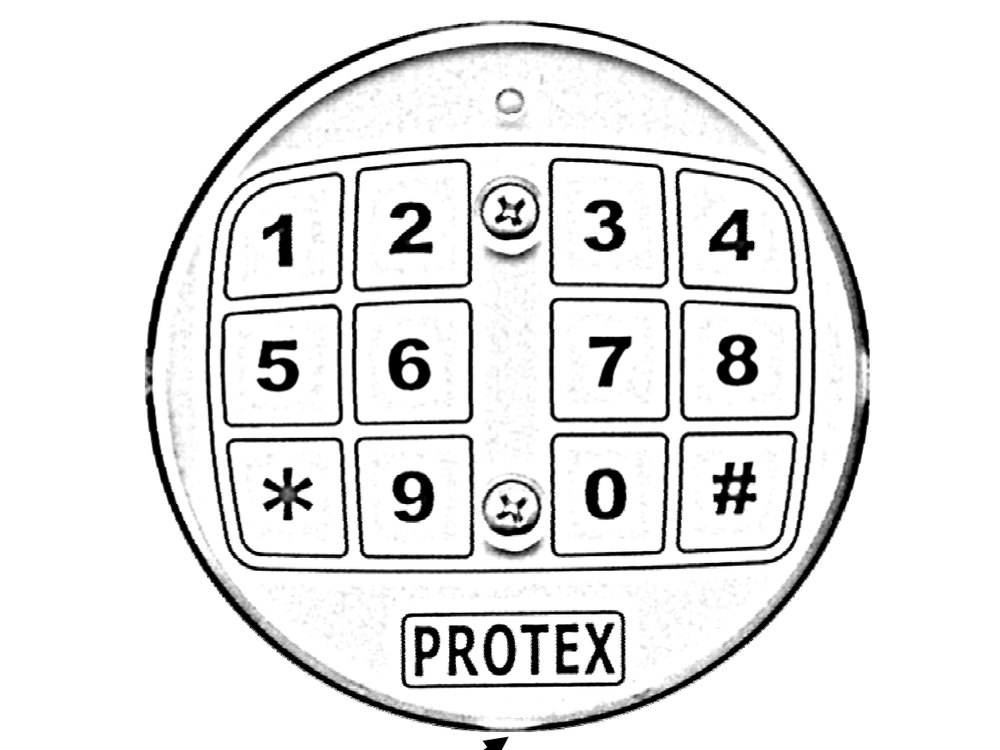
- An oval keypad with the keys laid out 1 2 3 4, 5 6 7 8, then * 9 0 #, and the PROTEX name under the keys. It has a red light.
- A small outlet for the power override cord sits right under the PROTEX name.
- It uses a fixed 6-digit combination and 9-volt alkaline batteries.
- If your keypad is round with a C key, you have a different lock. See our AMSEC ESL10 / ESL10XL guide, linked at the bottom of this page.
How to open it
- Press * to clear and wake up the electronics.
- Press your 6 digits, one at a time.
- Press #.
- If the combination is right you hear a click and the red LED lights. You have 3 seconds to open the door before the lock locks itself again.
- Each key press flashes the red light and chirps.
- Made a mistake? Press * to clear the last input and start over.
- Hide your code from onlookers: the lock keeps the first 5 digits, then only the last number you press before # as the 6th digit. So press the first five correct digits, then any made-up numbers, then the correct sixth digit and #.
How to change the battery
The lock uses 9-volt alkaline batteries. AMSEC says to use good quality fresh alkaline batteries (we recommend Procell) and to replace them once a year so leaking does not corrode the lock. The lock keeps your combination even if the batteries are dead or removed.
- Use the power override cord if the batteries are dead: push its two-prong plug into the small outlet below the keypad (right under the PROTEX name).
- Connect a 9-volt battery to the connector on the cord.
- Press *, enter your combination and press # as usual.
- The 202A sheet does not describe how to reach the batteries behind the keypad, so we are not guessing. If you cannot find them, call us.
- Always test the combination after you change batteries, with the door open.
How to change the code
Do this with the safe door OPEN.
AMSEC says combination changes should always be done with the door open. Test the new code several times before you close and lock the safe. Your code must be 6 digits.
You press the change keys, enter the old combination once and the new one twice. Change the factory combination as soon as the safe is installed.
- Press * and then #. You hear a short warbling tone and the red lamp strobes with the tone.
- Key in the old 6-digit combination and press #. A short good combo tone sounds.
- Key in your new 6-digit combination and press #. Another short good combo tone sounds.
- Key in the new combination again and press #. If it matches the first entry, a long good combo tone sounds.
- Test it: press *, your new 6 digits and #.
- If the second entry does not match the first, the lock gives the bad combo tone (4 short beeps) and the old combination stays.
- The factory combination is printed on AMSEC’s sheet and on the paperwork with the safe. We are not printing it here.
Tones and lights
| What you see and hear | What it means |
|---|---|
| Chirp and one red flash with every key | A key press was accepted. |
| Click and the red LED lights | A correct combination. You have 3 seconds to open the door. |
| Short warbling tone, red lamp strobes | The change routine has started (* then #), or an entry during the change was accepted. |
| Long good combo tone | The new combination was recorded. |
| 4 short beeps (bad combo tone) | The two entries of the new combination did not match. |
| Red lamp flashes once every 5 seconds | The lock is in penalty lockout. |
| Red lamp flashes with a chirp 8 times rapidly | You pressed a key while the lock is in penalty lockout. |
Wrong-code lockout
After 4 incorrect combinations the lock goes into a 15-minute “Penalty Lockout Mode.” The red lamp flashes once every 5 seconds. If you press a key during the lockout, the lamp flashes with a chirp 8 times rapidly. Wait it out.
If it still won’t open
The keypad does nothing
The batteries are probably dead. Use the power override cord with a fresh 9-volt battery (plug into the outlet under the PROTEX name) and enter your code. Then replace the batteries.
I changed the batteries and now it will not open
The lock keeps its combination without power, so the old combination should still work. Press * first, then the 6 digits and #.
I forgot the combination
Please do not keep guessing: four wrong tries lock the keypad for 15 minutes. Call us.
Download the full manufacturer instructions
This page is a quick-reference summary. For every feature and diagram, use the official manual for your model:
- Protex Operating Instructions for the ESL10 w/ 202A keypad (PDF)Rev. 011107. A Protex Safe Co. document from Protex’s Manual page. A copy is also hosted by Safe and Vault Store.
- Protex Safe: Manual pageProtex’s own page of user manuals.
Need a hand?
Still stuck? We can help.
Having a hard time getting into your safe? Our technicians are trained to open malfunctioning safes professionally, so your valuables can still be safely secured. Call us or stop by.
Steve’s Lock, Safe and Alarm · 3401 N. Sepulveda Blvd, Manhattan Beach, CA 90266
More lock guides
About this guide. This is an independent guide from Steve’s Lock, Safe and Alarm, a safe and lock dealer. Brand and model names belong to their owners and are used only to help you identify your lock. We are not affiliated with the manufacturers. These steps summarize the manufacturers’ own instructions; your lock may be a different version, so if anything here does not match what your lock does, follow your manual or call us. Always change codes with the safe door open, and test the new code several times before you close the door.
Steps last checked against the manufacturer documents on October 19, 2026.