
Safe lock help · Protex
Safe lock troubleshooting › Protex › PR100 electronic safe lock (master code, 6 users, time delay)
The Protex PR100 is a round electronic safe lock keypad with the digits (and letters), a * key and a # key and a multi-color LED. It has a master code (user 1) and up to six more user codes (users 2 to 7), plus dual code and time delay options. It runs on four AAA batteries behind the keypad. This guide covers how to open it, change the codes, set dual code or time delay, and replace the batteries.
- How to open
- Battery
- Master and user codes
- Lights
- Lockout
- Dual code mode (two codes to open)
- Time delay (1 to 99 minutes)
- Troubleshooting
- Manuals
Want the whole manual? Jump to the manufacturer download links.
Is this your lock?
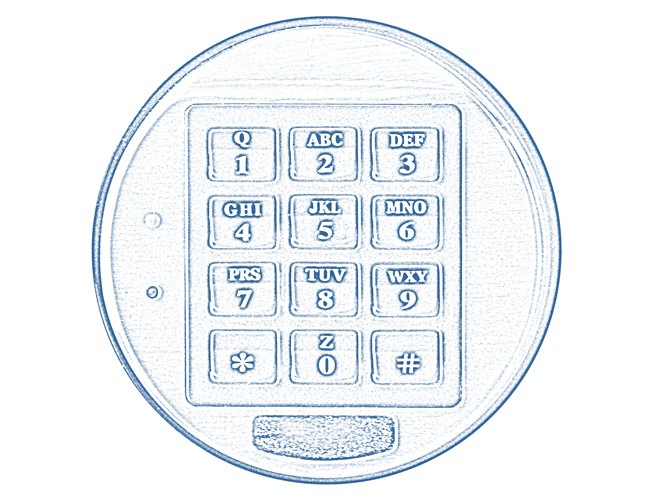
- A round keypad with 1 to 9, *, 0, # (the keys also have letters) and a small LED.
- There is a master code (user 1, 6 digits) and user codes 2 to 7 (4 to 8 digits).
- Protex’s manual is the “PR100 Electronic Safe Lock” user manual (Rev. 102907).
- It uses four “AAA” batteries.
How to open it
With the master code
- Press *, enter the master code, and press #.
- The LED lights green.
- Open the door with the handle.
With a user code
- Press *, enter the user code, and press #.
- Open the door with the handle.
- In single code mode (the default), any user code or the master code opens the safe. In dual code mode you need two codes: see below.
- The factory master code and user code are printed in Protex’s manual. We are not printing them here.
How to change the battery
The PR100 uses four “AAA” batteries (we recommend Procell) in a tray behind the keypad. The lock remembers all codes and settings without power.
- Hold the metal part of the keypad with your hands and turn it to the left (counter-clockwise).
- Remove the keypad to expose the battery tray.
- Replace the 4 AAA batteries with high-quality ones.
- Put the keypad back and test the lock with the door open.
How to change the codes
After you change the master code, all other codes are deleted.
Protex says that changing the master code deletes all the user codes. Set them up again afterwards. Do all of this with the door open and test each code before you close the safe.
Change the master code
- Press #, enter the master code, and press #. The LED lights orange.
- While the LED is orange, press 1 and then *.
- Enter the new master code (6 digits) and press #.
- Enter the new master code again and press #. The lock beeps twice.
Set or change a user code
- Press #, enter the master code, and press #. The LED lights orange.
- While the LED is orange, enter the user ID (2 to 7) and press *.
- Enter the new user code (4 to 8 digits) and press #.
- Enter the new user code again and press #. The lock beeps twice.
Delete one user code
- Press #, enter the master code, and press #. The LED lights orange.
- While the LED is orange, enter the user ID (2 to 7), then press * # #.
- The lock beeps twice.
Lights and beeps
| What you see and hear | What it means |
|---|---|
| LED green | The master code was accepted. Open the door. |
| LED orange | The lock is ready for a code change, delete or setting. |
| Two beeps | A code change or delete was accepted. |
| LED flashes yellow every 5 seconds | A time delay is counting. |
| LED flashes faster in the last 10 seconds, then 2 beeps | The time delay is done. You have 2 minutes to enter the code. |
Wrong codes
Protex’s PR100 manual does not describe a lockout or wrong-code behavior. If the lock stops accepting your code, please do not keep guessing. Call us.
Dual code mode (two codes to open)
By default any one code opens the safe. For more security you can require two.
- Turn dual code on: press #, the master code, then # 2 # 2 #.
- To open, press *, enter the first code (the master code and a user code, in either order) and press #, then enter the second code and press #. You have 60 seconds between the first and the second code before the lock goes back to sleep.
- Back to single code: press #, the master code, then # 0 # 0 #.
Time delay (1 to 99 minutes)
A time delay makes you wait before the safe can open.
- Set it: press #, the master code, then #, 01 to 99, #, the same two digits again, #. For example 05 is 5 minutes.
- To open: press * to start the delay. The LED flashes yellow every 5 seconds, flashes faster in the last 10 seconds, and the lock beeps twice when the delay is done. You then have 2 minutes to enter the code and open the safe.
- Turn it off: press #, the master code, then # 00 # 00 #.
If it still won’t open
I changed the master code and now the user codes do not work
Changing the master code deletes all user codes on the PR100. Set the user codes up again with the master code.
The keypad does nothing
Replace the four AAA batteries. Turn the keypad to the left to take it off and reach the tray. The lock keeps its codes without power.
I lost the master code
Protex’s sheet says to contact Protex about the electronic key override. Please do not keep guessing. Call us.
Download the full manufacturer instructions
This page is a quick-reference summary. For every feature and diagram, use the official manual for your model:
- Protex PR100 Electronic Safe Lock User Manual (PDF, Rev. 102907)A Protex Safe Co. manual, from Protex’s Manual page. Also hosted by Safe and Vault Store.
- Protex Safe: Manual pageProtex’s own page of user manuals.
Need a hand?
Still stuck? We can help.
Having a hard time getting into your safe? Our technicians are trained to open malfunctioning safes professionally, so your valuables can still be safely secured. Call us or stop by.
Steve’s Lock, Safe and Alarm · 3401 N. Sepulveda Blvd, Manhattan Beach, CA 90266
More lock guides
About this guide. This is an independent guide from Steve’s Lock, Safe and Alarm, a safe and lock dealer. Brand and model names belong to their owners and are used only to help you identify your lock. We are not affiliated with the manufacturers. These steps summarize the manufacturers’ own instructions; your lock may be a different version, so if anything here does not match what your lock does, follow your manual or call us. Always change codes with the safe door open, and test the new code several times before you close the door.
Steps last checked against the manufacturer documents on October 19, 2026.