
Safe lock help · Protex
Safe lock troubleshooting › Protex › HD-34, HD-34C and HD-series safes with the round LED keypad
Protex HD-series burglary safes such as the HD-34 and HD-34C have a round, backlit keypad with the digits, a * key and a # key, an LED indicator and a PROTEX label. They run on four AA batteries and have a setup button on the door. Newer HD-series safes show the voltage, the date and the time on a small display. This guide covers how to open the safe, set your code, replace the batteries, and use the override box or the key.
- How to open
- Battery
- Change code
- Lights and messages
- Lockout
- Opening with the emergency key
- Troubleshooting
- Manuals
Want the whole manual? Jump to the manufacturer download links.
Is this your lock?
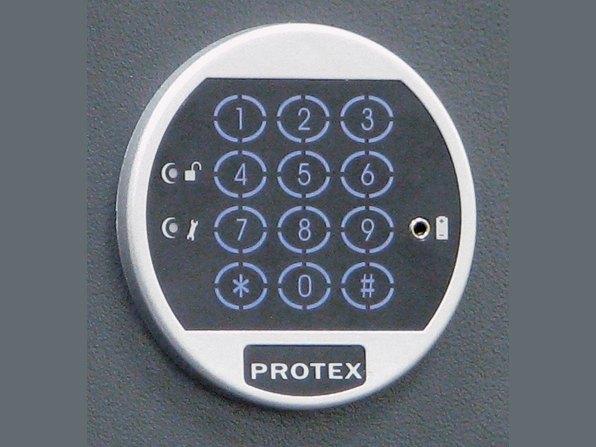
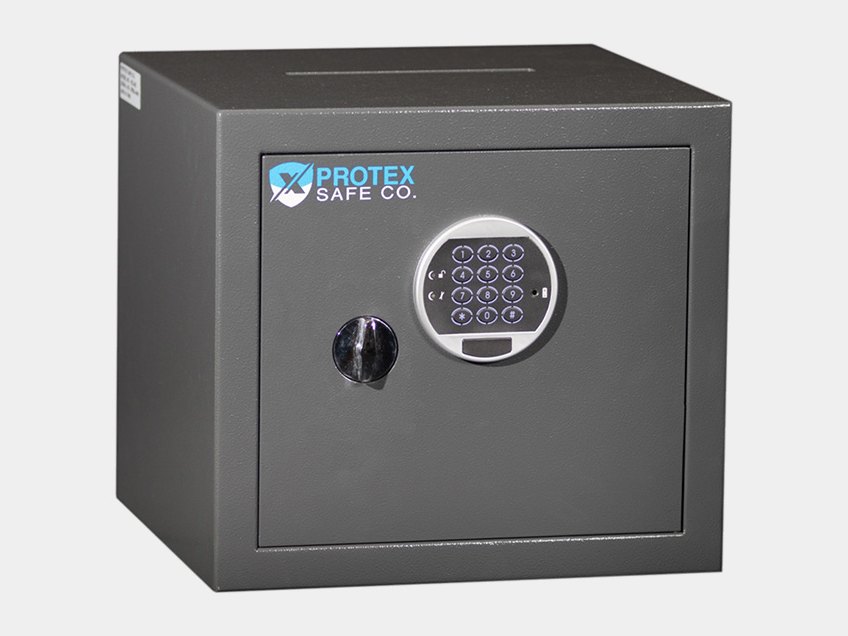
- A round backlit keypad with 1 to 9, *, 0 and #, a small LED indicator and a PROTEX label.
- Protex’s manuals are the HD-34 & HD-34C User Manual (Rev. 2.12) and the “Protex HD-Series Safes” user manual (with a date and time display).
- A red accessory box in the packing foam holds the 4 AA batteries and the power override box.
- If your safe has a small LCD that turns orange and blue, see the LCD safe guide instead.
How to open it
HD-34 and HD-34C
- Enter your personal code followed by #.
- Turn the knob clockwise to open the door.
Newer HD-series with the display
- Press *, enter your code, and press #. The display shows OPEN.
- Turn the handle clockwise to open the safe.
- If the display shows E-CODE, the wrong code was entered. Try again.
- First opening (new safe): put the 4 AA batteries in the black power override box, plug the jack into the power override outlet on the keypad, and enter the factory code from Protex’s manual (we are not printing it here). Then move the batteries to the battery box in the back of the door and keep the override box in a safe place, outside the safe.
- Hide your code (newer HD-series): press * * # and then enter your code as usual. Repeat to go back to showing it.
How to change the battery
The safe uses four AA alkaline batteries (we recommend Procell) in the battery box in the back of the door. The safe keeps your personal code for up to 6 months without power. On the newer HD-series, a blank voltage display means it is time to replace the batteries.
- Open the safe (use the override box if the batteries are dead).
- Open the battery box in the back of the door and put in 4 new alkaline batteries.
- Close the box and test your code with the door open.
If the batteries are dead: override box
- Put 4 AA batteries in the black power override box.
- Plug the power override jack into the power override outlet on the keypad.
- Enter your code and open the safe, then replace the batteries inside straight away.
- Do not use the override box on a regular basis. Use it only when the internal batteries die, and never lock the key or the override box inside the safe.
How to set your own code
Do this with the door OPEN.
Test your new code several times before you close the door. Do not use the # or * key as part of your code.
HD-34 and HD-34C (1 to 10 digits)
- Open the safe with your personal code (or the factory code if it was never changed).
- Write your new 1 to 10 digit code on paper or memorize it.
- Press the setup button once (on the inside edge of the door near the hinges). The LED turns yellow.
- Enter your new code and press # to end. The LED turns off. Your personal code is now programmed.
- Enter your new code followed by # and turn the knob to test.
Newer HD-series with the display (1 to 10 digits)
- Open the door and find the red programming button on the back of the door.
- Press it once. The display shows USER.
- Enter your new code and press #. Enter the new code again and press #.
- Try it a few times with the door open: *, the new code and #.
- To lock, shut the door and turn the handle to lock.
Newer HD-series: set the date and time
- The display reads year, month, day. Press #, enter your personal code and press #.
- Press #. The number that is flashing can be changed. Press # to confirm and move on.
Lights and messages
| What you see | What it means |
|---|---|
| LED yellow (HD-34) | The setup button was pressed. Enter the new code. |
| USER (newer HD) | The lock is ready for your new code. |
| OPEN (newer HD) | A good code. Turn the handle. |
| E-CODE (newer HD) | A wrong code. |
| Blank voltage display (newer HD) | The batteries are low. Replace them. |
Wrong codes
On the newer HD-series, four wrong codes in a row put the safe in lockout mode for 10 minutes. You must wait the whole 10 minutes before the right code works. Protex’s HD-34 sheet does not describe a lockout.
Opening with the emergency key
Use the key if you lost or forgot your code, the batteries are dead and the override does not work, or the keypad is damaged. Do not use it on a regular basis.
- HD-34 and HD-34C: gently remove the PROTEX label from the keypad to find the keyhole. Put the key in and turn it to the left until it stops. Hold the key there and turn the knob to open the door.
- Newer HD-series: unscrew the chrome cap and put the key in the keyhole. Turn the key until it stops, hold it, and turn the handle to open the safe.
If it still won’t open
The keypad does not light up
The batteries are probably dead. Use the power override box (4 AA, jack into the keypad outlet), open the safe, and change the batteries in the door.
My new code does not work
Use the key to open the safe (the PROTEX label on the keypad hides the keyhole on the HD-34), then set the code again with the door open.
Display shows E-CODE
The wrong code was entered. Four wrong codes in a row cause a 10-minute lockout on the newer HD-series.
Download the full manufacturer instructions
This page is a quick-reference summary. For every feature and diagram, use the official manual for your model:
- Protex HD-34 and HD-34C User Manual (PDF, Rev. 2.12)A Protex Safe Co. manual, from Protex’s Manual page.
- Protex HD-Series Safes User Manual (PDF)A Protex Safe Co. manual, from Protex’s Manual page.
- Protex Safe: Burglary safesProtex’s product page for the HD and HZ safes.
Need a hand?
Still stuck? We can help.
Having a hard time getting into your safe? Our technicians are trained to open malfunctioning safes professionally, so your valuables can still be safely secured. Call us or stop by.
Steve’s Lock, Safe and Alarm · 3401 N. Sepulveda Blvd, Manhattan Beach, CA 90266
More lock guides
About this guide. This is an independent guide from Steve’s Lock, Safe and Alarm, a safe and lock dealer. Brand and model names belong to their owners and are used only to help you identify your lock. We are not affiliated with the manufacturers. These steps summarize the manufacturers’ own instructions; your lock may be a different version, so if anything here does not match what your lock does, follow your manual or call us. Always change codes with the safe door open, and test the new code several times before you close the door.
Steps last checked against the manufacturer documents on October 19, 2026.