
Safe lock help · Protex
Safe lock troubleshooting › Protex › LCD safes: HD-20 to HD-150 and LC-30D, LC-35D, LC-53D fire safes
Many Protex safes have an LCD lock: a silver oval lock with a small LCD screen over a keypad and a turn knob. The screen turns orange when you press # and blue and shows OPEN when the code is right. Protex made manuals for the HD-20 to HD-150 burglary safes and for the LC-30D, LC-35D and LC-53D fire safes. This guide covers how to open it, change the code, set the clock, replace the four AA batteries, and use the power override box or the key.
- How to open
- Battery
- Change code
- Screen messages
- Lockout
- Opening with the key (HD models)
- Troubleshooting
- Manuals
Want the whole manual? Jump to the manufacturer download links.
Is this your lock?
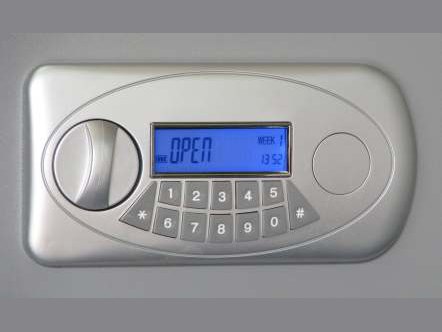
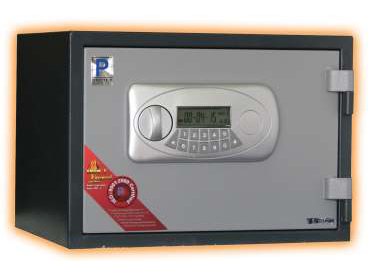
- A silver oval lock with a small LCD over the keypad (digits, a * key and a # key) and a round turn knob.
- Protex’s manuals cover HD-20, HD-23, HD-25, HD-34, HD-45, HD-53, HD-63A, HD-63B, HD-63C, HD-73, HD-100, HD-120 and HD-150 (Rev. 092606) and the LC-30D, LC-35D and LC-53D fire safes (V 04.10).
- The setup button is on the back of the door. The batteries are in a compartment on the back of the door, and there is a power override box and a tubular key.
- If your keypad has a round LED keypad with no LCD, see the HD-34 and HD LED keypad guide.
How to open it
- Press #. The LCD turns orange. (To keep your code off the screen, press # and then *.)
- Enter your code.
- Press #.
- The LCD turns blue and shows OPEN.
- Turn the knob clockwise (to the right) while the screen shows OPEN, and open the door.
- A wrong code shows Error. Enter the right code again.
- Use * as a backspace, and hold * for more than 2 seconds to clear the screen.
- HD models: three wrong codes in a row show ERROR and lock the safe for 3 minutes. It then returns to normal.
How to change the battery
The lock uses four AA alkaline batteries (we recommend Procell) in a battery compartment on the back of the door. When the screen shows LO-BAT, change the batteries as soon as possible. The safe keeps the code in memory up to 6 months without power.
- Open the safe (use the override box or key below if the batteries are dead).
- Open the battery cover on the back of the door and put in 4 new batteries.
- Close the battery cover. The safe goes back to normal operation.
If the batteries are dead: power override box
- Put 4 new AA batteries in the power override box.
- Plug the power override jack into the power override hole (outlet) on the lock.
- Open the safe as usual with your code.
- Open the battery cover and put 4 new batteries in the door compartment.
How to change the code and set the clock
Change the code with the door OPEN.
Protex says to leave the door open and practice your new code before you close it. The starting codes are in Protex’s manuals and with the safe paperwork. We are not printing them here.
HD models
- Open the safe as above.
- Press the setup button on the back of the door. The LCD turns blue.
- While the screen is blue, enter your new code (1 to 8 digits). If it is 8 digits long, skip the next step.
- Press #. The LCD turns blue and shows IN, and briefly shows your new code.
- Your code is set. Practice it with the door open.
LC-30D, LC-35D and LC-53D: user code
- Open the safe as above.
- While the LCD is blue, press *.
- Enter your new code (1 to 8 digits) and press #.
- The LCD shows INTO.
LC-30D, LC-35D and LC-53D: master code
- Open the safe with the master code.
- While the LCD is blue, press *.
- Enter the new master code (1 to 8 digits) and press #.
- The LCD shows INTO.
LC-30D, LC-35D and LC-53D: set the time and date
- Press * to enter the time and date setup mode.
- Use 0 to add and 8 to subtract, and # to move to the next item.
- The date is year, month, day (08-10-01 is October 1, 2008). The time is in military time (midnight is 00:00 and 5 p.m. is 17:00). The last item is the day of the week (Sunday is 1, Monday is 2, and so on).
- The LC-30D sheet has a way to reset all codes with the programming button on the back of the door. It puts the safe back to its factory settings, so we are not printing it here: call us.
Screen messages
| What you see | What it means |
|---|---|
| Orange screen | The lock is awake and waiting for the code. |
| Blue screen and OPEN | A good code. Turn the knob. |
| Error | A wrong code. |
| IN, INTO | A new code was set. |
| LO-BAT | The batteries are low. Change them as soon as possible. |
| CLEAR | All codes were reset to factory settings (LC models). We do not describe that reset here. |
Wrong codes
HD models: three wrong codes in a row show ERROR and the safe is locked for 3 minutes. After 3 minutes it returns to normal operation. The LC-30D sheet does not describe a lockout.
Opening with the key (HD models)
If the code and batteries will not open the safe, use the tubular key:
- Put the power override jack into the cover removal hole and push upwards.
- Gently remove the keyhole cover and insert the tubular key.
- Turn the key clockwise (right), then turn the knob to open the safe.
- Keep the key and the override box somewhere safe, not inside the safe.
If it still won’t open
The screen is dark
The batteries are probably dead. Use the power override box (4 AA, jack in the override hole), open the safe, then change the batteries in the door.
The screen says LO-BAT
Change the four AA batteries as soon as you can. The safe keeps its code for up to 6 months without power.
The code does not work after I changed it
Open the safe with the key (HD models), or call us. Always test a new code with the door open.
Download the full manufacturer instructions
This page is a quick-reference summary. For every feature and diagram, use the official manual for your model:
- Protex HD-series electronic safe user’s manual (PDF, Rev. 092606)A Protex Safe Co. manual for the HD-20 to HD-150, from Protex’s Manual page (copy also hosted by Safe and Vault Store).
- Protex LC-30D, LC-35D, LC-53D fire safe LCD lock manual (PDF, V 04.10)A Protex Safe Co. manual, from Protex’s Manual page.
- Safe and Vault Store: Protex lock operating instructionsDealer page with Protex manuals.
Need a hand?
Still stuck? We can help.
Having a hard time getting into your safe? Our technicians are trained to open malfunctioning safes professionally, so your valuables can still be safely secured. Call us or stop by.
Steve’s Lock, Safe and Alarm · 3401 N. Sepulveda Blvd, Manhattan Beach, CA 90266
More lock guides
About this guide. This is an independent guide from Steve’s Lock, Safe and Alarm, a safe and lock dealer. Brand and model names belong to their owners and are used only to help you identify your lock. We are not affiliated with the manufacturers. These steps summarize the manufacturers’ own instructions; your lock may be a different version, so if anything here does not match what your lock does, follow your manual or call us. Always change codes with the safe door open, and test the new code several times before you close the door.
Steps last checked against the manufacturer documents on October 19, 2026.