
Safe lock help · Sargent & Greenleaf
Safe lock troubleshooting › Sargent & Greenleaf › Atlas / SGBasic (Model 1004 two-user lock)
The Sargent & Greenleaf Model 1004, sold by distributors as the S&G Atlas or SGBasic, is a two-user electronic safe lock for home and gun safes: one master code and one user code. It is a motor-driven PivotBolt lock with a round lighted keypad and one 9-volt battery. This guide follows S&G’s own sheet for the 1004 in STAR mode (the factory setting, where you press # after the code). It covers how to open it, add, disable or delete the user code, change your code, check the battery, and what the beeps mean.
Want the whole manual? Jump to the manufacturer download links.
Is this your lock?
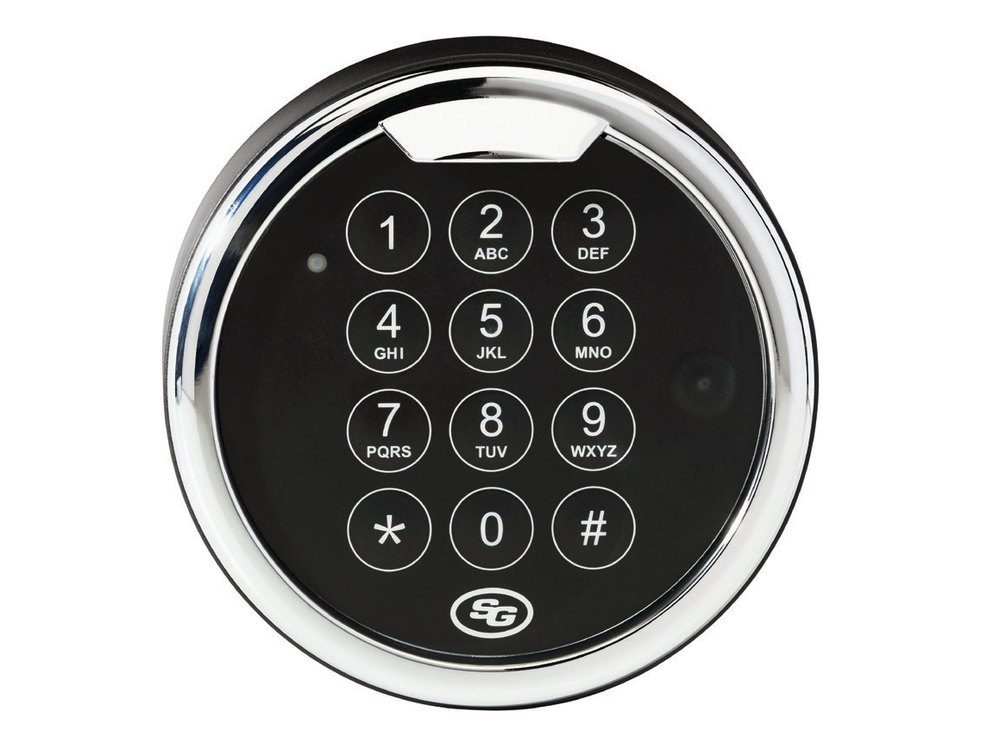
- A round keypad on the safe door with a red light at the upper left, in bright chrome, black platinum or matte black. S&G’s data sheet calls it a Quickmount lighted keypad.
- Two codes only: one master code and one user code, each six characters (digits and/or letters).
- MBA lists it as the S&G Atlas Pivotbolt (SGBasic Swingbolt) lock with a 1-battery top-lit keypad. S&G’s data sheet calls it the Model 1004.
- The lock body is S&G’s motor-driven Spinblocker and locks itself when the boltwork is fully extended. S&G tested up to 3,000 openings on a single 9-volt alkaline battery.
- It works in STAR mode (the factory setting) or BASIC mode. This page covers STAR mode. BASIC mode uses different key sequences: the Spartan guide shows both.
How to open it
- Enter your six-character code, then press #.
- The lock opens for about three seconds. Turn the safe handle to open the door in that time.
- If you do nothing, the lock goes back to the locked state.
- Each key press lights the red LED. If the keypad beeper is turned on it beeps with the LED. If it is off you hear a soft click.
- Press * * or wait 10 seconds to clear a mistake. Pausing more than 10 seconds between key presses resets the lock, and you start again.
- The factory master code is on S&G’s sheet. We are not printing it here. Change it as soon as the safe is installed.
Battery
The 1004 uses one 9-volt alkaline battery (we recommend Procell). If you enter a code and the lock beeps twenty times rapidly, the battery must be replaced. You can check the battery at any time with the battery check below. S&G’s 1004 sheet does not show how to get at the battery, so we are not guessing: call us and we will walk you through it.
- Press 8 9 *.
- One beep means the battery is weak. Two beeps mean it is good.
- After you hear the result, press * again to clear the battery check.
- Replace the battery with the safe door open, and test your codes afterward.
Add a user and change a code
Always do this with the safe door OPEN.
Check a new code at least three times before you close the door. In every sequence, wait for the beeps to finish before you press the next key. If you pause more than 10 seconds the lock resets and you start again.
Change your own code (master or user)
- Press 2 2 * (or 3 3 *).
- Enter your current six-character code, then #.
- Enter your new code, then #.
- Enter the new code again, then #.
Add the user code (master code)
- Press 7 4 *.
- Enter the master code, then #. Wait for the beeps.
- Press 1 #.
- Enter the new user code, then #.
- Enter the new user code again, then #.
Disable or enable the user code (master code)
- Press 5 5 *.
- Enter the master code, then #.
- S&G’s sheet shows the same keys to disable the user code (the lock gives 2 beeps) and to enable it again (the lock gives 4 beeps).
- A disabled user code stays in the lock. If it is used, the lock double-beeps and does not open.
Delete the user code (master code)
- Press 7 4 *.
- Enter the master code, then #. Wait for the beeps.
- Press 1 #.
- Press # two more times (nothing before each #).
Turn the keypad beeper off or on (master code)
- Press 7 8 *, then the master code and #.
- To turn the beeper off, press 0 # 0 #. To turn it on, press 1 # 1 #.
Switch from BASIC mode to STAR mode (master code)
- Press 6 6 *, then the master code and #.
- Press 1 # 1 #. The lock stays in STAR mode until someone changes it back to BASIC mode.
- The lock will not accept a user code that is the same as the master code. It signals an error.
- The 1004 may have a management reset code (MRC) that lets a new master code be set if the old one is lost. We are not printing those steps. If you lost the master code, call us or the safe maker.
- Do not use a birth date, street number or phone number as a code, and do not use 1 2 3 4 5 6 or 1 1 1 1 1 1.
Beeps and lights
| What you hear / see | What it means |
|---|---|
| Red LED blinks (and a beep if the beeper is on) with each key | The keypad took the key press. |
| 20 rapid beeps after you enter a code | The battery is weak. Replace the 9-volt battery. |
| 1 beep after 8 9 * | The battery is weak. |
| 2 beeps after 8 9 * | The battery is good. |
| Double beep and the lock does not open | You used a user code that has been disabled. |
| 2 long beeps (“braps”) when you press any key | The lock is in its 3-minute penalty time. Do not press any keys. |
Wrong-code lockout
If five or more wrong codes are entered in a row, the lock goes into a three-minute penalty period and will not take any input. Pressing a key during the penalty time adds a few seconds, so leave the keypad alone for at least 3 minutes, then try your code again.
If it still won’t open
It beeps 20 times when I enter my code
That is the low battery warning. The battery must be replaced with a new 9-volt alkaline battery. S&G’s 1004 sheet does not describe the battery compartment, so call us if you need help.
My user code stopped opening the lock
If the lock double beeps and stays locked, the user code was disabled with the master code. Use the master code to enable it again (see the codes section).
I get two long beeps no matter what I press
The lock is in its 3-minute penalty. Stop pressing keys, wait at least 3 minutes, then enter your code.
The lock will not take my new user code
The user code may be the same as the master code. Pick a different one.
I do not know if my lock is in STAR or BASIC mode
If you press # after your code and it opens, it is in STAR mode. If it opens by itself right after the sixth character, it is in BASIC mode: use the Spartan guide for the BASIC sequences.
Download the full manufacturer instructions
This page is a quick-reference summary. For every feature and diagram, use the official manual for your model:
- S&G 1004 Series operating instructions, STAR mode (PDF, document 630-905, 2/10/2017)Sargent & Greenleaf’s own sheet, hosted by a safe dealer (Safe and Vault Store).
- S&G Model 1004 Electronic Lock data sheet (PDF, SG-1003 Rev 10/20)S&G’s data sheet, hosted by MBA, a safe lock distributor.
- Sargent & Greenleaf: operating instructions indexS&G’s own page for its lock manuals. The BASIC mode sheet is document 630-869.
Need a hand?
Still stuck? We can help.
Having a hard time getting into your safe? Our technicians are trained to open malfunctioning safes professionally, so your valuables can still be safely secured. Call us or stop by.
Steve’s Lock, Safe and Alarm · 3401 N. Sepulveda Blvd, Manhattan Beach, CA 90266
More lock guides
About this guide. This is an independent guide from Steve’s Lock, Safe and Alarm, a safe and lock dealer. Brand and model names belong to their owners and are used only to help you identify your lock. We are not affiliated with the manufacturers. These steps summarize the manufacturers’ own instructions; your lock may be a different version, so if anything here does not match what your lock does, follow your manual or call us. Always change codes with the safe door open, and test the new code several times before you close the door.
Steps last checked against the manufacturer documents on October 20, 2026.