
Safe lock help · Sargent & Greenleaf
Safe lock troubleshooting › Sargent & Greenleaf › AxisBlu Bluetooth safe lock (AX26 series)
The Sargent & Greenleaf AxisBlu (model numbers starting AX26) is a Bluetooth safe lock. You open the safe with the S&G Axis app on a phone. It is built on S&G’s proven Titan lock body. It comes as a medallion kit (a small plate on the door, with no keypad) or as a keypad kit. This page tells you what the parts are and what the lock can do. S&G does not publish a public operating guide for the AxisBlu that we could find, so we do not guess at the steps: call us and we will help with your lock.
Want the whole manual? Jump to the manufacturer download links.
Is this your lock?
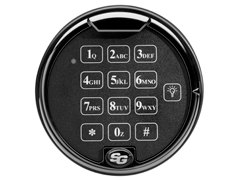
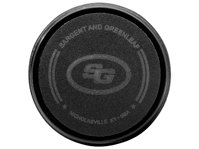
- A small medallion (a plate with no keys) on the safe door, or a 1-battery or QuickMount keypad, with a lock body inside the door marked AX26.
- S&G’s kit numbers are AX26-102 (PivotBolt with a medallion, matte black), AX26-202 (PivotBolt with a QuickMount keypad, matte black) and AX26-302 (PivotBolt with a 1-battery keypad, black platinum).
- MBA lists it as the S&G AxisBlu Pivotbolt (Swingbolt) lock with medallion.
- You use a mobile device with Bluetooth 4.2 or newer and the S&G Axis app, available for Android and Apple phones.
What the AxisBlu can do
These are S&G’s catalog features. Which of them are turned on depends on how your safe was set up.
- Opens from a phone: you access the safe through a Bluetooth-enabled mobile app. It is sold in medallion or keypad kits.
- 10 codes: one master, one supervisor and eight users.
- Two modes of operation: single control and manager/employee.
- Time delay from 1 to 99 minutes, and penalty lockout after wrong tries.
- Management reset code (MRC) and an optional duress module that needs an alarm interface.
- The lock body is the proven Titan lock body, updated with new firmware to work with a mobile device.
- S&G’s catalog lists the AxisBlu among its residential locks. S&G’s current website now features a newer C-Series keypad-free lock, so ask us if you are not sure which one you have.
If it still won’t open
My phone will not open the lock
Check that your phone supports Bluetooth 4.2 or newer, that Bluetooth is on, and that the S&G Axis app is open. If it still will not open, call us. S&G’s public documents do not cover the pairing or battery steps, so we will not guess.
I do not know my codes or who has access
Ask whoever set up the safe (the master or supervisor). Please do not keep guessing, because the lock has a penalty lockout. Call us.
I lost the master code or the phone that had it
Do not try to reset the lock yourself. Many S&G locks have a management reset code, but we cannot print those steps. Call us.
Download the full manufacturer instructions
This page is a quick-reference summary. For every feature and diagram, use the official manual for your model:
- S&G electronic safe lock catalog (PDF), AxisBlu pageSargent & Greenleaf’s catalog: 10 codes, two modes, time delay, the S&G Axis app and the AX26 kits.
- Sargent & Greenleaf: resource libraryS&G’s own page for its lock documents.
Need a hand?
Still stuck? We can help.
Having a hard time getting into your safe? Our technicians are trained to open malfunctioning safes professionally, so your valuables can still be safely secured. Call us or stop by.
Steve’s Lock, Safe and Alarm · 3401 N. Sepulveda Blvd, Manhattan Beach, CA 90266
More lock guides
About this guide. This is an independent guide from Steve’s Lock, Safe and Alarm, a safe and lock dealer. Brand and model names belong to their owners and are used only to help you identify your lock. We are not affiliated with the manufacturers. These steps summarize the manufacturers’ own instructions; your lock may be a different version, so if anything here does not match what your lock does, follow your manual or call us. Always change codes with the safe door open, and test the new code several times before you close the door.
Steps last checked against the manufacturer documents on October 20, 2026.