
Safe lock help · Tecnosicurezza
Safe lock troubleshooting › Tecnosicurezza › PulsePro keypad (up to 59 users, Dallas key option)
The Tecnosicurezza PulsePro is a keypad for banks, ATMs and commercial safes. It has the keys 1 to 5 and a clock key on the top row, 6 to 0 and OK below, and the words Pulse PRO on the side. It works with a lock body inside the door, up to 59 users (each with an ID number plus a code), a Dallas key option, dual control and a time delay. This guide covers how to open it, change a code, add, disable or delete users, set the time delay and the clock, check the battery, and read the beeps.
- How to open
- Battery
- Codes and users
- Beeps
- Lockout
- Time delay (Function 9, Manager)
- Set the time and date
- Test the keypad (Function 5)
- Troubleshooting
- Manuals
Want the whole manual? Jump to the manufacturer download links.
Is this your lock?
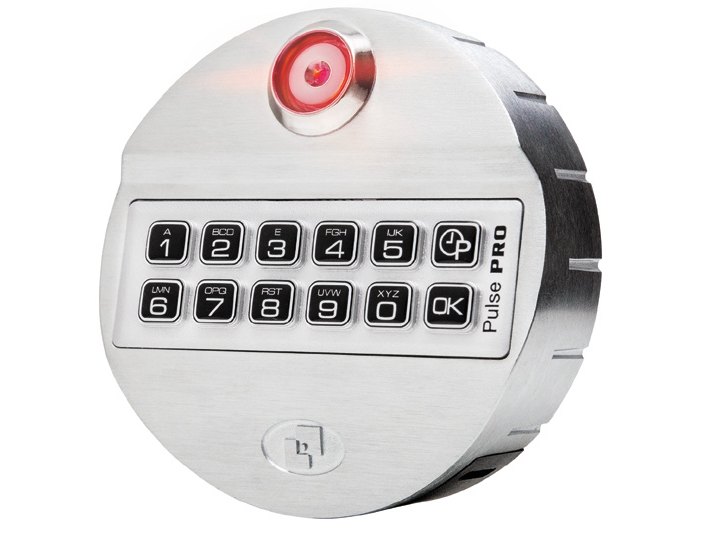
- A keypad with the keys 1 2 3 4 5 and a clock key (a small clock with a P) on the top row, and 6 7 8 9 0 and OK on the bottom row. Pulse PRO is printed on the right side.
- Every user opens with an ID number plus a numeric code, for example 03-030303 is ID 03 with the code 030303. A user can also have a Dallas key.
- IDs: Master 80 (and 81), Manager 60 (and 61), users 01 to 59, and override users (10, or 50 to 59) who always open without the time delay.
- The older Pulse and Pulse Next keypads are different: see the Pulse Next guide. The TechMaster and MiniTech have an LCD screen.
- The lock can be powered by a 9-volt alkaline battery in the compartment below the keypad, a 6-cell battery box inside the safe, or a power adapter.
How to open it
Manager or a standard user
- Enter your ID and code. 2 short beeps mean it is correct.
- Open the lock within 3 seconds. (On a motorized lock the motor moves the bolt and it stays open about 8 seconds.)
With a time delay
- Enter your ID and code. A short beep sounds and the LED flashes once every 2 seconds while the delay counts. Press the clock key to stop the count.
- When the delay ends, the open window starts: the lock flashes and beeps alternately every second.
- Enter your ID and code again (two codes in dual mode). 2 short beeps mean the lock can be opened.
Dual control (two people)
- Enter the first ID and code. The LED flashes fast.
- Enter the second ID and code. To stop a dual opening, press the clock key while the LED is flashing.
Override user
- Enter the override user’s ID and code. 2 short beeps mean the lock can be opened, with no time delay.
A new lock that is not set up yet (“pre-setup” mode)
- Press 1 to open the lock. 2 short beeps sound. Open it within 3 seconds.
- The keypad switches itself off if you do not press a key for 5 seconds. If you made a mistake, wait 5 seconds for it to switch off and start again. Press the clock key to cancel an operation.
- On a lock with a Dallas key, your combination is ID + code + key. Put the key in the reader after the code.
- Default codes are printed on Tecnosicurezza’s sheet. We are not printing them here. Change them before you use the lock.
Battery
A series of beeps means the battery is low and needs to be replaced right away. Tecnosicurezza’s sheet names Duracell; we recommend Procell alkaline batteries, which are the same type. The 9-volt battery is in the compartment below the keypad. Tecnosicurezza’s user sheet does not show how to open it, so we are not guessing: call us.
- Press and hold 4 for 2 seconds until you hear 2 short beeps.
- 2 more short beeps mean the battery is good. A series of beeps means it is low.
- The lock keeps its settings and users when the battery is changed. After a change, test your code with the door open.
Codes and users
Do these with the safe door OPEN.
Test every new code several times before you close the door. After you close it, check that the handle cannot be turned to the open position.
Change a code (Function 0)
- Press and hold 0 until you hear 2 short beeps. The LED stays on.
- Enter the user ID plus the old code (and the Dallas key if the user has one). 2 short beeps.
- Enter the new code without the ID. 2 short beeps.
- Enter the new code again to confirm. 2 short beeps and the LED goes off.
Add a user (Function 1, Manager)
- Press and hold 1 until you hear 2 short beeps. The LED stays on.
- Enter the Manager’s ID and code. 2 short beeps.
- Enter the new user ID. 2 short beeps.
- Enter the new user’s code (and/or Dallas key). 2 short beeps. Enter it again to confirm. 2 short beeps and the LED goes off.
Disable or enable a user (Function 2, Manager)
- Press and hold 2 until you hear 2 short beeps. The LED stays on.
- Enter the Manager’s ID and code. 2 short beeps.
- Enter the user ID. A single flat beep means the user is now disabled. 2 short beeps mean the user is enabled.
Delete a user (Function 3, Manager)
- Press and hold 3 until you hear 2 short beeps. The LED stays on.
- Enter the Manager’s ID and code. 2 short beeps.
- Enter the user ID to delete. 2 short beeps and the LED goes off.
- To add an override user, the bolt must be kept open.
- If the lock was first set to configuration 80 (“shift mode”), only the Manager and user 01 exist. Change the configuration before you add users.
- A long beep means the operation, ID or code is wrong. The Master (ID 80) changes the configuration, time and date. Do not hold OK: it is the reset key, which Tecnosicurezza describes only for use with a reset box.
Beeps and lights
| What you hear / see | What it means |
|---|---|
| 2 short beeps | The operation, ID or code is correct. |
| One long beep | The operation, ID or code is wrong. |
| One long beep every time you open the lock | The time and date were never set. Set them (see the clock section). |
| A single flat beep | An option was turned on, or a user was disabled. |
| A long beep and 3 short beeps | An expired code was entered. |
| A series of beeps | The battery is low. Replace it right away. |
| LED on | The keypad is in programming mode. |
| LED flashes once every 2 seconds | A time delay is counting. |
| LED flashes fast | The lock is waiting for the second code (dual mode). |
| LED flashes once every 10 seconds, every key gives a long beep | The lock is in its 4-minute penalty. |
Wrong-code lockout
Four wrong codes in a row start a 4-minute penalty. The LED flashes once every 10 seconds and every key you press gives a long beep. No operation is allowed until it ends.
Time delay (Function 9, Manager)
The delay can be 0 to 99 minutes (00 turns it off) and the open window 1 to 19 minutes.
- Press and hold 9 until you hear 2 short beeps. The LED stays on.
- Enter the Manager’s ID and code. 2 short beeps.
- Enter the delay (two digits) and then the open window (two digits). 2 short beeps.
- Enter both values again to confirm. 2 short beeps and the LED goes off.
- To set a shorter delay than the current one, the lock must be open. If it is not, the current countdown starts and the new value is only saved when it ends.
Set the time and date
A new lock needs its time and date set. Tecnosicurezza recommends updating them at least once a year.
- Time: press and hold the clock key until you hear 2 short beeps. (On a lock still in pre-setup mode, skip the next step.) Enter the Manager or Master ID and code, press 1, enter the time as hh:mm, then enter it again.
- Date: press and hold the clock key until you hear 2 short beeps. Enter the Manager or Master ID and code, press 2, enter the date, then enter it again. The date format (day/month/year or month/day/year) is chosen in the lock setup.
Test the keypad (Function 5)
Press and hold 5 until 2 short beeps and the LED stays on, then press the keys in the order Tecnosicurezza shows. Every key that works gives 2 short beeps. A damaged key gives a long beep and the keypad switches off.
If it still won’t open
It gives a long beep every time I open the lock
The time and date were not set. Tecnosicurezza says a long beep sounds at every opening until they are. See the clock section. An error beep can also mean a clock problem: update the time and date.
It beeps several times and will not open
That is the low battery signal. Replace the 9-volt battery (see the battery section) and check it with 4.
The keypad switched off while I was entering a code
It switches off after 5 seconds without a key press. Start over: enter the ID and the code quickly.
I get a flat single beep after a user ID
That user is disabled or not installed. A Manager can enable it (Function 2).
I lost the Manager or Master code
Please do not keep guessing: four wrong codes start a 4-minute penalty. Call us.
Download the full manufacturer instructions
This page is a quick-reference summary. For every feature and diagram, use the official manual for your model:
- Pulse PRO User Instructions, English (PDF, IU_PulsePro_T6630_14, 03/06/2026)Tecnosicurezza’s user instructions. Hosted by Tecnosicurezza.
- Pulse PRO quick sheet, English (PDF, IU_PulsePro_easy_04)The short user sheet. Hosted by Tecnosicurezza.
- Tecnosicurezza: downloads (English)Installation instructions, setup and audit software guides.
Need a hand?
Still stuck? We can help.
Having a hard time getting into your safe? Our technicians are trained to open malfunctioning safes professionally, so your valuables can still be safely secured. Call us or stop by.
Steve’s Lock, Safe and Alarm · 3401 N. Sepulveda Blvd, Manhattan Beach, CA 90266
More lock guides
About this guide. This is an independent guide from Steve’s Lock, Safe and Alarm, a safe and lock dealer. Brand and model names belong to their owners and are used only to help you identify your lock. We are not affiliated with the manufacturers. These steps summarize the manufacturers’ own instructions; your lock may be a different version, so if anything here does not match what your lock does, follow your manual or call us. Always change codes with the safe door open, and test the new code several times before you close the door.
Steps last checked against the manufacturer documents on October 20, 2026.