
Safe lock help · Tecnosicurezza
Safe lock troubleshooting › Tecnosicurezza › Touch Manager Dallas key reader (T4001 lock)
The Tecnosicurezza Touch Manager has no keypad. You open the safe by touching a Dallas key to a small reader on the door. The system is a T4001 lock with a Dallas key reader, and a lock can have up to 50 user keys. A blue programming key adds and removes user keys, and a red reset key clears them. This guide covers how to open the lock, add or remove user keys, use dual mode and the time delay, what the beeps mean, and the battery.
Want the whole manual? Jump to the manufacturer download links.
Is this your lock?
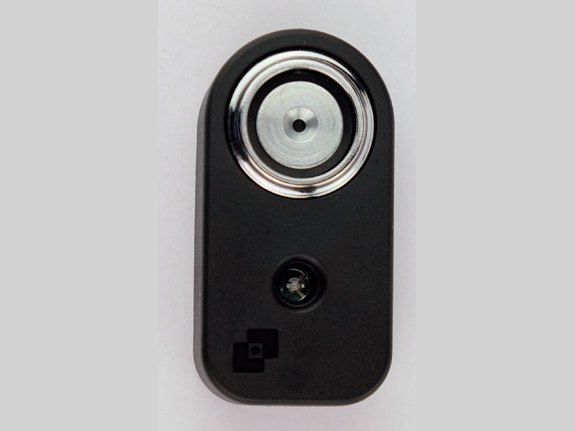
- A small Dallas key reader on the safe door with a red LED and a buzzer, and no keypad.
- Three kinds of key: a blue programming key, a red reset key, and user keys (Tecnosicurezza models N1990 or N1982).
- The reader has a contact area for a 9-volt battery, for emergency opening.
- The system must be powered through an alarm interface or a battery box connected to the lock’s secondary connector.
- Tecnosicurezza’s keypad locks (Pulse, PulsePro, TechMaster, MiniTech) are different: see their guides.
How to open it
A user key
- Place a user Dallas key on the reader. A double beep means the key is accepted.
- If a time delay is set, the count starts and the LED flashes every second. A beep every second means the delay has ended.
- Place a user key on the reader again. A double beep and the lock opens. Open the door.
Dual mode (two keys)
- Place a user Dallas key on the reader. A double beep.
- The reader beeps and the LED flashes every second, waiting for the second key.
- Place a second, different user key. A double beep and the lock opens. Open the door.
- A long flat beep means the key is not enabled to open this lock.
- In dual mode, after 10 seconds of nothing the session closes with a long beep.
- On a MotorLock with the bolt open, you can always close the lock by placing a user Dallas key on the reader.
Battery
Five beeps mean the battery is low. Replace it right away with a new alkaline 9-volt battery (we recommend Procell). The lock is powered from an alarm interface or a battery box on its secondary connector, so the battery is in the box, not in the reader. Tecnosicurezza’s sheet does not show where the box sits in your safe: call us if you cannot find it.
- The reader has contacts for a 9-volt battery you can hold on it for emergency opening if the lock’s own power is dead.
Add and remove user keys
Keep the blue and red keys safe.
Anyone with the blue key can add or remove user keys, and the red key can clear all of them. If one is lost, call us.
- Place the blue programming key on the reader. A double beep means a programming session has started. Then a triple beep every 3 seconds counts down the 30-second session.
- Place a user Dallas key on the reader. A double beep means the key is stored. A triple beep means the key was already enabled and is now removed.
- Place another user key to add or remove it, or place the blue key again to close the session.
- A long flat beep means the key you used is not enabled for this step.
- After 30 seconds of nothing the programming session closes with a long beep.
- There are no codes on this lock. The red reset key removes all user keys: we are not printing those steps, so call us. Changing the blue or red key also needs a reset box and the lock open: call us.
Beeps and lights
| What you hear / see | What it means |
|---|---|
| Double beep | The key or operation was accepted. |
| Triple beep | The key is already stored in the lock. |
| Long beep | The end of a programming session. |
| Long flat beep | The key is not enabled for this operation. |
| One beep every second (and LED flashing) | The lock is waiting for the second key in dual mode, or the time delay has ended. |
| Five beeps | The battery is low. Replace it right away. |
Wrong-code lockout
If a penalty is set, a certain number of wrong keys (8 by default) start a 4-minute penalty. Each time you place a key during those 4 minutes, the count starts again, so leave the reader alone until it ends.
If it still won’t open
I touch my key and get a long flat beep
That key is not enabled on this lock. Try a different user key. If no user key works, call us.
It beeps five times
That is the low battery signal. Replace the 9-volt battery right away.
Nothing happens when I place the key
The lock’s power may be dead. Hold a fresh 9-volt battery on the reader’s emergency contacts and place your key. Then call us to replace the battery.
It beeps once every second and will not open
It is either waiting for the second key (dual mode) or the time delay has ended. Place the next user key.
I lost the blue programming key
Call us. Do not try to reset the lock yourself.
Download the full manufacturer instructions
This page is a quick-reference summary. For every feature and diagram, use the official manual for your model:
- Touch Manager user instructions, English (PDF, IU_TouchManager_08)Tecnosicurezza’s user sheet. Hosted by Tecnosicurezza.
- Touch Manager brochure, English (PDF)Features: up to 50 users, dual mode, 9-volt emergency contacts. Hosted by Tecnosicurezza.
- Tecnosicurezza: downloads (English)Installation instructions and other manuals.
Need a hand?
Still stuck? We can help.
Having a hard time getting into your safe? Our technicians are trained to open malfunctioning safes professionally, so your valuables can still be safely secured. Call us or stop by.
Steve’s Lock, Safe and Alarm · 3401 N. Sepulveda Blvd, Manhattan Beach, CA 90266
More lock guides
About this guide. This is an independent guide from Steve’s Lock, Safe and Alarm, a safe and lock dealer. Brand and model names belong to their owners and are used only to help you identify your lock. We are not affiliated with the manufacturers. These steps summarize the manufacturers’ own instructions; your lock may be a different version, so if anything here does not match what your lock does, follow your manual or call us. Always change codes with the safe door open, and test the new code several times before you close the door.
Steps last checked against the manufacturer documents on October 20, 2026.