
Safe lock help · Tecnosicurezza
Safe lock troubleshooting › Tecnosicurezza › Pulse Next keypad (banks, ATMs and commercial safes)
The Tecnosicurezza Pulse Next is a round keypad with a backlight key, made for banks, ATMs and retail safes. It works with a lock body inside the door, can have a programmable time delay, and gives a double beep when it accepts a code. This guide covers how to open it, how the time delay works, how to change a code, how to replace the battery, and what the beeps and the 4-minute penalty mean.
Want the whole manual? Jump to the manufacturer download links.
Is this your lock?
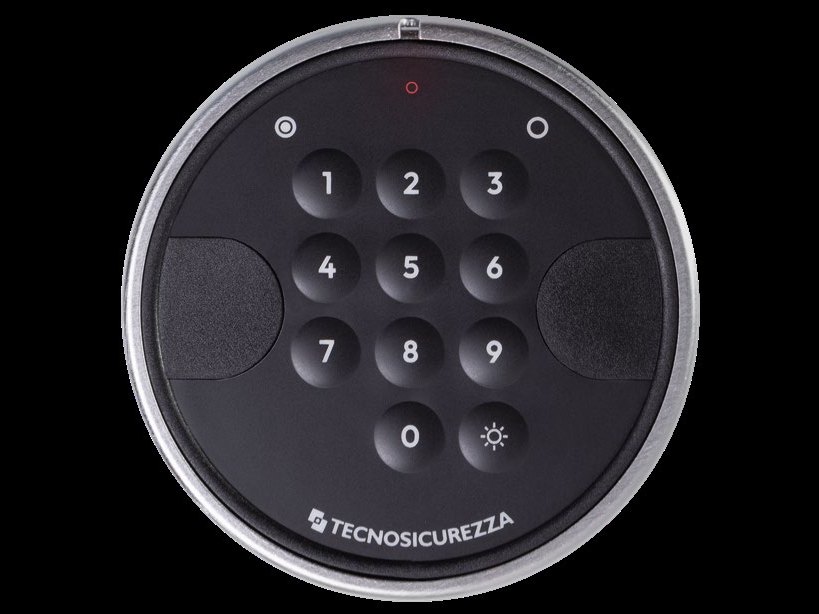
- A round keypad with a satin chrome or black ring, a dark face, the keys 1 to 9, 0, and a sun-shaped backlight key next to the 0. The TECNOSICUREZZA name is at the bottom. A small LED sits near the top and a dark side module on each side.
- It comes in a standard version (about 40 mm deep, with a battery drawer on the bottom edge) and a flat version (about 13 mm deep). Both are used on bank, ATM and retail safes.
- The keypad has no screen. It talks to you with beeps and a small LED. It is wired to a lock body inside the door (a SwingBolt, DeadBolt, LatchBolt or MotorLock).
- The older Tecnosicurezza Pulse keypad looks different (it has arrow and OK keys instead of the sun key) but uses the same beeps and the same hold-key steps.
How to open it
- Enter your opening code. If the code is right, the keypad gives a double beep. A long beep means the code was not right.
- If there is no time delay, skip to step 4. If a time delay is programmed, the count now starts and the LED flashes every 2 seconds. Wait. One beep every 2 seconds means the delay is over.
- After the delay, enter your opening code again. The keypad gives a double beep.
- Open the door within 4 seconds.
Dual-mode lock (two codes needed)
- Enter the first opening code. If a time delay is programmed, the LED flashes every 2 seconds until it ends.
- When you hear one beep every 2 seconds, enter both opening codes. The keypad gives a double beep.
- Open the door within 4 seconds.
- On SwingBolt and MotorLock locks you then turn the door handle to the open position. On DeadBolt and LatchBolt locks you turn the knob (or the keypad, depending on how it is installed).
- The opening window is the time after the delay during which you can enter the code and open. If you miss it, start again.
- The sun-shaped key switches the keypad backlight on, so you can see the keys in a dim room.
How to change the battery
The standard keypad uses one 9-volt alkaline battery (we recommend Procell) in a drawer on the bottom edge. Low battery: a series of beeps while you open the door. Replace the battery right away with a new alkaline one. Do this with the door open.
- Open the safe door and keep it open.
- Push on the battery drawer at the bottom edge of the keypad until you hear a click. This releases the cover.
- Slide the drawer out to the side.
- Take out the old 9-volt battery and put in a new 9-volt alkaline battery. Follow the + and – marks in the drawer.
- Slide the drawer back in until it clicks.
- Test your code with the door open before you close the safe.
- These steps are for the standard keypad. Some safes are wired to an external battery pack (6 C-size cells in a holder) or to a 12 to 24 volt power supply instead, and the flat keypad has contacts for an emergency battery. If your keypad does not have a drawer, call us.
- Tecnosicurezza says to use alkaline batteries only.
How to change a code and other functions
Do this with the safe door OPEN.
Store the new code safely and test it several times before you close the door. Do not use a code like 123456 or a birth date. Adding and deleting users, and setting the time delay, need the Manager code.
Change your own code
- Press and hold 0 until you hear a double beep. The LED stays on.
- Enter your old code.
- Enter your new code, then enter it again to confirm it.
- Test your new code several times with the door open.
Add a user (Manager code needed)
- Press and hold 1 until the double beep. The LED stays on.
- Enter the Manager code.
- On a 10-user lock, press the user number (1 to 9). If that user is free, the keypad gives a double beep.
- Enter the code for the user, then enter it again to confirm it.
Delete a user (Manager code needed)
- Press and hold 3 until the double beep. The LED stays on.
- Enter the Manager code.
- On a 10-user lock, press the number of the user to delete (1 to 9). The keypad gives a double beep and the user is deleted.
Set the time delay (Manager code needed)
- Press and hold 9 until the double beep. The LED stays on.
- Enter the Manager code. The keypad gives a double beep.
- Enter the time delay (0 to 99 minutes) and the opening window (1 to 19 minutes), each as two digits (for example 10 and 05), then confirm them the same way.
- The delay can only be lowered during the opening window.
Test the keypad keys
- Press and hold 5 until the double beep. The LED stays on.
- Press the keys 1 to 9, then 0, one at a time. A double beep for each key means it works. A long beep means a damaged key.
- The Manager can open, program and change their own code. Users can open and change their own code.
- Two-user versions work the same way but have only a Manager and one user, so you do not enter a user number.
- Other functions (disable or enable all users, check that the Manager code was changed, change the lock’s re-closing mode) are in Tecnosicurezza’s user sheet: see the download box below.
What the beeps and light mean
| What you hear or see | What it means |
|---|---|
| Double beep | The code or step was accepted. |
| Long beep | The code was wrong, or the step failed or ended. |
| LED flashing every 2 seconds | The time delay is counting down. |
| One beep every 2 seconds | The time delay is over. Enter the opening code. |
| A series of beeps while you open | The battery is low. Replace it. |
| Double beep, then 2 LED flashes (T4710/M MotorLock) | The lock has closed again by itself. |
| Hold a key, double beep, LED stays on | The keypad is ready for the function that key controls. |
Wrong codes (penalty)
After 4 wrong codes, the lock starts a 4-minute penalty period. Every time you enter a code during those 4 minutes, the count starts over, so do not touch the keypad until the 4 minutes have passed.
If it still won’t open
The keypad beeps twice but the door will not open
If a time delay is set, the double beep only starts the delay. Wait until you hear a beep every 2 seconds, then enter the code again and open the door within 4 seconds. If the lock is dual mode, enter both codes.
The keypad keeps giving a long beep
The code is wrong, or the lock is in its 4-minute penalty. Stop pressing keys for 4 minutes, then enter the code once, slowly.
The keypad is dead or the beeps are weak
Replace the 9-volt battery (see the battery section). Some safes use an external battery pack or a power supply: if yours does, call us.
A key does not seem to work
Run the keypad test (hold 5, then press 1 to 0). A long beep means a damaged key. Call us.
Download the full manufacturer instructions
This page is a quick-reference summary. For every feature and diagram, use the official manual for your model:
- Pulse 10 users: user instructions, English (PDF)Tecnosicurezza, user sheet for the 10-user Pulse family. Hosted by Tecnosicurezza.
- Pulse 2 users: user instructions, English (PDF)Tecnosicurezza, user sheet for the 2-user Pulse family. Hosted by Tecnosicurezza.
- Pulse Next installation instructions (PDF, Italian)Includes the battery replacement and function test pages with pictures.
- Pulse Next brochure, English (PDF)Models and features.
- Tecnosicurezza Pulse Next pageTecnosicurezza’s product page.
Need a hand?
Still stuck? We can help.
Having a hard time getting into your safe? Our technicians are trained to open malfunctioning safes professionally, so your valuables can still be safely secured. Call us or stop by.
Steve’s Lock, Safe and Alarm · 3401 N. Sepulveda Blvd, Manhattan Beach, CA 90266
More lock guides
About this guide. This is an independent guide from Steve’s Lock, Safe and Alarm, a safe and lock dealer. Brand and model names belong to their owners and are used only to help you identify your lock. We are not affiliated with the manufacturers. These steps summarize the manufacturers’ own instructions; your lock may be a different version, so if anything here does not match what your lock does, follow your manual or call us. Always change codes with the safe door open, and test the new code several times before you close the door.
Steps last checked against the manufacturer documents on October 15, 2026.