
Safe lock help · NL / LP
Safe lock troubleshooting › NL / LP › LockONE (display keypad)
The NL LockONE is an electronic safe lock with a small display and an OK key. It is built for business and cash-handling safes: instead of a fixed code, it can use one-time opening codes that your company’s LockONE software generates. This guide covers how to open it with a one-time code, replace the 9-volt battery, and what the messages on the display mean.
Want the whole manual? Jump to the manufacturer download links.
Is this your lock?
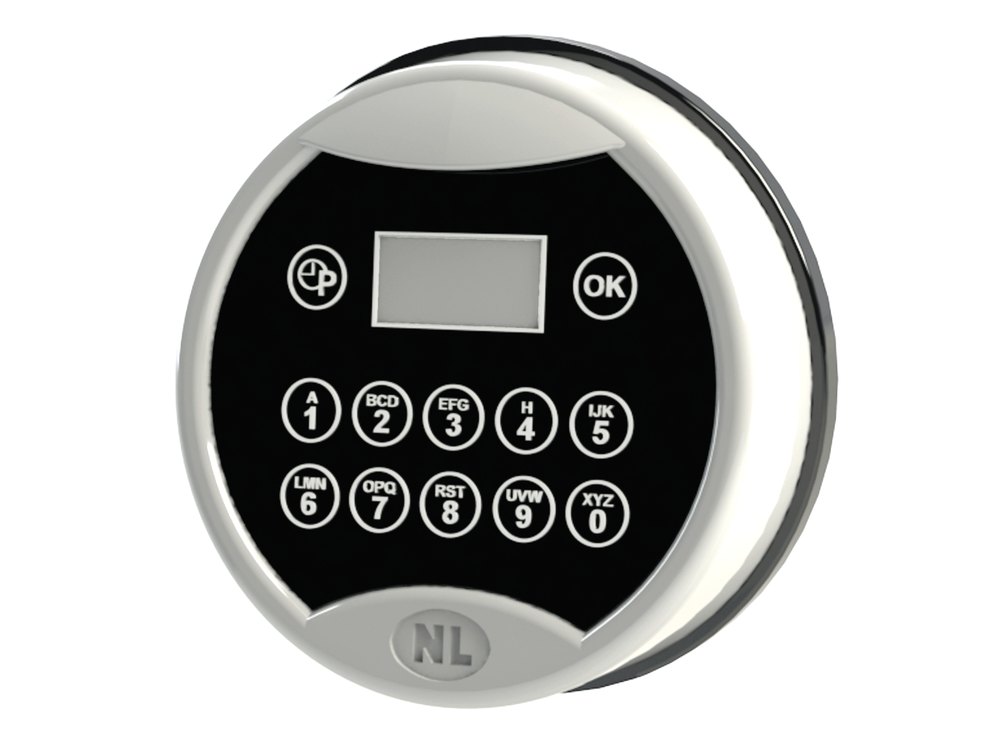
- A round NL keypad with a small LCD display at the top, number keys, and an OK key. The LCD guides the user through each step.
- The battery compartment is in the bottom of the keypad and opens with a slider. It uses one 9-volt alkaline battery.
- Each lock has a unique serial number. Each user has a 4-digit PIN. Opening codes are normally generated for you by your company’s LockONE web software, and can also be sent to a phone app.
- A keypad with no display and a light button at the lower left is the Premier: see the NL Premier guide.
How to open it with a one-time code
Your supervisor or the LockONE app gives you a 10-digit one-time opening code (OTC) for the lock. Each OTC works only for your PIN and for that lock.
- Press and hold the 4 key until you hear a double beep. The display shows PIN.
- Enter your 4-digit personal PIN. The display shows OTC.
- Enter the 10-digit OTC you were given. Check the number, then press OK.
- If the code is valid, you hear a double beep and the display shows OPEN LOCK. Open the lock.
- After you close the lock again, the display shows a closing seal. Give that closing seal to your supervisor (or type it into the open task in the app) so the opening task can be closed.
- If the lock is not physically opened within 3 seconds after a valid OTC, the same OTC can be used to try again.
- LockONE can also open through a Bluetooth phone app: you start Bluetooth mode on the keypad by entering a valid 6-digit code, then tap the task in the app and enter your PIN.
- Only your company’s supervisor can create codes and assign opening tasks. We cannot generate them for you.
How to change the battery
The lock uses one 9-volt alkaline battery (we recommend Procell). A series of signals means the battery is weak and must be replaced. The compartment is in the bottom of the keypad.
- Open the battery compartment at the bottom of the keypad by moving the slider.
- Unsnap the old battery from its battery clip.
- Connect a new 9-volt alkaline battery to the clip and put it back in the compartment.
- Close the compartment. With the safe door open, check that the lock still responds before you rely on it.
About codes and PINs
A LockONE does not use a single fixed code that you change on the keypad. Codes and PINs are created and managed in your company’s LockONE web software by a supervisor or administrator. If you forgot your PIN, or an OTC will not work, ask your supervisor. Do not keep guessing. If you are the supervisor and need help with the software or with an opening that failed, call us.
- Your PIN is a 4-digit number tied to your user account.
- An OTC is a 10-digit one-time code that is valid for one opening of one lock.
What the display and beeps mean
| What you see / hear | What it means |
|---|---|
| Double beep, display shows PIN | The keypad is ready for your 4-digit PIN. |
| Display shows OTC | Enter the 10-digit one-time code, then press OK. |
| Double beep, display shows OPEN LOCK | The code was valid. You can open the lock now (within 3 seconds). |
| A closing seal on the display after the lock is closed | Give this number to your supervisor, or enter it in the app, to finish the opening task. |
| A series of signals when you use the lock | The battery is weak. Replace the 9-volt battery. |
Wrong codes
NL’s LockONE documents that we reviewed do not give a wrong-code lockout time, so we do not either. If an OTC is rejected, ask your supervisor for a new one rather than trying numbers.
If it still won’t open
The display is blank
Replace the 9-volt battery with a fresh alkaline one. If it is still blank, call us.
The OTC was accepted but I did not open the lock in time
If you did not physically open the lock within 3 seconds, the same OTC can be used again.
I do not have a PIN or an OTC
Ask your company’s LockONE supervisor. We cannot generate codes for you.
Download the full manufacturer instructions
This page is a quick-reference summary. For every feature and diagram, use the official manual for your model:
- LockONE (TE20-xxD) One-Time-Code Operations (PDF)NL Lock, September 2018. Hosted by NL.
- LockONE Web Operations (PDF)NL Lock, September 2018. For supervisors and administrators. Hosted by NL.
- LockOne Entry TE20-xx Technical Manual (PDF)NL Lock&Electronics. Battery compartment. Hosted by NL.
- NL LockONE siteManufacturer site for the LockONE system.
Need a hand?
Still stuck? We can help.
Having a hard time getting into your safe? Our technicians are trained to open malfunctioning safes professionally, so your valuables can still be safely secured. Call us or stop by.
Steve’s Lock, Safe and Alarm · 3401 N. Sepulveda Blvd, Manhattan Beach, CA 90266
More lock guides
About this guide. This is an independent guide from Steve’s Lock, Safe and Alarm, a safe and lock dealer. Brand and model names belong to their owners and are used only to help you identify your lock. We are not affiliated with the manufacturers. These steps summarize the manufacturers’ own instructions; your lock may be a different version, so if anything here does not match what your lock does, follow your manual or call us. Always change codes with the safe door open, and test the new code several times before you close the door.
Steps last checked against the manufacturer documents on October 14, 2026.