
Safe lock help · Sargent & Greenleaf
Safe lock troubleshooting › Sargent & Greenleaf › 6121 and 6123 motorized electronic combination locks
The Sargent & Greenleaf 6121 and 6123 are motorized electronic combination locks in the same family as the 6120. The round keypad has the digits and letters on the keys, a small LED and a # key. They have a master code, an optional supervisor code, user codes, and a time delay. They run on 9-volt batteries in the keypad. This guide covers how to open them, change codes, use the time delay, replace the batteries, and what the beeps and the 15-minute lockout mean.
Want the whole manual? Jump to the manufacturer download links.
Is this your lock?
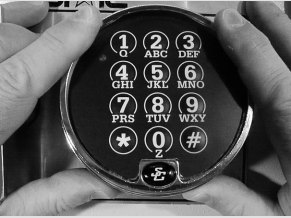
- A round keypad on the safe door with digits and letters on the keys, and an LED that lights briefly with each press.
- 6121: a master code (code #1), a supervisor code (#2) and up to seven user codes (#3 to #9). 6123: a master code, a supervisor code, five user codes (#3 to #7), a time delay and an optional time delay override code.
- Every code is six digits or six letters and ends with #.
- Both use two 9-volt alkaline batteries in the keypad. Some 6123 keypads have a single battery in a holder under the keypad base.
How to open it
- Press the code digits or letters in order, then #.
- The lock bolt retracts for six seconds. Turn the handle and open the door. Do not put any pressure on the handle until after you have entered the code.
- The lock locks automatically when you close the door and turn the handle to the locked position.
- Each button press gives a chirp and the keypad LED lights. A pause of more than 10 seconds resets the entry. Press * to start the entry over.
- If a time delay is turned on, see the time delay section below.
- The 6123 in supervisor/user mode: the master or supervisor code does not open the lock. It enables or disables the user codes, with four short beeps (users can open) or two long beeps (users cannot).
How to change the battery
The lock uses two 9-volt alkaline batteries in the keypad (we recommend Procell). The lock does not forget its codes during a battery change, even with no batteries in for a long time. When the batteries are low: the 6121 gives noticeably higher pitched chirps with every key press and keeps opening a few more times; the 6123 gives twenty consecutive beeps after you enter a code and will not open until the batteries are replaced. Both have a low battery simulator: hold * for about three seconds until three chirps, then enter your code to hear what low batteries sound like.
- Remove the keypad from its mounting base by pulling the housing away from the base (the top on the 6121, the bottom on the 6123). Support the housing so the wires are not pulled. Do not let it hang from the wires.
- Turn the keypad over and pull out both batteries by gripping the bottom of each. Do not pry them with a tool.
- Push new batteries straight into the connectors. Support the connectors so they do not bend, and watch the polarity.
- Coil the extra wire inside the housing, away from the spring clips. Line up the spring clips with the base and push the housing back on until it snaps.
- Check the master code and all user codes at least three times with the safe door open before you close it.
6123 one-battery keypad
- The removable battery holder is under the keypad base. Do not take the keypad apart. Pull the holder slightly toward the front of the keypad and then down.
- The new battery rests on a spring in the holder, with the larger contact in line with the larger opening in the top of the holder.
- Slide the holder back in until it clicks. If the lock does not work, do not press any buttons for five minutes and try again.
- The lock works with one 9-volt battery attached to either connector in an emergency. It does not harm the lock.
How to change codes and set the time delay
Do all programming with the safe door OPEN.
Code changes all start with 7 4 * (the same as “SG*”). If the lock gives a long error tone (a “brap”, or a nearly continuous run of chirps on the 6121), you made a mistake and the old code is kept. The factory master code is in S&G’s manual and we are not printing it here.
Change the master code (code 1)
- Press 7 4 *, your existing master code and #.
- Press 1 *, the new master code and #, then the new master code again and #.
- Three chirps show it was accepted. Only the master code can change the master code, and it cannot be deleted.
Set or change the supervisor code (code 2)
- Press 7 4 *, the master code (or the supervisor code) and #.
- Press 2 *, the new supervisor code and #, then the new code again and #.
Set or change a user code
- Press 7 4 *, the master code (or supervisor code) and #.
- Press the user position (3 to 9 on the 6121, 3 to 7 on the 6123) and *, the new user code and #, then the new code again and #.
- To delete the supervisor or a user code, use the same steps but press # # instead of a new code.
6123: a user changes their own code
- Press 3 3 *, the old user code and #, then the new code and #, then the new code again and #. A user cannot delete their own code.
Time delay: 6121
- The time delay is 0 to 27 minutes in 3-minute steps. Use the button number times three: 1 is 3 minutes, 5 is 15 minutes, 9 is 27.
- Press 7 4 *, the master code and #, then 0 *, the delay button, #, the same button again, #. Three chirps show it was accepted. To turn it off, set it to 0 the same way, during the two-minute opening window.
- To open with a delay on: enter a valid code (3 chirps, it does not open). The lock chirps once every 10 seconds, then ten chirps at the end, then once every 1.5 seconds for two minutes: enter a valid code in that window to open.
Time delay: 6123
- Press 7 4 *, the master code and #, then 0 *, the delay in minutes (1 to 99) and #, then the same number again and #. Setting it to zero removes it.
- To open: enter a valid code. The lock beeps every 10 seconds during the delay and ten rapid beeps at the end. Then you have the opening window (two minutes, settable to nine minutes with 8 *) to enter a valid code.
- If a delay is already set, you can only change it during the opening window.
- The 6123 can also have a management reset code (MRC) and a time delay override (TDO) code. These must be decided before the master code is changed for the first time, and cannot be added afterwards. They are set up by the installer: call us if you are not sure what your lock has.
- A time delay reduces battery life (about 50 percent on the 6121), so change batteries more often.
Beeps
| What you hear | What it means |
|---|---|
| One chirp with each key (LED lights) | The key was accepted. |
| Three chirps after a programming step | The change was accepted. |
| A long “brap” or a nearly continuous run of chirps | You made a mistake. The old code is kept. |
| Higher pitched chirps (6121) | The batteries are low. |
| Twenty consecutive beeps after the code (6123) | The batteries are low and the lock will not open until they are replaced. |
| Three chirps, then a chirp every 10 seconds (time delay) | The time delay is running. |
| Ten rapid beeps (6123) or chirps (6121) | The time delay is over. The opening window has started. |
| Four short beeps / two long beeps (6123 supervisor/user mode) | Users can open / users cannot open. |
Wrong-code lockout
If four incorrect codes are entered in a row, the lock shuts down for up to 15 minutes. On the 6123, pressing any button during the lockout resets the timer to the full penalty time, so do not touch the keypad for 15 minutes. Then enter a valid code.
If it still won’t open
It chirps but will not open
The batteries may be too weak for the lock motor. Replace both 9-volt batteries. If the safe’s boltwork is pressing on the lock bolt, move the handle to the fully locked position and enter a working code again.
No sound at all when I press keys
Dead batteries are most likely. If new batteries do not help, a loose keypad connector may be the cause: pull the keypad off the base and check that the wire connector is firmly seated in its receptacle (it only fits one way).
I forgot the master code
Please do not keep guessing: four wrong codes start a 15-minute lockout. Some locks were set up with a management reset code. Call us.
Download the full manufacturer instructions
This page is a quick-reference summary. For every feature and diagram, use the official manual for your model:
- S&G Model 6121 Operating Instructions, document 630-308 (PDF)Revision 8/15/00. Hosted by Sargent & Greenleaf.
- S&G Model 6123 Operating Instructions, document 630-327 (PDF)Revised 7/23/2010. Hosted by Sargent & Greenleaf.
- Sargent & Greenleaf: operating instructions indexS&G’s page of manuals for all of its locks.
Need a hand?
Still stuck? We can help.
Having a hard time getting into your safe? Our technicians are trained to open malfunctioning safes professionally, so your valuables can still be safely secured. Call us or stop by.
Steve’s Lock, Safe and Alarm · 3401 N. Sepulveda Blvd, Manhattan Beach, CA 90266
More lock guides
About this guide. This is an independent guide from Steve’s Lock, Safe and Alarm, a safe and lock dealer. Brand and model names belong to their owners and are used only to help you identify your lock. We are not affiliated with the manufacturers. These steps summarize the manufacturers’ own instructions; your lock may be a different version, so if anything here does not match what your lock does, follow your manual or call us. Always change codes with the safe door open, and test the new code several times before you close the door.
Steps last checked against the manufacturer documents on October 19, 2026.