
Safe lock help · Sargent & Greenleaf
Safe lock troubleshooting › Sargent & Greenleaf › Pulsetronic 2000 series (keypad that talks to the lock by sound)
The Sargent & Greenleaf Pulsetronic (2000 series) is an electronic safe lock whose keypad has a small LCD and talks to the lock with sound: it sends a series of audible “knocks” through the safe door, and the lock “hears” them. You enter six digits (or six letters) and #, the screen says TURN HANDLE, and the lock clicks. This guide covers how to open it, change the code, set up the keypad, and what the beeps, the 15-minute lockout and the low battery signals mean.
- How to open
- Battery
- Change code and set up the keypad
- Beeps
- Lockout
- If the lock does not open
- Sound and the safe
- Troubleshooting
- Manuals
Want the whole manual? Jump to the manufacturer download links.
Is this your lock?
- A keypad with a small LCD (listed by UL with S&G keypads 2000-1XX) that shows messages such as TURN HANDLE, LINKING, SENSITIVITY and LOW BATTERY.
- There is no cable between the keypad and the lock: the keypad talks to the lock with audible knocks through the safe door, so the keypad must stay in place on the door.
- Every code is six digits or six letters (any digit or letter can repeat) and ends with #. After the sixth digit the # blinks.
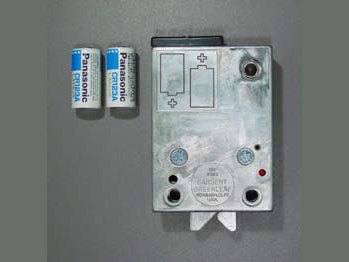
- The lock body inside the door uses two 3-volt lithium CR123A batteries. The keypad has its own battery that cannot be replaced (you replace the keypad).
How to open it
- Press your six code digits (or letters), one at a time, then press #. The keypad can be on or off the safe while you key, but have it in place on the safe when you press #.
- The screen says TURN HANDLE and the lock gives one long beep. You then hear the lock release with a click.
- You have about six seconds to turn the handle and open the safe. Do not put pressure on the handle before the lock tells you to.
- When you close the door and turn the handle to the locked position, the lock re-locks by itself and beeps two times to show the bolt is extended.
- If you pause more than 10 seconds between key presses, the display goes blank. Start over from the first digit.
- Press * to clear the last digit. To clear the whole code, press and hold * for two seconds (until the display blanks), or just wait ten seconds.
- Lock responses: one long beep means a correct code; one long “brap” tone means an incorrect code; one long, eight short, one long means the lock cannot open because of pressure on the handle.
Battery
The lock needs two 3-volt lithium batteries (CR123A). S&G says to always put in new, unused cells and recommends Panasonic CR123A. The batteries are in the lock body inside the door, so S&G strongly recommends that your safe dealer or a qualified safe technician replace them: the back panel and other parts may have to come off. After new batteries go in, the lock has to be activated with a special key sequence, or it stays unlocked. That is the part we do for you.
- Low battery in the lock: when you enter a correct code, you hear one long beep followed by eight short beeps. The lock can be opened about fifty more times, and the warning repeats on every correct code.
- On the 51st opening with the warning, the lock beeps the pattern five times and stays unlocked until the batteries are replaced. It beeps once every two seconds until the batteries fail completely, and it cannot lock and secure your safe.
- Low battery in the keypad: the screen shows LOW BATTERY for three seconds before the code entry screen. The keypad battery is not serviceable: replace the keypad as soon as possible (your safe dealer or sglocks.com for replacement information).
- Do not leave a safe with a “stays unlocked and beeps every two seconds” lock. Call us right away.
- The lock has a counter that tracks battery use. It must be reset whenever batteries are removed and re-installed or replaced, using the activation sequence in S&G’s manual (we are not printing it here: call us).
How to change the code and set up the keypad
Open the safe first and leave it open.
Do not close the safe until you have opened it with the new code at least three times. The lock comes with a factory code that you should change right away. It is in S&G’s manual and we are not printing it here.
Change your code
- Press 2 2 #. The display says CHANGE CODE, ENTER OLD CODE.
- Enter your existing six-digit code and press #. The display says ENTER NEW CODE.
- Enter your new six-digit code and press #. The display says RE-ENTER NEW CODE.
- Enter the new code again and press #. The display says TEST NEW CODE.
- Enter the new code a third time and press #. The display says TURN HANDLE and the lock opens if the code was accepted.
Set the language
- With the display blank, press 2 5 #. The display lists 1: ENGLISH, 2: DEUTSCH, 3: ESPAÑOL, 4: FRANÇAIS.
- Press the number for your language, then #.
Auto sensitivity (set it up after the keypad is mounted)
- With the safe door open and the keypad where you will use it, press 7 7 #. The display says SENSITIVITY and the lock gives a complex series of beeps.
- The keypad sends eight identical knock patterns and the lock sets the best level. Then it beeps two to eight times to show the level: two beeps means the safe door transmits sound easily; eight beeps means maximum amplification is being used.
- If you get eight beeps, move the keypad closer to the lock body and repeat.
Link the keypad and the lock
- Press 5 5 #. The display says LINKING and the lock responds when linking is successful.
Hide or show your digits
- Press 3 7 #. The display then shows stars instead of digits as you key. Repeat the same keys to show digits again.
- If the lock gives a “brap” instead of three chirps during a change, an error occurred and the old code is kept. Begin again.
- If the re-entered code does not match, the keypad shows ERROR for two seconds and the lock goes back to the old code.
- If you forgot your code, your safe’s maker may be able to give you an eight-digit reset code. S&G does not keep a record of it. Call us.
What the beeps mean
| What you see and hear | What it means |
|---|---|
| TURN HANDLE and one long beep | The code is correct. Turn the handle within about 6 seconds. |
| One long “brap” | The code was wrong, or the keypad and lock are out of sync (see the checks below). |
| One long, eight short, one long | The lock cannot open because of pressure on the handle (binding). |
| Two long “brap” tones when you try a code | The lock is in its 15-minute penalty lockout. |
| Two beeps after you turn the handle to locked | The lock bolt is extended: the safe is locked. |
| One long beep and eight short beeps after a correct code | The lock batteries are low. |
| A short beep once every two seconds, lock stays unlocked | The lock batteries are nearly dead, or the lock was not activated after a battery change. |
| LOW BATTERY on the screen for 3 seconds | The keypad battery is low. Replace the keypad. |
| Silence after you press # | The lock is not hearing the keypad. See the checks below. |
Penalty lockout
If more than 25 codes (right or wrong) are entered in a 15-minute period, the keypad goes into a 15-minute lockout. The screen cycles through TAMPER, LOCKOUT and a countdown (for example 14:30), and it does not accept codes. The lock body also goes into its own 15-minute lockout, and emits two long “brap” tones when a code is attempted. The two lockouts can run independently. Wait it out.
If the lock does not open
S&G’s manual gives these checks:
- One long “brap”: key the code again carefully. If it still fails, the keypad and lock may be out of sync: put the keypad on the safe, run Auto Sensitivity (7 7 #) and then Link (5 5 #), then try your code.
- Lock silent: the lock is not getting enough sound from the keypad. Move the keypad closer to the lock, then run Auto Sensitivity and Link again. Turn off radios and machinery nearby, because noise can interfere.
- One long, eight short, one long: something is binding the lock bolt, usually pressure on the handle before the lock released. Do not touch the handle until after the code and the click. If the door is binding, put the handle in the middle of its travel and push in on the door with your body weight while you enter the code.
- Two long “brap” tones: the lock is in penalty lockout. Wait 15 minutes.
Sound and the safe
Because the keypad talks to the lock by sound, how well the safe carries sound matters. S&G says heavily insulated safes muffle it and very light sheet steel containers echo, so a Pulsetronic may not work well on those. S&G tells installers to run Auto Sensitivity, Linking and Opening three times with the door open, then closed with the handle open, then closed and locked, before putting anything in the safe.
If it still won’t open
The lock stays unlocked and beeps every two seconds
The batteries in the lock are dead, or the lock was not activated after the batteries were changed. This needs a technician: call us right away so the safe can be secured.
The keypad shows LOW BATTERY
The keypad battery cannot be replaced. You need a new keypad. Call us.
It worked yesterday and now nothing happens
Check that the keypad is in the same place on the door and run Auto Sensitivity then Link. Turn off nearby noise. If it still fails, call us.
I forgot the code
Please do not keep guessing: more than 25 codes in 15 minutes starts a lockout. Your safe’s maker can supply a reset code. Call us.
Download the full manufacturer instructions
This page is a quick-reference summary. For every feature and diagram, use the official manual for your model:
- S&G Pulsetronic Operating Instructions, document 630-628 (PDF)Revision 12/22/05. Hosted by Sargent & Greenleaf.
- S&G Pulsetronic installation instructions, document 630-563 (PDF)Hosted by Sargent & Greenleaf.
- Sargent & Greenleaf: operating instructions indexS&G’s page of manuals for all of its locks.
Need a hand?
Still stuck? We can help.
Having a hard time getting into your safe? Our technicians are trained to open malfunctioning safes professionally, so your valuables can still be safely secured. Call us or stop by.
Steve’s Lock, Safe and Alarm · 3401 N. Sepulveda Blvd, Manhattan Beach, CA 90266
More lock guides
About this guide. This is an independent guide from Steve’s Lock, Safe and Alarm, a safe and lock dealer. Brand and model names belong to their owners and are used only to help you identify your lock. We are not affiliated with the manufacturers. These steps summarize the manufacturers’ own instructions; your lock may be a different version, so if anything here does not match what your lock does, follow your manual or call us. Always change codes with the safe door open, and test the new code several times before you close the door.
Steps last checked against the manufacturer documents on October 19, 2026.