
Safe lock help · Sargent & Greenleaf
Safe lock troubleshooting › Sargent & Greenleaf › 6124 / 6125 Comptronic (single, multiple user and dual control)
The Sargent & Greenleaf Comptronic 6124 and 6125 are motor-driven electronic safe locks with a square bolt. They are sold for banks, retail and commercial safes, with single user, multiple user and dual control versions and an optional time delay. S&G’s short user guides are the source for this page. It covers how to open the lock, the time delay, how to change your code, how to change the batteries, and what the beeps and the 10-minute penalty mean.
Want the whole manual? Jump to the manufacturer download links.
Is this your lock?
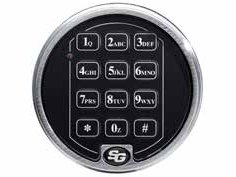
- A keypad on the safe door that beeps and flashes a red LED with each key. S&G’s catalog shows the 61KP-105 two-battery keypad in satin chrome.
- The lock body inside the door is an auto-relocking square bolt lock (S&G catalog order numbers 6124-143 and 6124-238).
- Codes are 6 characters (digits or letters). Do not use # or * in a code.
- S&G has three user guides: single user, multiple user and dual control. Your lock is set up for one of them. If you are not sure which, ask whoever manages the safe or call us.
- The 6124 gives you 6 seconds to turn the handle after a valid code. The 6125 gives you 15 seconds.
How to open it
Single user or multiple user
- Enter your 6-digit code, then #.
- Pause a second, then turn the safe handle to the unlocked position within 6 seconds (6124) or 15 seconds (6125).
Dual control (two people)
- The first user enters a 6-digit code and #.
- Within 60 seconds, the second user enters a 6-digit code and #. (If more than 60 seconds pass, the first code must be entered again.)
- Turn the safe handle to the unlocked position within 6 seconds (6124) or 15 seconds (6125).
If your lock has a time delay
- Single or multiple user: enter your code and #. The time delay starts and the lock beeps once every 10 seconds. At the end it beeps rapidly 10 times and the opening window begins: the lock beeps twice every 6 seconds. Enter your code and # again, then open the safe.
- Dual control: the first user enters a code and # to start the time delay. When the opening window starts, the second user enters a code and # to open the safe.
- Time delay override (TDO): a lock can be set up to let a code (for example a cash carrier’s) skip the delay. If it is used after the delay starts, it must be entered in the first 60 seconds.
- Always wait for each set of beeps to end before you press the next key, or you will interrupt the sequence.
- Press * to clear a mistake (or E on some dual-control keypads), or wait 10 seconds and the lock clears itself. Do not wait more than 10 seconds between keys.
Batteries
The keypad takes two alkaline batteries (S&G’s catalog calls the 61KP-105 a 2-battery keypad). S&G recommends alkaline batteries, and we recommend Procell. No codes or settings are lost during battery replacement.
- Carefully remove the keypad housing: lift the bottom edge (the edge closest to the S&G logo) first, then ease it off the base.
- Detach the old batteries from their terminals.
- To avoid bending or breaking the holder, support the top of each battery holder as you put in each fresh battery.
- Put the keypad housing back on and test your code with the door open.
- 5 double-beeps when the lock opens means the batteries are low. Change them as soon as possible.
- 20 beeps when you enter a code, and the lock does not open, means the batteries are too weak for the lock to work. Change them right away.
- If the keypad does not beep when you press a key, check that the batteries are fresh and connected properly.
How to change your code
Do this with the safe door OPEN.
Test the new code before you close the door. Wait for each set of beeps before you press the next key.
- Press 2 2 *. (2 2 is also “CC”, for Change Code.)
- Enter your old 6-digit code, then #. The lock gives 5 beeps.
- Enter your new 6-digit code, then #. The lock gives 3 beeps.
- Enter the new code again, then #. The lock gives 3 beeps.
- A new code can use any numbers or letters, but not # or *, because those are commands to the lock.
- Adding, deleting or changing other people’s codes, the time delay and the dual control settings are done with the manager’s codes. S&G’s management guides cover those, and we do not print them here.
Beeps and lights
| What you hear / see | What it means |
|---|---|
| A beep and a red LED flash with each key | The lock took the key press. |
| One long beep after you enter a code | The code was wrong. |
| Two long beeps during the penalty time | The lock is in its 10-minute penalty. |
| One double-beep (low, then high) | The bolt just extended to the locked position. |
| Beeps once every 10 seconds, then 10 rapid beeps, then 2 beeps every 6 seconds | Time delay running, then ended, then the opening window. |
| 5 double-beeps when the lock opens | The batteries are low. |
| 20 beeps and the lock does not open | The batteries are too weak. Change them now. |
| 3 short high, 3 short low, 3 short high beeps, twice (SOS) | The keypad tamper indicator: the keypad housing was moved. Enter a valid code within one minute and it resets. |
Wrong-code lockout
Five wrong codes in a row start a 10-minute penalty. If you enter another code in that time, you hear two long beeps. On a single or multiple user lock, the only way out is to wait the 10 minutes. On a dual control lock, a correct code during the penalty gives a short beep and the lock does not open, but that cancels the penalty. Enter the correct code a second time and the lock opens.
If it still won’t open
The keypad does not beep when I press a key
The batteries may be dead or not connected. Check that they are fresh and seated, then try again (see the batteries section).
It beeps 20 times and will not open
The batteries are too weak for the lock to work. Change both batteries right away. Codes and settings are kept.
I hear a long beep after my code
The code was wrong. Press * to clear, wait for the beeps to end, and try again. Five wrong codes in a row start a 10-minute penalty, so do not keep guessing.
The lock beeped an SOS pattern and did not open
That is the keypad tamper indicator (on locks that have it): the keypad housing was moved. After the beeps stop, enter a valid code within one minute. If you did not move the keypad, call us.
I entered a valid code but the handle will not turn
You only have 6 seconds (6124) or 15 seconds (6125) to turn the handle. Pause a second after # and turn right away. If it still will not turn, the bolt may be binding: call us.
Download the full manufacturer instructions
This page is a quick-reference summary. For every feature and diagram, use the official manual for your model:
- S&G Single User Guide for Comptronic 6124 and 6125 (PDF)Sargent & Greenleaf user guide, hosted by MBA, a safe lock distributor.
- S&G Multiple User Guide for Comptronic 6124 and 6125 (PDF)Same, for multiple user locks.
- S&G Dual User Guide for Comptronic 6124 and 6125 (PDF)Same, for dual control locks.
- S&G electronic safe lock catalog (PDF), Model 6124 pageS&G’s catalog: modes, 10 codes, 6124-143 and 6124-238 lock bodies and the 61KP-105 keypad. Hosted by Sargent & Greenleaf.
Need a hand?
Still stuck? We can help.
Having a hard time getting into your safe? Our technicians are trained to open malfunctioning safes professionally, so your valuables can still be safely secured. Call us or stop by.
Steve’s Lock, Safe and Alarm · 3401 N. Sepulveda Blvd, Manhattan Beach, CA 90266
More lock guides
About this guide. This is an independent guide from Steve’s Lock, Safe and Alarm, a safe and lock dealer. Brand and model names belong to their owners and are used only to help you identify your lock. We are not affiliated with the manufacturers. These steps summarize the manufacturers’ own instructions; your lock may be a different version, so if anything here does not match what your lock does, follow your manual or call us. Always change codes with the safe door open, and test the new code several times before you close the door.
Steps last checked against the manufacturer documents on October 20, 2026.