
Safe lock help · Sargent & Greenleaf
Safe lock troubleshooting › Sargent & Greenleaf › 6300 series (6352 keypad and control unit, 6354 square bolt lock)
If your safe lock says 6354, it is the square bolt lock of the Sargent & Greenleaf 6300 series multiple compartment electronic safe lock (S&G’s catalog number is 6354-005). The rest of the system is a 2-line LCD keypad and control unit (6352) and a plug-in power supply (6160). This page tells you what the parts are and what the system can do. S&G marks its user and programming guides for the 6300 as confidential, so we do not copy the steps: call us and we will help with your lock.
Want the whole manual? Jump to the manufacturer download links.
Is this your lock?
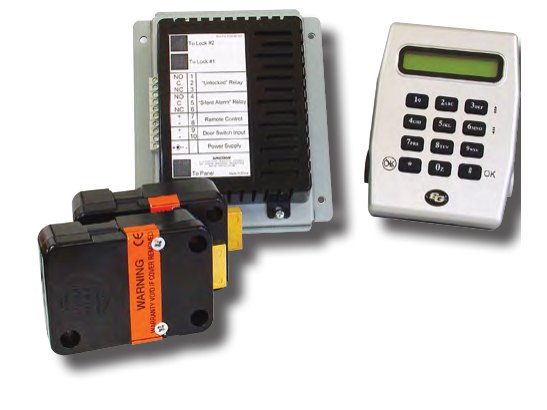
- A 2-line LCD keypad and a separate control unit inside the safe (the 6352-004 keypad and control unit), with a square bolt lock on a cable (the 6354-005 lock body).
- The system is powered by an AC plug-in transformer (the 6160-101 120-volt power supply), with battery backup capability built in.
- S&G sells a 6350-001 software kit for programming the lock and managing the audit trail on a PC.
- The keypad and control unit can operate one or two locks independently, and the keypad shows text in English or Spanish.
What the 6300 system can do
These are S&G’s catalog features for the 6300 series. Which of them are turned on depends on how your safe was set up.
- Three field-settable modes: multiple user, dual control, and manager/employee.
- Codes: one programmer code, two supervisor codes and eighteen user codes, in a 6, 7 or 8 digit format.
- Time delay from 1 to 99 minutes, with time delay override authority for chosen code holders.
- Time lock: a seven-day repeating schedule with up to 27 special holiday overrides.
- Dual control and touch keys: a user can be required to enter a code with another code holder, or to present a registered touch key to the keypad.
- Penalty lockout to stop someone entering sequential or random codes until one works.
- Duress capability is standard and built into the control unit.
- Audit trail: 500 time and date stamped events, managed with the PC software or viewed on the LCD keypad.
- The steps to open, change a code or set the clock are in S&G’s 6300 guides. S&G marks those guides confidential, so we are not reproducing them here.
If it still won’t open
The display is dark
Check that the plug-in power supply is plugged in and on. If it is, call us.
I do not know my codes or how my lock is set up
Ask whoever manages the safe (the manager or programmer). Please do not keep guessing, because a penalty lockout shuts the lock down after wrong codes. Call us and we will go over your options.
The keypad shows a tamper message
Do not take the keypad housing apart. Call us.
Download the full manufacturer instructions
This page is a quick-reference summary. For every feature and diagram, use the official manual for your model:
- S&G 2014 electronic safe lock catalog (PDF), page 9: 6300 SeriesRevision date 6/23/2014. Hosted by Sargent & Greenleaf. Lists the 6352 keypad and control unit, the 6354 square bolt lock, the 6160 power supply and the 6350 software kit.
- Sargent & Greenleaf: operating instructions indexS&G’s own page for its lock manuals.
Need a hand?
Still stuck? We can help.
Having a hard time getting into your safe? Our technicians are trained to open malfunctioning safes professionally, so your valuables can still be safely secured. Call us or stop by.
Steve’s Lock, Safe and Alarm · 3401 N. Sepulveda Blvd, Manhattan Beach, CA 90266
More lock guides
About this guide. This is an independent guide from Steve’s Lock, Safe and Alarm, a safe and lock dealer. Brand and model names belong to their owners and are used only to help you identify your lock. We are not affiliated with the manufacturers. These steps summarize the manufacturers’ own instructions; your lock may be a different version, so if anything here does not match what your lock does, follow your manual or call us. Always change codes with the safe door open, and test the new code several times before you close the door.
Steps last checked against the manufacturer documents on October 20, 2026.