
Safe lock help · Sargent & Greenleaf
Safe lock troubleshooting › Sargent & Greenleaf › A-Series ATM lock (6128 and 6129)
The Sargent & Greenleaf A-Series (models 6128 and 6129) is an ATM safe lock: a round keypad with a keypad extension that has three small lights (red, green and amber) and a blue-dot key reader. It has three security levels and 16 possible codes. S&G’s full programming guide for it is marked confidential, so this page follows S&G’s public quick start sheet. It covers the lights, how to open the lock, and how to add a user and change a code.
Want the whole manual? Jump to the manufacturer download links.
Is this your lock?
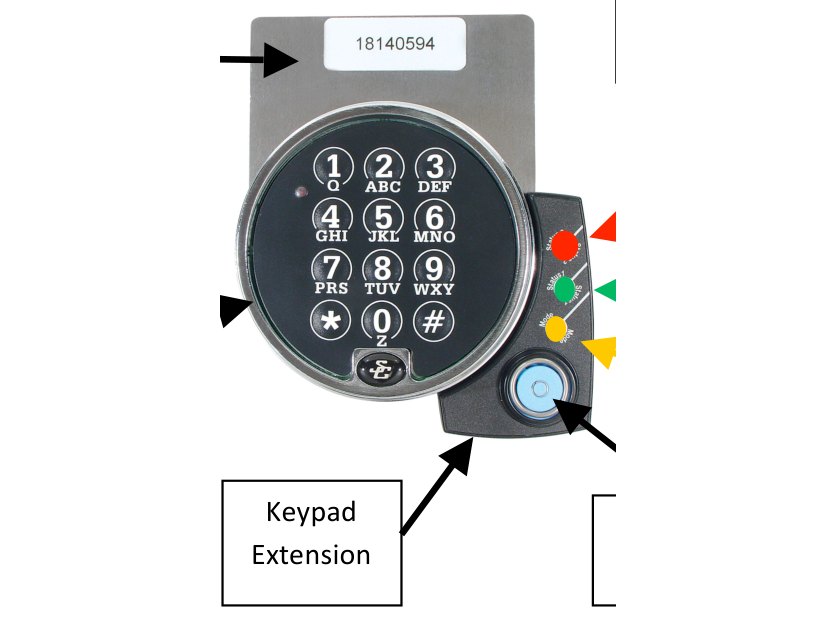
- A round keypad with letters on the keys and a keypad extension beside it with a red, a green and an amber light and a blue-dot reader. The serial number label is on the bracket above the keypad.
- There are three security levels: Officer (PIN positions 02 and 03), Administrator (PIN positions 04 to 07) and User (PIN positions 10 to 19), for 16 possible codes.
- Codes are eight digits, two digits for the PIN position followed by a six-digit code.
- The lock comes with an Officer code and a User code already programmed. The starting codes are on S&G’s quick start sheet and we are not printing them here.
How to open it
- Enter an Officer code or a User code (8 digits) and press #.
- Watch the lights: green means success. Then open the door.
- Every code is the two-digit PIN position followed by the six-digit code, for example a User in position 10.
- Either an Officer code or a User code opens the lock, according to S&G’s sheet.
Power
S&G’s A-Series quick start sheet does not say how the lock is powered or how to change a battery. We are not guessing: if the keypad shows no lights, call us.
- If the keypad is dark, check whether the machine or safe it is in has power, then call us.
Add a user and change a code
Adding codes takes two people.
One person must be an Officer and the other a User. S&G suggests adding a second User before you change any codes, so that all three starting codes can then be changed to secure codes known only to their owners. Do this with the door open and test every new code.
Add a user
- Press 7 4 *.
- Enter an Officer code and #.
- Enter a User code and #.
- Enter the new user code (PIN position plus six digits, for example a new user in position 11) and #.
- Enter the new user code again and #.
Change your own code
- Press 2 2 *.
- Enter your old code (8 digits) and #.
- Enter your new secure code and #, then the new code again and #.
What the lights mean
| Light | What it means |
|---|---|
| Red | Error. |
| Green | Success. |
| Amber | Data transfer. |
If it still won’t open
The red light comes on
The code or the entry was not accepted. Check that you entered the two-digit PIN position first, then the six-digit code, then #. Please do not keep guessing: call us.
I need codes added or removed
That takes an Officer and a User together, or an administrator. Call us if nobody on site has the right level.
I lost the Officer code
Call us. S&G’s full programming guide is marked confidential, so we cannot print its recovery steps here.
Download the full manufacturer instructions
This page is a quick-reference summary. For every feature and diagram, use the official manual for your model:
- S&G A-Series ATM Lock Quick Start Instructions (PDF, NU design 6-2010)Hosted by Sargent & Greenleaf. One page.
- Sargent & Greenleaf: operating instructions indexS&G’s own page for its lock manuals.
Need a hand?
Still stuck? We can help.
Having a hard time getting into your safe? Our technicians are trained to open malfunctioning safes professionally, so your valuables can still be safely secured. Call us or stop by.
Steve’s Lock, Safe and Alarm · 3401 N. Sepulveda Blvd, Manhattan Beach, CA 90266
More lock guides
About this guide. This is an independent guide from Steve’s Lock, Safe and Alarm, a safe and lock dealer. Brand and model names belong to their owners and are used only to help you identify your lock. We are not affiliated with the manufacturers. These steps summarize the manufacturers’ own instructions; your lock may be a different version, so if anything here does not match what your lock does, follow your manual or call us. Always change codes with the safe door open, and test the new code several times before you close the door.
Steps last checked against the manufacturer documents on October 20, 2026.