
Safe lock help · NL Lock (QSecurity)
Safe lock troubleshooting › NL Lock (QSecurity) › Basic board locks: Large RotoBolt EM20-20, Universal RotoBolt UR20-20, Straight Bolt EM35-20
NL Lock’s Basic board locks are two-user electronic safe locks: one 6-digit Primary code and one Secondary user code. The Large RotoBolt EM20-20, the Universal (Mini) RotoBolt UR20-20 and the Straight Bolt EM35-20 all work this way, with an NL Premier, QuickTouch, EasyTouch or THinPut keypad. NL Lock’s instructions now carry the QSecurity Industries name. This guide covers how to open the lock, change a code, add or delete the second user, set a time delay, run the electronics test, and read the beeps.
- How to open
- Battery
- Change codes
- Beeps
- Lockout
- Time delay (Primary code)
- Electronics test (Function 5)
- Troubleshooting
- Manuals
Want the whole manual? Jump to the manufacturer download links.
Is this your lock?
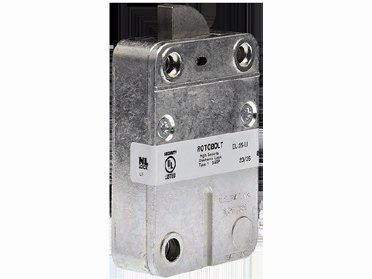
- The lock body is inside the safe door. You see only the keypad on the outside, joined to the lock by a cable that plugs into the receiver marked ENT.
- MBA lists these as the NL Basic Full-Size Rotobolt (EM20-20), the NL Mini / Universal Rotobolt (UR20-20) and the NL Straight Bolt (EM35-20), all with a “Basic Board”, and as 2-User packages.
- Works with the Premier (PI20), Premier II (PI80), THinPut (TH20), EasyTouch (ET20) and QuickTouch (QT20) keypads. The keypad guide is on the Premier, Rotating Premier and QuickTouch page.
- The lock is rated UL Type 1 (and VdS EN1300 Class B for the models that carry it).
- A lock with a 10-user DIA board instead of the Basic board is on the DIA page.
How to open it
- Enter your 6-digit code. Each key press gives a beep and an LED flash.
- A double beep after the last digit means the code is valid.
- Turn the safe boltwork handle to the OPEN position within 3 seconds.
Straight Bolt (EM35-20)
- Enter your code. After the double beep you have 3 seconds to retract the lock bolt by turning the rotating keypad or the knob.
- Then move the safe boltwork to the OPEN position.
- To lock: put the boltwork in the fully LOCKED position and extend the lock bolt by turning the keypad or knob counter-clockwise. The lock secures itself.
- If you do not open the door within 3 seconds, the lock re-secures automatically.
- If the first code entry fails, wait 10 seconds before you enter it again. A code entry is also cancelled if 10 seconds pass with no key press.
- To lock a RotoBolt: close the door and turn the handle to the fully locked position. The lock secures itself. Check by trying to turn the handle.
- The factory code is in NL’s sheet. We are not printing it here. Change it before you start using the safe.
Battery
The keypad runs on a 9-volt alkaline battery (we recommend Procell; NL’s sheet names Energizer and Duracell). A series of beeps after you enter a code means the battery is weak and must be replaced. The battery compartment is in the keypad. The steps for the Premier and QuickTouch keypads are on the keypad page.
- Change the battery with the safe door open and test your code afterward.
How to change codes
Do these with the safe door OPEN.
Test every new code several times before you close and lock the door.
Change the Primary or the Secondary code
- Press and hold 0 until you hear a double beep, then let go. The LED stays on for the next steps.
- Enter the old code (double beep).
- Enter the new code (double beep), then the new code again (double beep).
- Try the new code.
Activate the second (Secondary) user code
- Press and hold 1 until you hear a double beep, then let go.
- Enter the Primary code (double beep).
- Enter the Secondary code twice (double beep).
Delete the second (Secondary) user code
- Press and hold 3 until you hear a double beep, then let go.
- Enter the Primary code. The Secondary code is deleted.
- A long beep during any of these means an entry error. The old code stays valid.
- The Primary code can be changed but not deleted. Only the Primary code can delete the Secondary code.
- Do not use birth dates or phone numbers as codes, and keep all codes stored securely.
Beeps and lights
| What you hear / see | What it means |
|---|---|
| Double beep | The entry was valid. |
| Long beep | The entry was invalid or out of range. In a code change, the old code stays valid. |
| A series of beeps after you enter a code | The battery is weak. Replace it. |
| LED flashes every 2 seconds | A time delay is counting down. |
| LED flash and beep every second | The open window: enter your code again to open. |
| LED flashes every 10 seconds and every key gives a long beep | The lock is blocked for 5 minutes after wrong codes. |
Wrong-code lockout
Four invalid codes in a row block the keypad for 5 minutes. The LED flashes every 10 seconds and any key press gives a long beep. When the 5 minutes end, two more invalid codes start another 5 minutes.
Time delay (Primary code)
The delay can be 0 to 99 minutes, followed by an open window of 1 to 19 minutes.
- Set it: press and hold 9 until you hear a double beep, then let go. Enter the 6-digit Primary code (double beep).
- Enter the delay and then the open window as two-digit numbers. For a 26-minute delay and a 12-minute window, enter 2 6 1 2 (double beep).
- Enter the same numbers again to confirm. A double beep means it was accepted and the LED goes out. A long beep means an invalid or out-of-range entry.
- To open with a time delay: enter a valid code. The LED flashes every 2 seconds while the delay counts. When it ends, the open window starts with an LED flash and a beep every second.
- During the open window, enter a valid code again (double beep) and, within 3 seconds, turn the handle to OPEN.
- To remove the delay: during the open window, enter 0 0 0 1. You can only make the delay shorter during the open window.
Electronics test (Function 5)
This is NL’s built-in test of the keypad and lock.
- Press and hold 5 until you hear a double beep and the LED stays on.
- Press the keys in order: 1 2 3 4 5 6 7 8 9 0.
- A double beep at each key means the lock and keypad are talking properly. A long beep points to a fault that can likely be fixed by replacing the keypad.
- Functional test with the door open: enter your code (double beep), turn the handle to OPEN (the bolt must move freely), turn it back to LOCKED (the bolt must fully extend). Repeat it several times before you lock the safe door.
If it still won’t open
It beeps several times after my code and will not open
That is the weak battery signal. Replace the 9-volt battery in the keypad.
Nothing happens when I press the keys
The battery may be dead, the keypad cable may not be fully seated in the ENT receiver on the lock, or the lock may be blocked for 5 minutes. Run the electronics test (hold 5). A long beep points to the keypad. If you are not sure, call us.
I got a valid code but the handle will not turn
You only have 3 seconds. If the lock re-secured, enter the code again. The bolt may also be binding on the boltwork: do not force it, call us.
I lost the Primary code
Please do not keep guessing: four wrong codes block the keypad for 5 minutes. Call us.
Download the full manufacturer instructions
This page is a quick-reference summary. For every feature and diagram, use the official manual for your model:
- Large RotoBolt EM20-20 Instructions, Basic Board (PDF, Rev. 2407)NL Lock / QSecurity Industries manual, hosted by MBA, a safe lock distributor.
- Universal RotoBolt UR20-20 Instructions, Basic Board (PDF, Rev. 2409)Same maker, hosted by MBA.
- Straight Bolt EM35-20 Instructions, Basic Board (PDF, Rev. 2407)Same maker, hosted by MBA.
Need a hand?
Still stuck? We can help.
Having a hard time getting into your safe? Our technicians are trained to open malfunctioning safes professionally, so your valuables can still be safely secured. Call us or stop by.
Steve’s Lock, Safe and Alarm · 3401 N. Sepulveda Blvd, Manhattan Beach, CA 90266
More lock guides
About this guide. This is an independent guide from Steve’s Lock, Safe and Alarm, a safe and lock dealer. Brand and model names belong to their owners and are used only to help you identify your lock. We are not affiliated with the manufacturers. These steps summarize the manufacturers’ own instructions; your lock may be a different version, so if anything here does not match what your lock does, follow your manual or call us. Always change codes with the safe door open, and test the new code several times before you close the door.
Steps last checked against the manufacturer documents on October 20, 2026.