
Safe lock help · NL Lock (QSecurity)
Safe lock troubleshooting › NL Lock (QSecurity) › DIA and DIA Pro board locks: RotoBolt, Straight Bolt and MotorDrive (10 or 40 users)
The DIA board gives NL Lock’s RotoBolt, Straight Bolt and MotorDrive safe locks a manager and up to nine users, with dual control, time delay and an optional Dallas key. The DIA Pro board does the same with up to 39 users and an ID number before each code. NL Lock’s instructions now carry the QSecurity Industries name. This guide covers how to open the lock, change your code, add, disable or delete users, set a time delay, run the electronics test, and read the beeps.
- How to open
- Battery
- Codes and users
- Beeps
- Lockout
- Time delay (Function 9, manager code)
- Electronics test (Function 5)
- Troubleshooting
- Manuals
Want the whole manual? Jump to the manufacturer download links.
Is this your lock?
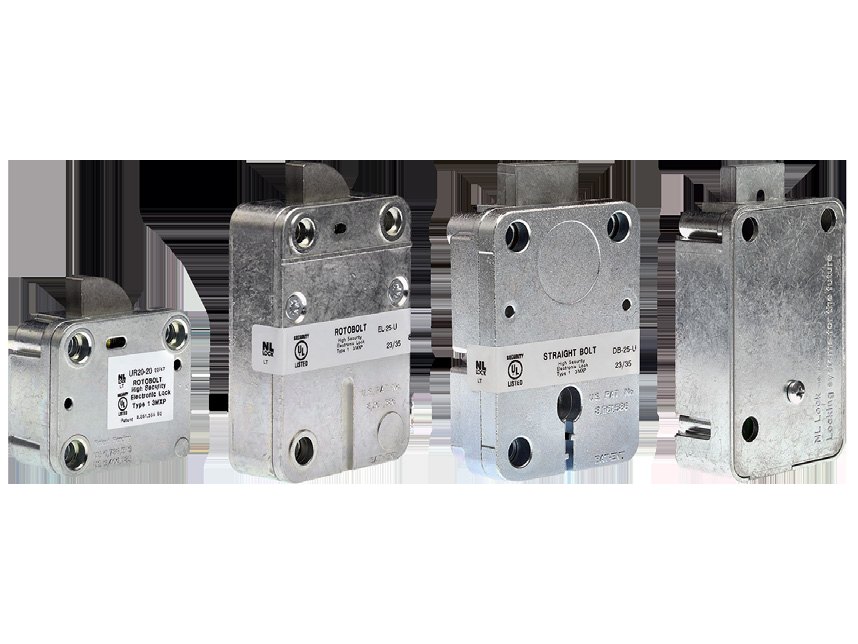
- The lock body is inside the safe door. You see only the keypad, joined to the lock by a cable.
- DIA board locks are the UR20-50 Universal RotoBolt, EM20-50 Large RotoBolt, EM35-50 Straight Bolt and EM30-50 MotorDrive. MBA sells them as the NL DIA Full-Size Rotobolt and DIA Direct Drive Deadbolt packages, with 10 users.
- DIA Pro board locks have the same bodies with -55 model numbers (UR20-55, EM20-55, EM35-55, EM30-55).
- Works with the Premier (PI20), Premier II (PI80), Premier Dallas (PI30), THinPut (TH20), EasyTouch (ET20) and QuickTouch (QT20) keypads.
- A lock with only two codes (one Primary, one Secondary) has the Basic board: see that guide instead.
How to open it
DIA board, standard mode
- Enter your 6-digit code (manager or user). A double beep means it is valid. A long beep means invalid.
- If you have a Dallas key set up with your code, hold the key on the keypad opening after the code. If you do not do it within 7 seconds, the lock gives a long beep.
- The motor releases the lock. You have a 3-second window to open the door.
DIA Pro board
- Enter your 2-digit ID, then your 6-digit code (eight digits in all). The manager’s ID is 00 and users are 01 to 39.
- A double beep means it is valid. The lock then opens for 3 seconds.
Dual control (two people)
- Enter the first code, then the second code. If a time delay is on, the first code starts the delay and both codes are needed again in the open window.
- A double beep means the motor is activated and the lock can be opened.
Override mode (user 9)
- When a time delay is on, enter the first code to start it.
- Then enter the user 9 code (and Dallas key if used). A double beep means the motor is activated.
- With a time delay on, entering a valid code starts the countdown. The LED flashes every 2 seconds. The open window starts with an LED flash and beep every second: enter your code again to open.
- The factory codes are on NL’s sheets. We are not printing them. Change the factory code when the lock is installed.
- To close: put the boltwork in the LOCKED position. The RotoBolt secures itself. On a MotorDrive set to “one key to close”, the bolt stays open until a key is pressed and the motor then closes it. The keypad shows the open bolt with one LED flash and beep every 10 seconds.
Battery
The DIA board works from battery power of 6 to 9 volts, usually a 9-volt alkaline in the keypad (we recommend Procell). If the battery drops below 4.8 volts while the motor runs you hear multiple beeps. Below 4 volts you hear higher-pitched multiple beeps and the board resets, and it keeps resetting until the battery is replaced. All data is saved in the board’s memory and is not lost. The steps to change the battery are on the keypad page.
- Change the battery with the safe door open and test your code afterward.
Codes and users
Do these with the safe door OPEN.
Test every new code several times before you close and lock the door. A new code is rejected unless at least 2 digits differ from the existing code (for example, 1-2-3-4-5-6 cannot become 1-3-3-4-5-6).
Change a code (Function 0, manager or user)
- Press and hold 0 until you hear a double beep and the LED stays on, then let go.
- Enter the current code to be changed (double beep).
- Enter the new code (double beep), then the new code again (double beep). The LED goes out.
- A long beep means an error and the old code stays valid. If the code has a Dallas key, use the same or a new key when you enter the new code and when you confirm it.
Add a user (Function 1, manager code)
- Press and hold 1 until you hear a double beep and the LED stays on, then let go.
- Enter the manager code (double beep).
- Enter the user ID, 1 to 9. (Not needed on a single-user lock.) A double beep and the LED on means the user is available. A long beep means that user is not available.
- Enter the new user code (double beep), then enter it again to confirm (double beep).
Disable or enable all users (Function 2, manager code)
- Press and hold 2 until you hear a double beep, then let go. One short LED flash means the function is not available.
- Enter the manager code. A double beep means all active user codes are now disabled, or re-enabled if they were disabled.
Delete a user (Function 3, manager code)
- Press and hold 3 until you hear a double beep, then let go. One short LED flash means the function is not available.
- Enter the manager code (double beep).
- Enter the user ID, 1 to 9. A double beep means that user’s code is deleted. A long beep means the user was not active.
- On a lock set to dual control, enter a valid user code before the manager code to use Function 1 or 3. Function 2 is not available with dual control.
- DIA Pro: you enter the 2-digit ID plus the 6-digit code for every code. Besides the manager (ID 00) there can be an optional master (ID 40) who cannot open the lock but can change settings. Users 31 to 39 become time delay override users in dual control when a time delay is on.
- The lock’s configuration (number of users, dual control, one key to close) is chosen at set-up and cannot be changed afterward without the optional reset box. We do not print the reset steps: call us.
Beeps and lights
| What you hear / see | What it means |
|---|---|
| Double beep | The entry was valid. |
| Long beep | The entry was invalid, or a function could not be done. In a code change, the old code stays valid. |
| One short LED flash after holding a function key | That function is not available on this lock. |
| Multiple beeps when the motor runs | The battery is low. Replace it. |
| LED flashes every 2 seconds | A time delay is counting down. |
| LED flash and beep every second | The open window: enter your code again. |
| LED flashes every 10 seconds and every key gives a long beep | The keypad is blocked for 5 minutes after wrong codes. |
Wrong-code lockout
Four invalid codes in a row block the keypad for 5 minutes. The LED flashes every 10 seconds and any key press gives a long beep. When the 5 minutes end, two more invalid codes start another 5 minutes.
Time delay (Function 9, manager code)
The delay can be 0 to 99 minutes and the open window 1 to 19 minutes. The manager can only make the delay longer while a delay is running.
- Press and hold 9 until you hear a double beep, then let go. One short LED flash means it is not available.
- Enter the manager code (double beep).
- Enter the delay (two digits, 00 turns it off) and the open window (two digits). For 26 minutes and 12 minutes, enter 2 6 1 2 (double beep).
- Enter the same numbers again to confirm. A double beep means correct. A long beep means a confirmation error.
Electronics test (Function 5)
This tests the keypad and lock. Any user can run it.
- Press and hold 5 until you hear a double beep and the LED stays on, then let go.
- Press the keys in order: 1 2 3 4 5 6 7 8 9 0.
- A double beep at each key means the lock and keypad are communicating properly. A long beep points to a fault that can likely be fixed by replacing the keypad.
- Function 7 (manager code): checks whether a user is active (double beep), deleted (single beep) or not activated (long beep), or downloads the basic audit file (the last 100 openings, with no time or date) to a Dallas audit key.
If it still won’t open
I hold a function key and only the LED flashes once
That function is not available on your lock’s setup (for example, Function 2 on a dual control lock, or a manager-only function when only the manager code exists).
It beeps several times and will not open
The battery is low. Replace the 9-volt battery in the keypad. Your codes are kept.
My new code is rejected
A new code must differ from the old one by at least 2 digits. It also needs to be entered the same way twice.
I lost the manager code
Please do not keep guessing: four wrong codes block the keypad for 5 minutes. Call us.
Download the full manufacturer instructions
This page is a quick-reference summary. For every feature and diagram, use the official manual for your model:
- DIA Software Instructions (PDF, Rev. 2407)NL Lock / QSecurity Industries manual for the DIA board, hosted by MBA, a safe lock distributor.
- DIA Pro Software Instructions (PDF, Rev. 2407)Same maker, for the DIA Pro board. Hosted by MBA.
- Large RotoBolt EM20-50/55 DIA / DIA Pro Instructions (PDF, Rev. 2407)The lock body sheet for the Large RotoBolt. Hosted by MBA.
Need a hand?
Still stuck? We can help.
Having a hard time getting into your safe? Our technicians are trained to open malfunctioning safes professionally, so your valuables can still be safely secured. Call us or stop by.
Steve’s Lock, Safe and Alarm · 3401 N. Sepulveda Blvd, Manhattan Beach, CA 90266
More lock guides
About this guide. This is an independent guide from Steve’s Lock, Safe and Alarm, a safe and lock dealer. Brand and model names belong to their owners and are used only to help you identify your lock. We are not affiliated with the manufacturers. These steps summarize the manufacturers’ own instructions; your lock may be a different version, so if anything here does not match what your lock does, follow your manual or call us. Always change codes with the safe door open, and test the new code several times before you close the door.
Steps last checked against the manufacturer documents on October 20, 2026.