
Safe lock help · Sargent & Greenleaf
Safe lock troubleshooting › Sargent & Greenleaf › 3000 series digital locks (Audit Lock 2.0, A-Series with Display, Digital Time Lock, NexusIP)
If your S&G lock is numbered 3006, 3007, 3028 or 3029, it is part of S&G’s 3000 series “digital platform.” The keypad has a display. S&G sells it in four versions: Audit Lock 2.0 (3000-100 series), A-Series with Display (3000-200), Digital Time Lock (3000-300) and NexusIP (3000-500). This page tells you which one you have and what it can do. S&G marks its programming and operating guides for these locks as confidential, so we do not copy the steps: call us and we will help with your lock.
Want the whole manual? Jump to the manufacturer download links.
Is this your lock?
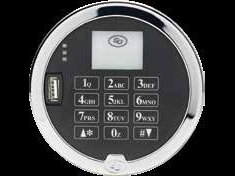
- A keypad on the safe door with a display, and a lock body inside the door numbered 3006 (auto relocking PivotBolt), 3007 (direct drive square bolt), 3028 (auto relocking square bolt) or 3029 (push/pull square bolt).
- The last three digits of the kit number tell you the version: -102 is Audit Lock 2.0, -202 is A-Series with Display, -302 is Digital Time Lock and -502 is NexusIP. For example, 3006-102 is an Audit Lock 2.0 PivotBolt kit.
- MBA lists these as the S&G Audit Pivotbolt, the Audit Direct Drive, NexusIP Keypad and Motor Retracted Dead Bolt and A-Series with Display locks.
- The older 6126 / 6127 Audit Lock and the 6128 / 6129 A-Series ATM lock are different locks with their own guides.
What each version can do
These are S&G’s catalog features. Which of them are turned on depends on how your safe was set up.
- Audit Lock 2.0 (3000-100 series): three modes (single control, dual control, manager/employee), up to 100 codes, time delay 1 to 99 minutes, penalty lockout, optional duress module, and 1,000 time and date stamped events that you can download to a USB flash drive.
- A-Series with Display (3000-200 series): the same digital platform with one-time code (OTC) options: S&G’s app and software can create one-time codes that are only live in a time window set by a supervisor. Works with Dallas iButton key fobs (red for the manager, black for users).
- Digital Time Lock (3000-300 series): four opening windows per day for up to 100 users, up to 30 holidays, 1,000 events to a USB drive, and programming through a website.
- NexusIP (3000-500 series): an internet protocol (IP) lock for one lock or a network of locks. It uses an existing Wi-Fi connection, can add, delete, enable and disable users and set schedules remotely, is powered externally with an emergency battery backup, and logs 1,000 events. Kits include a Wi-Fi module.
- The steps to open, change a code or set the clock are in S&G’s guides for these locks. S&G marks those guides confidential, so we are not reproducing them here.
If it still won’t open
I do not know my codes or how my lock is set up
Ask whoever manages the safe (the manager or programmer). Please do not keep guessing, because a penalty lockout shuts the lock down after wrong codes. Call us and we will go over your options.
The display is dark or the lock will not respond
The batteries (or, on a NexusIP, the external power and its emergency battery backup) may be dead. Call us and we will check the lock.
I need to download the audit trail
S&G’s Audit Lock 2.0 downloads to a USB flash drive. The steps are in S&G’s operating guide, which we cannot reproduce here. Call us.
I lost the manager code
Many of these locks have an optional management reset code (MRC). We cannot print the steps. Call us or the safe maker.
Download the full manufacturer instructions
This page is a quick-reference summary. For every feature and diagram, use the official manual for your model:
- S&G electronic safe lock catalog (PDF): Audit Lock 2.0, A-Series, Digital Time Lock, NexusIPSargent & Greenleaf’s catalog, posted in its resource library. See the pages for each lock.
- Sargent & Greenleaf: resource libraryS&G’s own page for its lock documents.
Need a hand?
Still stuck? We can help.
Having a hard time getting into your safe? Our technicians are trained to open malfunctioning safes professionally, so your valuables can still be safely secured. Call us or stop by.
Steve’s Lock, Safe and Alarm · 3401 N. Sepulveda Blvd, Manhattan Beach, CA 90266
More lock guides
About this guide. This is an independent guide from Steve’s Lock, Safe and Alarm, a safe and lock dealer. Brand and model names belong to their owners and are used only to help you identify your lock. We are not affiliated with the manufacturers. These steps summarize the manufacturers’ own instructions; your lock may be a different version, so if anything here does not match what your lock does, follow your manual or call us. Always change codes with the safe door open, and test the new code several times before you close the door.
Steps last checked against the manufacturer documents on October 20, 2026.